


 Recently, Microsoft’s new search engine “Bing” has gone live and is being loved by lots of Internet users. If you feel, Bing is as powerful as Google, then you might want to replace your default search engine with Bing.
Below are the simple ways on, How to set Bing as the default search engine in Internet Explorer, Firefox, and Chrome browser. This change will let all your searches be opened using Bing.
Mozilla Firefox
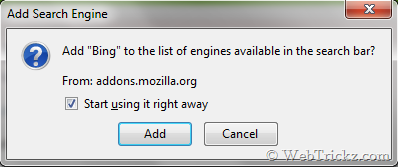
Bing add-on can be used to easily make Bing as the default search provider in Firefox. Go to the addon page and click on “Add to Firefox”. Then check the mark and click Add.

Internet Explorer
Just visit this page: in Internet Explorer.

Then click on “Add to Internet Explorer”. A box will be opened as shown below:
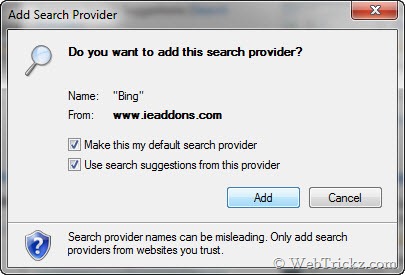
Check both the boxes and select the Add button.

Now Bing is your default search provider.
Google Chrome
In Chrome go to Settings > Options by clicking the tool icon at the top right corner. Now, Under Basics > Default Search click on Manage.

Select “Add” to add a Bing as the new search engine. Enter the details like Name, keyword, and URL as shown below. In URL enter the below line:
http://www.bing.com/search?q=%s&go=&form=QBLH&scope=web
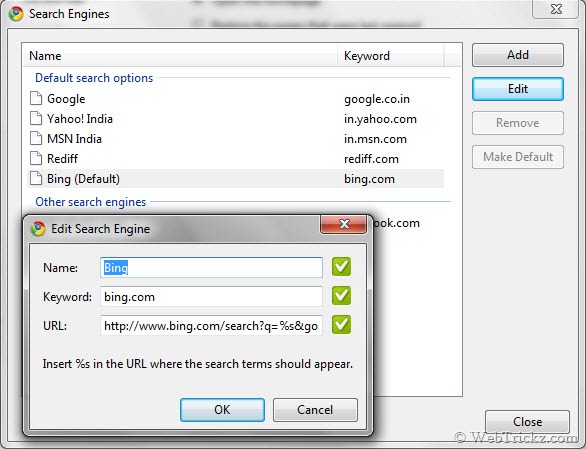
Click OK and set Bing as default search by selecting “Make Default”.
Now all your searches made from the Chrome address tab will show results using Bing.
Hope you liked this post. Subscribe to our feed and share your views in the comments below.










Thanks for sharing this. But still I love Google search
You’re ignorant if you think bing is just as powerful as google. Have you tried searching? Are you a rep for Microsoft?
Dude, you read it wrong. I said “If you feel, Bing is as powerful as Google, then you might want to replace your default search engine with Bing”.
I always like Google 😀