WebTrickz
TRENDING
  • Turn Off Copilot Search in Bing (Official Extension)
No Result
View All Result
  • Reviews
  • Editorials
  • Social Media
    • Facebook
    • Twitter
    • YouTube
    • Messenger
    • Instagram
    • Snapchat
    • WhatsApp
    • TikTok
  • Apps
  • How To’s
  • Apple
  • iPhone
  • Google
  • Android
  • Mac
  • Security
  • About Us
    • About Us
    • Contact Us
    • Privacy Policy
  • Reviews
  • Editorials
  • Social Media
    • Facebook
    • Twitter
    • YouTube
    • Messenger
    • Instagram
    • Snapchat
    • WhatsApp
    • TikTok
  • Apps
  • How To’s
  • Apple
  • iPhone
  • Google
  • Android
  • Mac
  • Security
  • About Us
    • About Us
    • Contact Us
    • Privacy Policy
No Result
View All Result
WebTrickz
No Result
View All Result
Home Facebook

How to Download Reels Video from Facebook

Mayur Agarwal by Mayur Agarwal
June 17, 2024
in Facebook, How To's

People who love watching short funny videos often like to download Facebook reels that they find interesting enough. Downloading Reels allows you to watch a reel later outside of the Facebook app or share the reel video to your story.

Whatever your use case may be, neither Instagram nor Facebook offers an official way to download someone else’s reels to the gallery.

Thankfully, there are several video downloading services that you can use to download reel videos from Facebook. Let’s find out how.

How to download Facebook Reels video with music

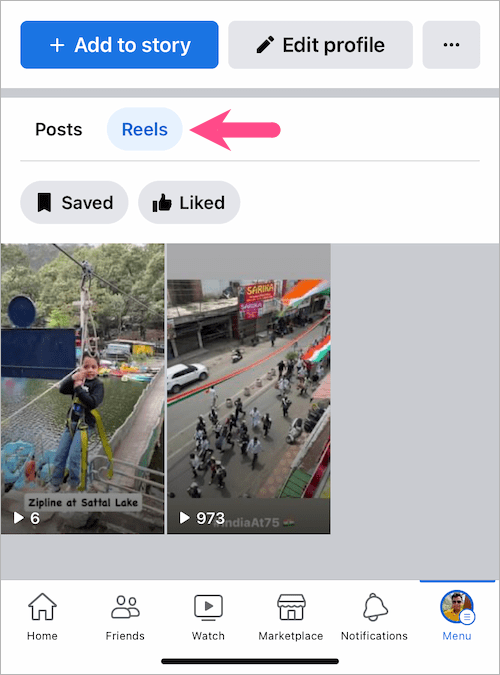
  1. Go to the “Reels” section in the Facebook app and find the reel you want to download. To find reels posted by you, tap your profile at the top-right corner and view the ‘Reels‘ tab.
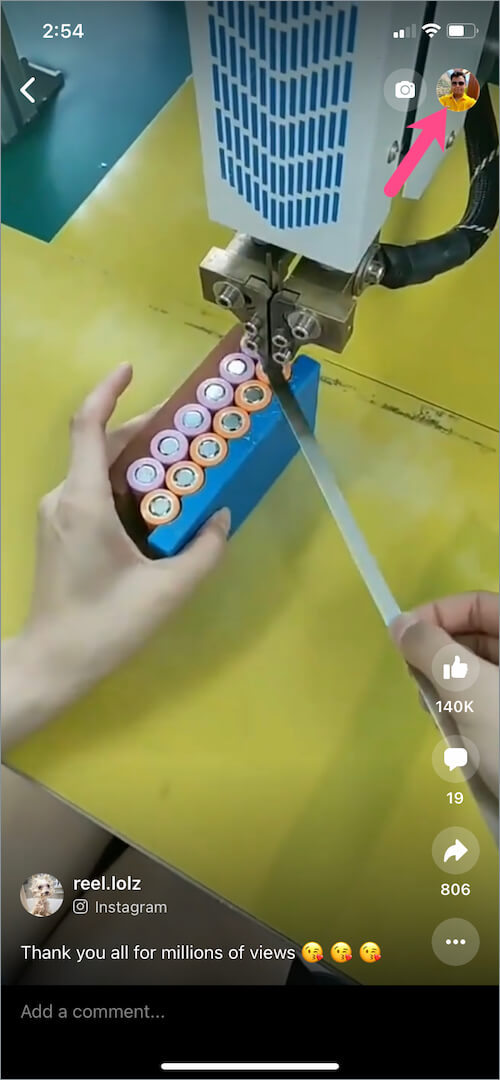
    Facebook reels
    where are my reels on facebook
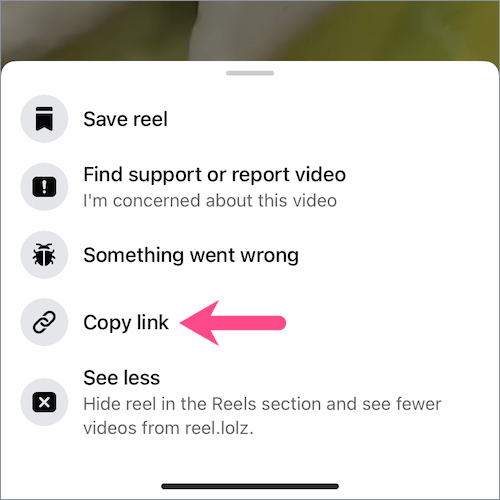
  2. Tap the ellipsis button (3-dot icon) at the bottom-right corner. reels on Facebook app
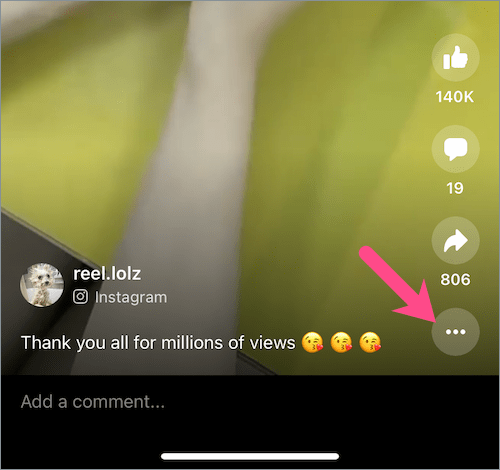
  3. Select “Copy link“. copy Facebook reel link
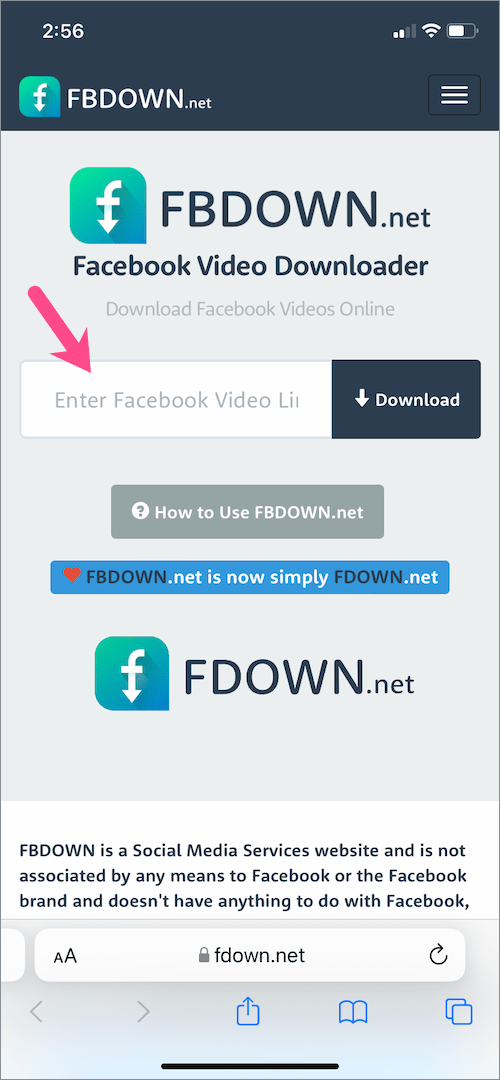
  4. Visit an online video downloader website like fdown.net (or use the one you prefer).
  5. Paste the link in the Facebook Video Link field and hit “Download“. how to download Facebook reels video on iPhone
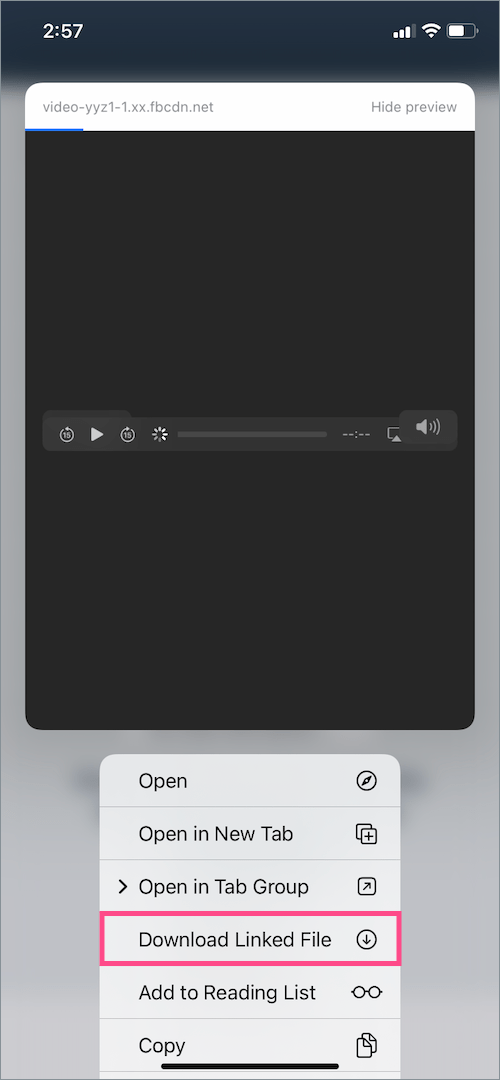
  6. Long-press the ‘Download Video in HD Quality‘ link and select ‘Download Linked File’ to save the reel.
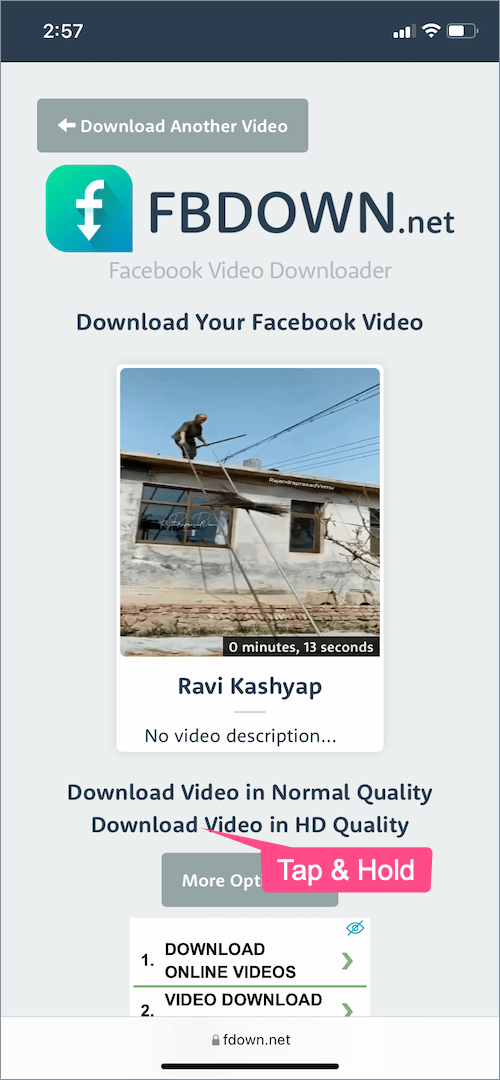
    how to download reels from Facebook on iPhone
    download Facebook reels with music
  7. After downloading is over, open the Files app and navigate to “Downloads”.
  8. Open the reel file you downloaded and tap the “Share” button. files app on iPhone
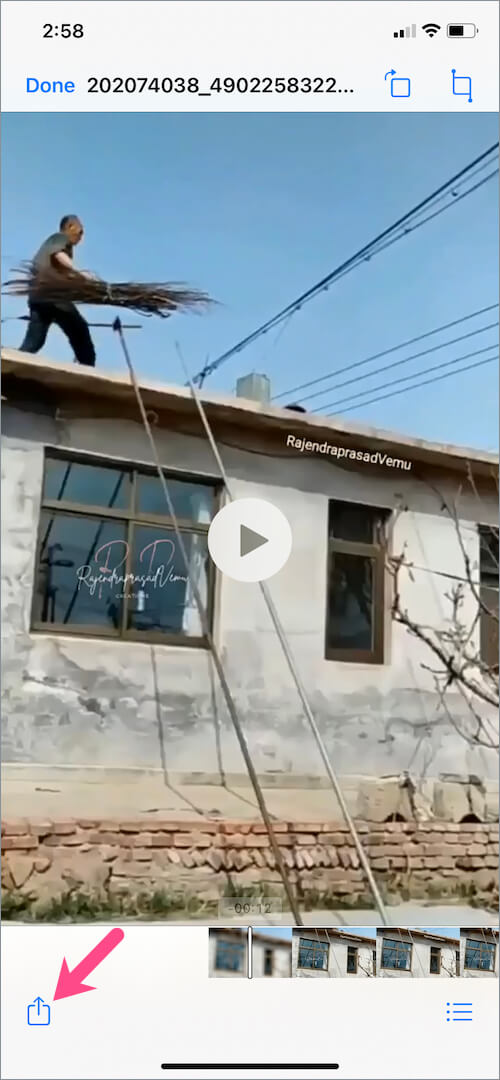
  9. Tap “Save Video” to save the Facebook reel video to the Photos app. how to save Facebook reels to gallery on iPhone
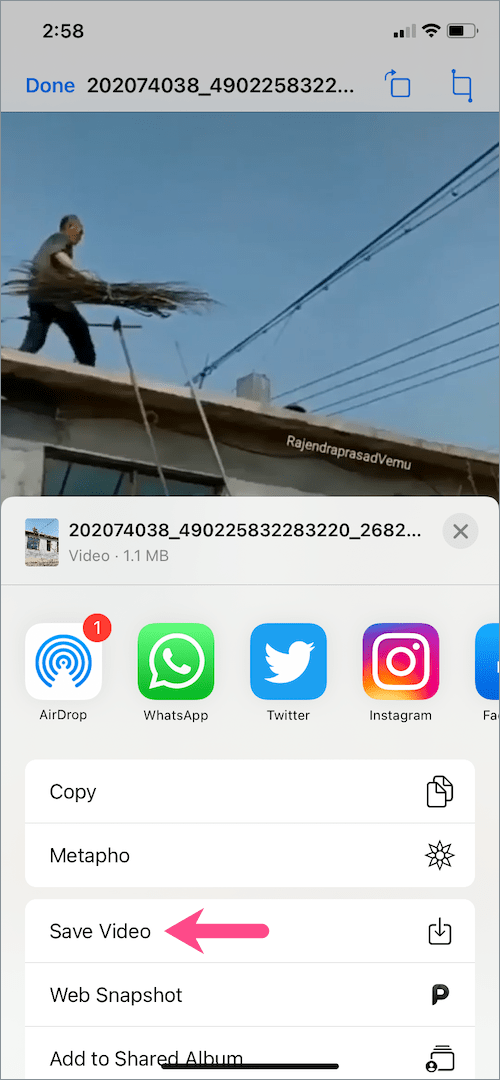
The above steps are applicable for iPhone but the process should be similar for Android users.

Easy way to download your own Reels from Facebook

Many people are unaware that the Facebook app has a built-in option for downloading your own Reels video.

The only downside is that reels downloaded using this method are saved without music if they use audio from Facebook or Instagram’s music library. However, reels with original audio will be saved to your camera roll with music.

Follow the below steps to download your reels from Facebook:

  1. Open the Menu tab in the Facebook app and tap the “Reels” shortcut. reels tab in Facebook app
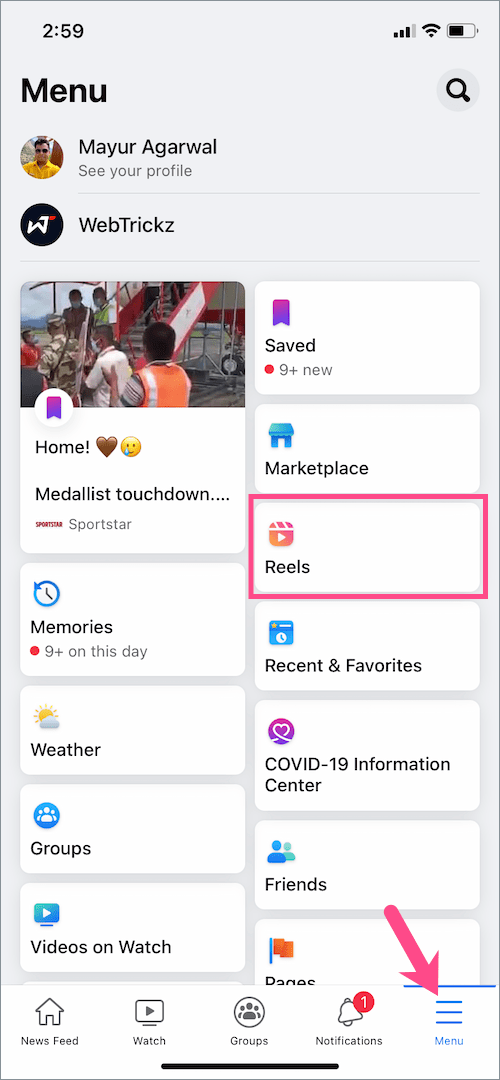
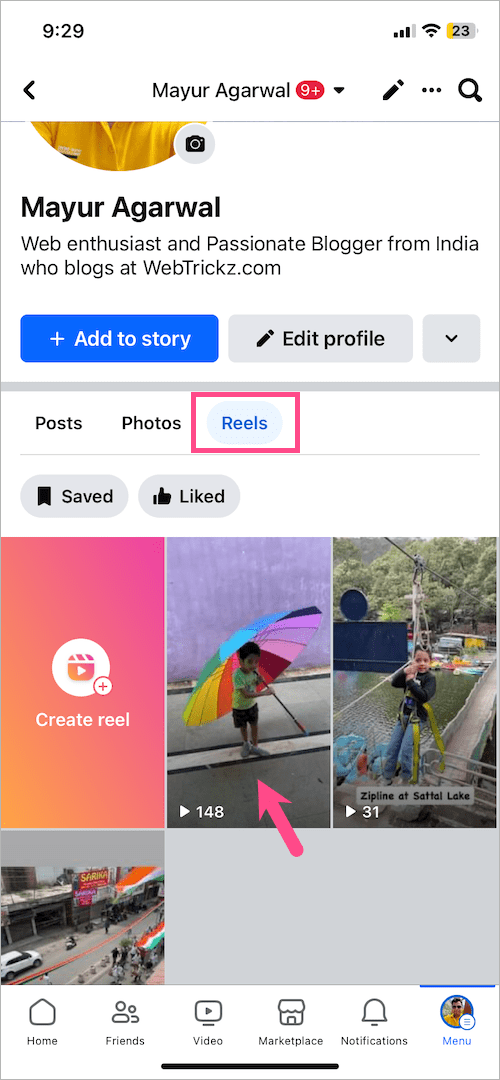
  2. Tap your Facebook profile picture in the upper-right corner.
  3. Under ‘Reels‘, open the reel video you want to download. find your published reels on Facebook
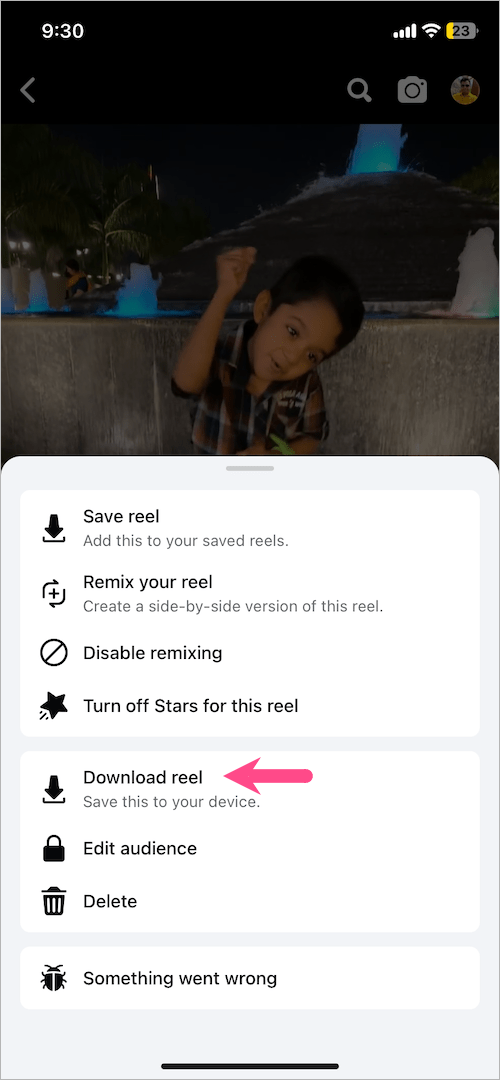
  4. Tap the ellipsis button (3-dot icon) in the lower-right corner.
  5. Select the “Download reel” option. how to download your own reels from Facebook

That’s it. The reel will now be saved to your phone’s local storage, which you can view in the gallery or Photos app.

RELATED TIPS:

  • Look at your Liked Reels on Facebook
  • How to delete your Facebook Reels video
Tags: FacebookInstagramReelsSocial MediaTips
ShareTweetSend
Previous Post

4 Ways to Remove the Floating Home Button on iPhone

Next Post

How to Turn Off Dark Mode for Certain Apps on iPhone & iPad

Mayur Agarwal

Mayur Agarwal

Mayur Agarwal, the founder and editor of WebTrickz, is a tech enthusiast with a Bachelor's degree in Computer Applications and over 15 years of experience in tech writing. His passion for technology and gadgets drives him to create insightful how-to articles and troubleshooting guides.

Next Post
iPhone 12 white

How to Turn Off Dark Mode for Certain Apps on iPhone & iPad

Comments 1

  1. SYG says:
    3 years ago

    Now on the web?

    Reply

Leave a Reply Cancel reply

Your email address will not be published. Required fields are marked *

Latest Stories

copilot logo

How to Turn Off Copilot Search in Bing on Edge & Chrome

June 10, 2026
microsoft edge new logo

How to Turn Off Notifications in Microsoft Edge (2026 Guide)

June 8, 2026
chatgpt logo

How to Clear or Delete ChatGPT Memory on PC and Mobile

June 5, 2026
1337x logo

1337x Proxy List 2026: Working Proxy & Mirror Sites

June 2, 2026

How to Find Saved Reels on Facebook App & Desktop (2026)

June 8, 2026
microsoft edge browser

How to Restore or Reopen Closed Tabs in Microsoft Edge

June 9, 2026
Facebook app on iPhone

How to See Recently Watched Reels on Facebook (2026 Guide)

June 5, 2026

Trending Stories

  • microsoft family safety settings

    How to Turn Off Microsoft Family Safety on Windows 11 & 10

  • 1337x Proxy List 2026: Working Proxy & Mirror Sites

  • How to See Recently Watched Reels on Facebook (2026 Guide)

  • How to Turn Off Microsoft Edge Game Assist in Windows 11

  • How to Turn Off Fn Lock or Fn Key on Windows 11/10 Laptop

  • About Us
  • Contact Us
  • Privacy Policy
  • Advertise

© 2026 WebTrickz. All Rights Reserved.

No Result
View All Result
  • Reviews
  • Apps
  • How To’s
  • Android
  • Google
  • iPhone
  • Mac
  • About Us
  • Contact Us
  • Privacy Policy

© 2026 WebTrickz. All Rights Reserved.