

WebTrickz
TRENDING
  • Complete list of 1337x Proxy and Mirror Sites
No Result
View All Result
  • Reviews
  • Editorials
  • Social Media
    • Facebook
    • Twitter
    • YouTube
    • Messenger
    • Instagram
    • Snapchat
    • WhatsApp
    • TikTok
  • Apps
  • How To’s
  • Apple
  • iPhone
  • Google
  • Android
  • Mac
  • Security
  • About Us
    • About Us
    • Contact Us
    • Privacy Policy
  • Reviews
  • Editorials
  • Social Media
    • Facebook
    • Twitter
    • YouTube
    • Messenger
    • Instagram
    • Snapchat
    • WhatsApp
    • TikTok
  • Apps
  • How To’s
  • Apple
  • iPhone
  • Google
  • Android
  • Mac
  • Security
  • About Us
    • About Us
    • Contact Us
    • Privacy Policy
No Result
View All Result
WebTrickz
No Result
View All Result
Home Snapchat

How to See People You Blocked on Snapchat

Mayur by Mayur
September 3, 2024
in How To's, Snapchat

Blocking someone on social media isn’t uncommon as we all tend to block certain people at some point in time. Similar to Facebook and Instagram, you can easily block a person’s profile on Snapchat to stop any interaction with them. Blocking is an apt way to avoid people who spam or bother you with unwanted snaps, selfies, or chats. It’s however different than just removing a friend on Snapchat.

When you block someone on Snapchat, they will no longer be able to see your stories, view your Charms, or send you a Snap or Chat message. If you’re friends with someone, blocking them will also remove them from your Snapchat Friends list. Moreover, the blocked person won’t be able to search for your username anymore.

Thankfully, Snapchat doesn’t notify the relevant person when you block them. The platform does this to protect user privacy and there is no sure way to find out whether someone has blocked or unfriended you.

Perhaps, if you want to add a blocked person as a friend again, you’ll first need to unblock them and then send them a new friend request.

How do I find my blocked list on Snapchat?

If you’ve blocked a lot of people over time then it might be difficult to remember who you have blocked. Worry not, you can easily see who you blocked on Snapchat with a few taps. Doing so will let you unblock someone and add them back as a friend.

Now let’s see how to see blocked people on Snapchat on iPhone and Android.

How to see your Blocked list on Snapchat

Follow the steps below to find accounts you’ve blocked on Snapchat.

On iPhone

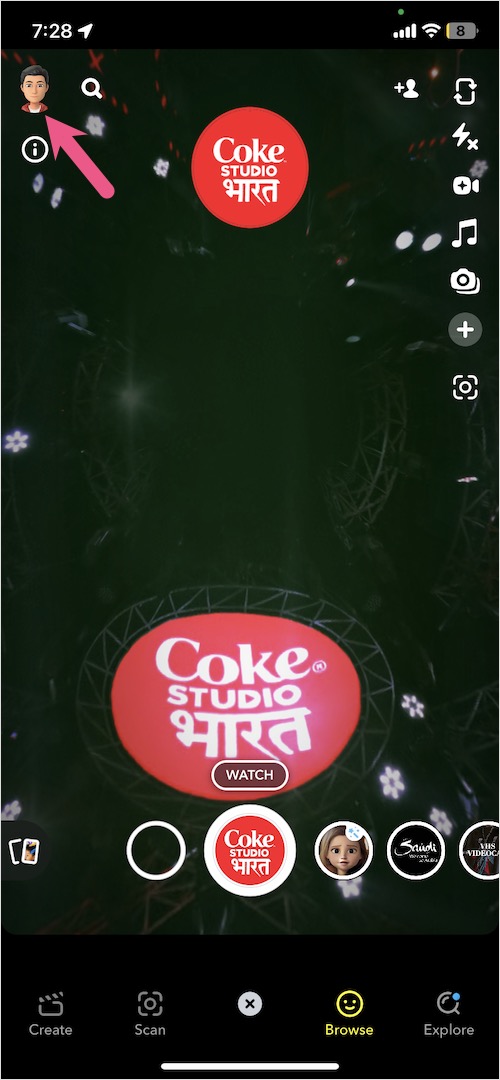
  1. Open the Snapchat app and tap your profile picture at the top-left corner. profile picture on snapchat app
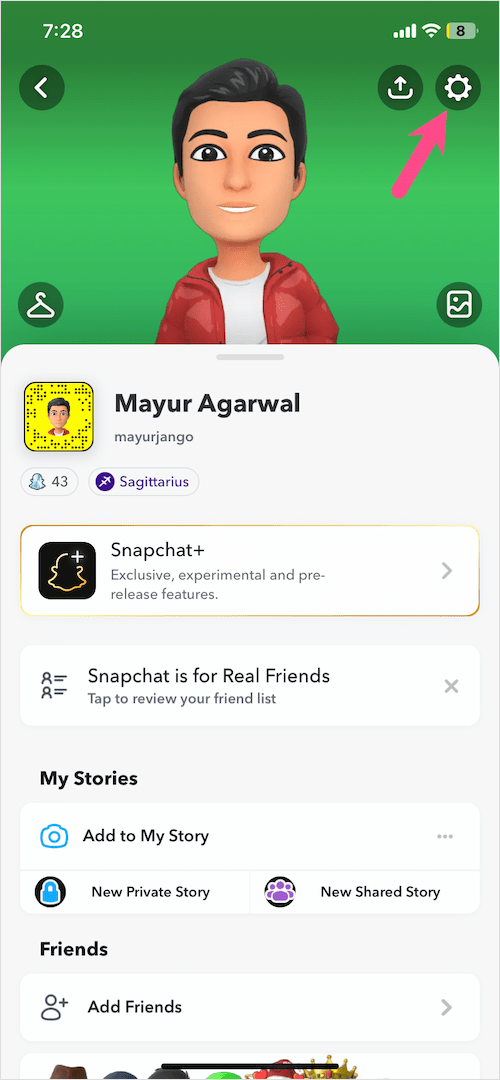
  2. Tap the gear icon at the top right to go to Settings. snapchat settings on iphone
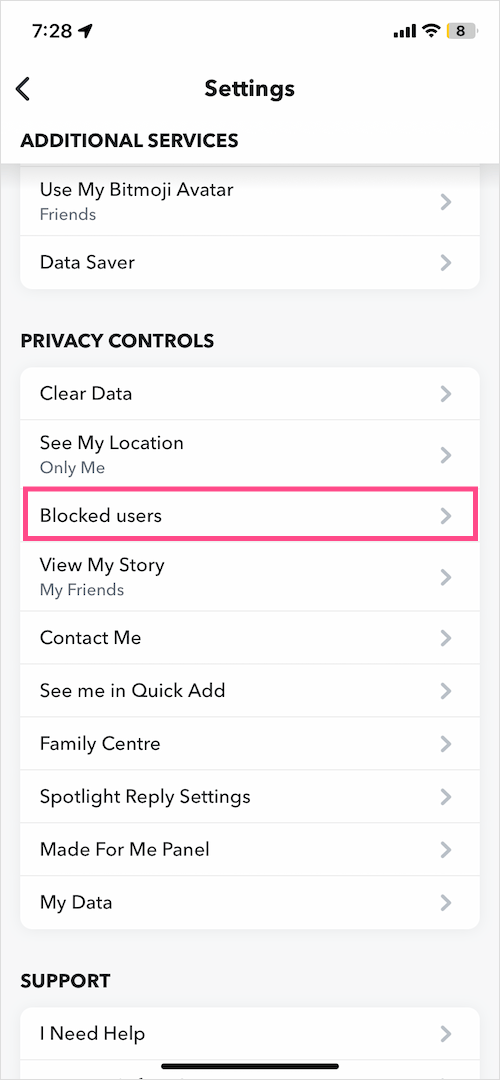
  3. Scroll down to the ‘Privacy Controls’ section and tap on “Blocked users“. how to see who you blocked in snapchat on iphone
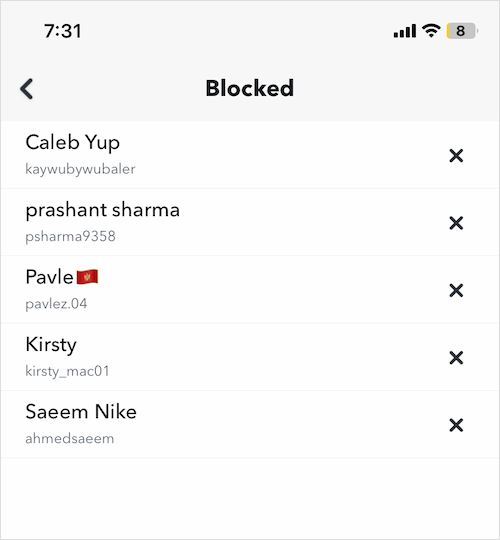
  4. Here you can see the list of people you have blocked all in one place. how to find blocked friends on snapchat on iphone
On Android

  1. Tap your profile icon to go to your profile. snapchat for android
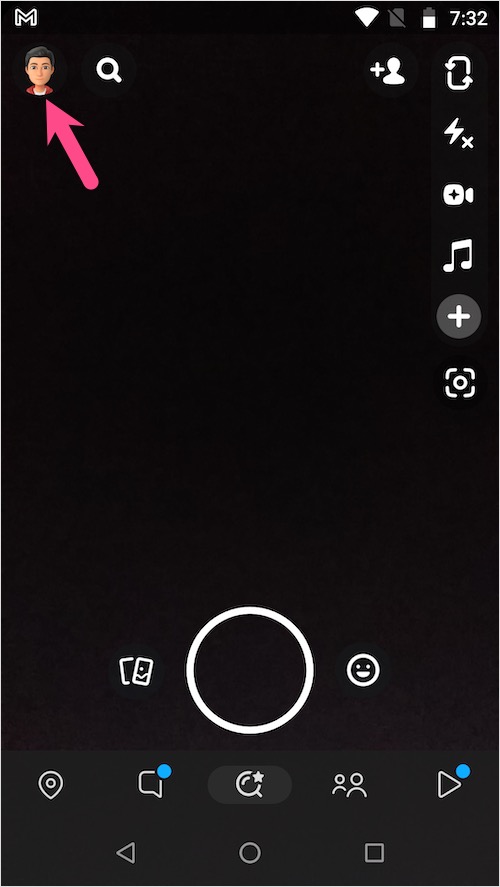
  2. Tap the Settings button (gear icon) at the top-right corner.
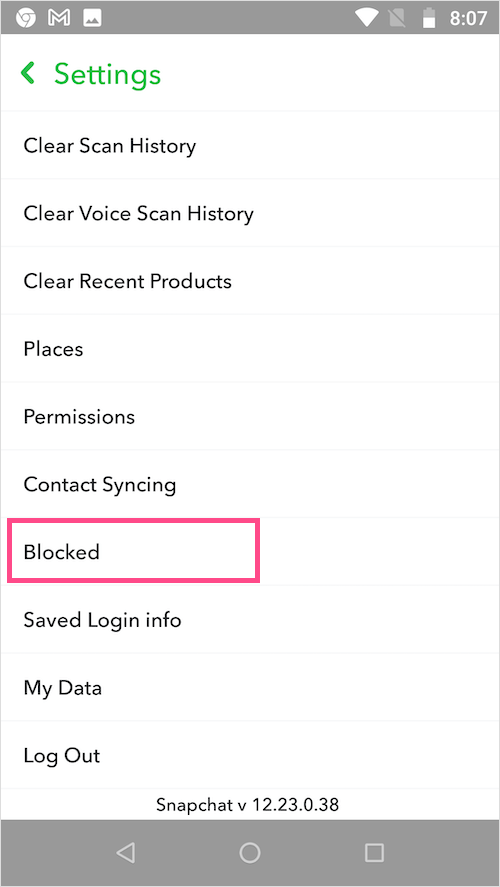
  3. Under Settings, scroll down to the bottom and tap the ‘Blocked‘ option under ‘Account Actions’. how to see blocked people on snapchat on android
  4. The Blocked screen will show all the blocked accounts. how to see snapchat blocked list on android
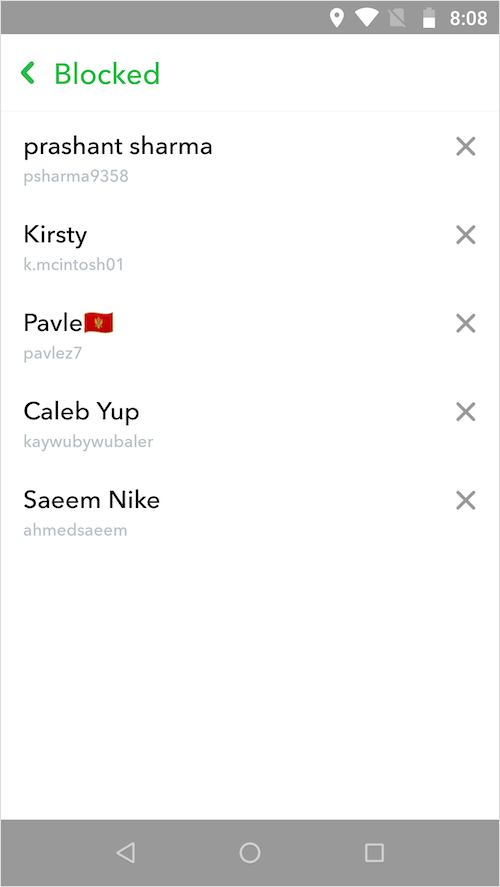
NOTE: The blocked friends list appears in reverse chronological order, i.e. the most recently blocked person is shown first.

To unblock a person on Snapchat, simply tap the X icon next to their name. Then select ‘Yes‘ to confirm. The respective person will then be removed from your blocked list. You can now search for their username and add them back as friends.
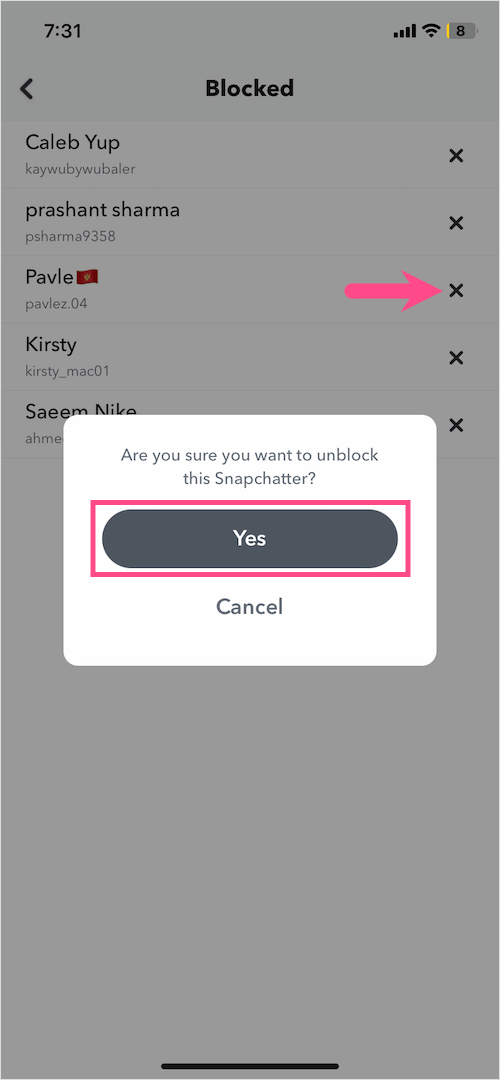
how to unblock someone on snapchat

Sadly, there is no option to unblock everyone at once and you cannot unblock multiple accounts either.

Hope you found this article helpful.

ALSO READ:

  • How to Find Block List on the Facebook App
  • How to Delete a Shortcut on Snapchat
Tags: AndroidAppsiPhoneSnapchatSocial MediaTips
ShareTweetSend
Previous Post

Apps to Create an Eye-catching Presentation on Mac

Next Post

The Impact Of Social Media On Children

Mayur

Mayur

Mayur Agarwal, the founder and editor of WebTrickz, is a tech enthusiast with a Bachelor's degree in Computer Applications and over 15 years of experience in tech writing. His passion for technology and gadgets drives him to create insightful how-to articles and troubleshooting guides.

Next Post
Photo by Andrea Piacquadio on Pexels

The Impact Of Social Media On Children

Leave a Reply Cancel reply

Your email address will not be published. Required fields are marked *

Latest Stories

chatgpt logo

How to Clear or Delete ChatGPT Memory on PC and Mobile

June 5, 2026
1337x logo

1337x Proxy List 2026: Working Proxy & Mirror Sites

June 2, 2026

How to Find Saved Reels on Facebook App & Desktop (2026)

April 1, 2026
microsoft edge browser

How to Restore or Reopen Closed Tabs in Microsoft Edge

March 26, 2026
Facebook app on iPhone

How to See Recently Watched Reels on Facebook (2026 Guide)

April 3, 2026
microsoft edge new logo

Download Microsoft Edge Offline Installer [Latest Version]

March 16, 2026

How to Turn Off Bing SafeSearch in Microsoft Edge

March 12, 2026

Trending Stories

  • microsoft family safety settings

    How to Turn Off Microsoft Family Safety on Windows 11 & 10

  • How to Turn Off Microsoft Edge Game Assist in Windows 11

  • How to Turn Off Fn Lock or Fn Key on Windows 11/10 Laptop

  • How to See Recently Watched Reels on Facebook (2026 Guide)

  • 1337x Proxy List 2026: Working Proxy & Mirror Sites

  • About Us
  • Contact Us
  • Privacy Policy
  • Advertise

© 2026 WebTrickz. All Rights Reserved.

No Result
View All Result
  • Reviews
  • Apps
  • How To’s
  • Android
  • Google
  • iPhone
  • Mac
  • About Us
  • Contact Us
  • Privacy Policy

© 2026 WebTrickz. All Rights Reserved.







