

WebTrickz
TRENDING
  • Complete list of 1337x Proxy and Mirror Sites
No Result
View All Result
  • Reviews
  • Editorials
  • Social Media
    • Facebook
    • Twitter
    • YouTube
    • Messenger
    • Instagram
    • Snapchat
    • WhatsApp
    • TikTok
  • Apps
  • How To’s
  • Apple
  • iPhone
  • Google
  • Android
  • Mac
  • Security
  • About Us
    • About Us
    • Contact Us
    • Privacy Policy
  • Reviews
  • Editorials
  • Social Media
    • Facebook
    • Twitter
    • YouTube
    • Messenger
    • Instagram
    • Snapchat
    • WhatsApp
    • TikTok
  • Apps
  • How To’s
  • Apple
  • iPhone
  • Google
  • Android
  • Mac
  • Security
  • About Us
    • About Us
    • Contact Us
    • Privacy Policy
No Result
View All Result
WebTrickz
No Result
View All Result
Home Instagram

How to Remove or Delete a Repost on Threads

Taigun by Taigun
July 17, 2024
in How To's, Instagram

Meta’s Twitter rival Threads is now a week old and the app has already reached 100 million users in just five days. Threads by Instagram is very similar to Twitter as both social networking apps have a lot in common.

In Threads, you easily Repost someone else’s thread just like you Retweet a post on Twitter. The only difference in the reshare option is the name – Repost vs Retweet. There is also a Quote feature that lets users share another person’s thread with their own thoughts.

Can I remove a repost on the Threads app?

Perhaps, those unfamiliar with Twitter will find Instagram Threads entirely new and it may take some time to learn the basic tips. For instance, you may get lost while trying to delete a repost that you may have accidentally reposted on Threads.

Thankfully, similar to ‘Undo Retweet’ on Twitter, you can simply undo reposts on the Threads app to remove a reposted post from your Threads feed.

Now let’s see how you can delete a repost on the Threads app.

How to delete a repost on Threads

    1. Open the Threads app and tap the Profile tab at the bottom right corner. view instagram threads profile
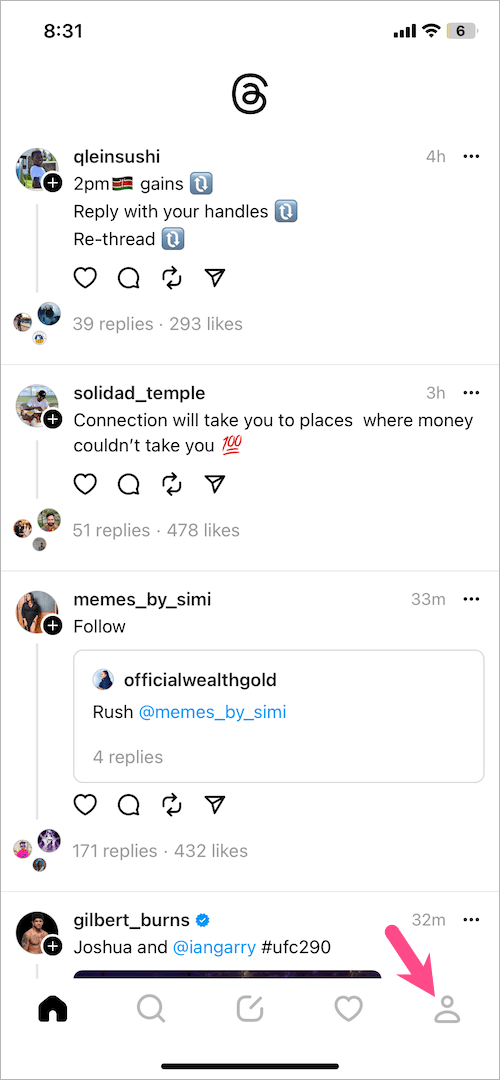
    2. On your profile screen, tap the ‘Reposts‘ column and find the repost you want to delete. view your reposts on instagram threads

    3. To unrepost a thread, tap the ‘Repost‘ icon (with a checkmark) at the bottom of that thread. how to delete repost on Threads app
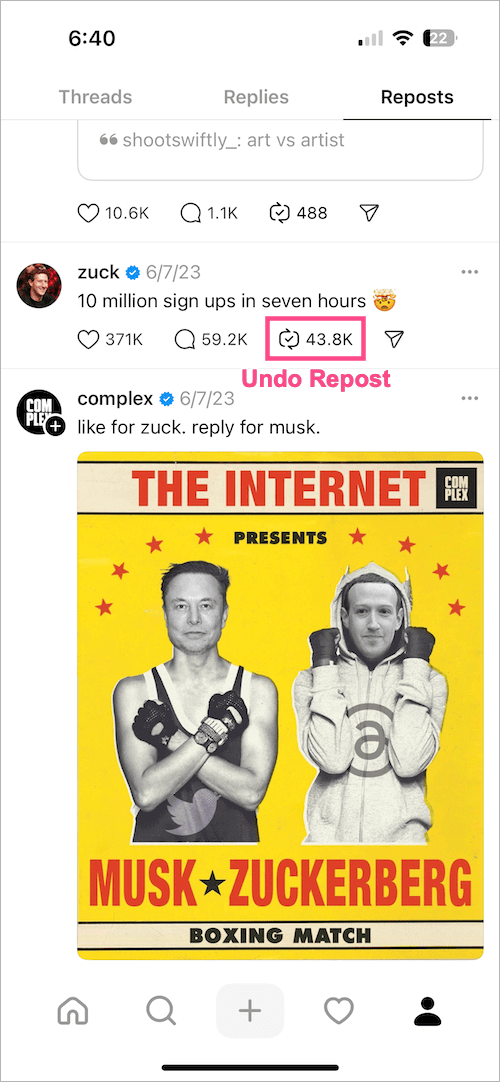
    4. Tap ‘Remove repost‘ in the menu to remove the repost from your Threads profile. how to remove a repost on instagram threads
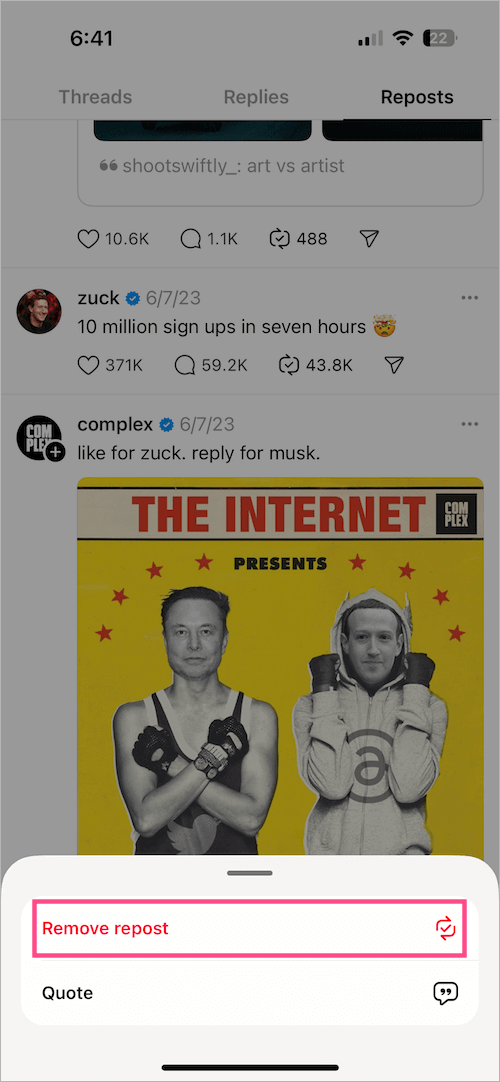
That’s it. The reposted thread will no longer appear in your Threads timeline or feed. Note that doing so won’t delete the original post.

Similarly, you can undo reposts on the Threads website.

RELATED TIPS:

  • How to see your likes on Threads
  • How to see who you’re following on Threads
  • How to temporarily deactivate your Threads account
Tags: InstagramSocial MediaThreadsTips
ShareTweetSend
Previous Post

How to Find Your Liked or Hearted Items on Amazon

Next Post

Here’s how you can See Your Likes on Threads

Taigun

Taigun

Mayur Agarwal, the founder and editor of WebTrickz, is a tech enthusiast with a Bachelor's degree in Computer Applications and over 15 years of experience in tech writing. His passion for technology and gadgets drives him to create insightful how-to articles and troubleshooting guides.

Next Post
instagram threads logo

Here's how you can See Your Likes on Threads

Leave a Reply Cancel reply

Your email address will not be published. Required fields are marked *

Latest Stories

1337x logo

1337x Proxy List 2026: Working Proxy & Mirror Sites

June 2, 2026

How to Find Saved Reels on Facebook App & Desktop (2026)

April 1, 2026
microsoft edge browser

How to Restore or Reopen Closed Tabs in Microsoft Edge

March 26, 2026
Facebook app on iPhone

How to See Recently Watched Reels on Facebook (2026 Guide)

April 3, 2026
microsoft edge new logo

Download Microsoft Edge Offline Installer [Latest Version]

March 16, 2026

How to Turn Off Bing SafeSearch in Microsoft Edge

March 12, 2026
google chrome logo

Download Google Chrome Offline Installer [Latest Version]

June 3, 2026

Trending Stories

  • microsoft family safety settings

    How to Turn Off Microsoft Family Safety on Windows 11 & 10

  • How to Turn Off Fn Lock or Fn Key on Windows 11/10 Laptop

  • How to Turn Off Microsoft Edge Game Assist in Windows 11

  • How to See Recently Watched Reels on Facebook (2026 Guide)

  • How to Restore or Reopen Closed Tabs in Microsoft Edge

  • About Us
  • Contact Us
  • Privacy Policy
  • Advertise

© 2026 WebTrickz. All Rights Reserved.

No Result
View All Result
  • Reviews
  • Apps
  • How To’s
  • Android
  • Google
  • iPhone
  • Mac
  • About Us
  • Contact Us
  • Privacy Policy

© 2026 WebTrickz. All Rights Reserved.







