WebTrickz
TRENDING
  • Turn Off Copilot Search in Bing (Official Extension)
No Result
View All Result
  • Reviews
  • Editorials
  • Social Media
    • Facebook
    • Twitter
    • YouTube
    • Messenger
    • Instagram
    • Snapchat
    • WhatsApp
    • TikTok
  • Apps
  • How To’s
  • Apple
  • iPhone
  • Google
  • Android
  • Mac
  • Security
  • About Us
    • About Us
    • Contact Us
    • Privacy Policy
  • Reviews
  • Editorials
  • Social Media
    • Facebook
    • Twitter
    • YouTube
    • Messenger
    • Instagram
    • Snapchat
    • WhatsApp
    • TikTok
  • Apps
  • How To’s
  • Apple
  • iPhone
  • Google
  • Android
  • Mac
  • Security
  • About Us
    • About Us
    • Contact Us
    • Privacy Policy
No Result
View All Result
WebTrickz
No Result
View All Result
Home iPhone

iOS 26: How to Turn On or Off Adaptive Power Mode on iPhone

Enable or disable Adaptive Battery Mode in iOS 26 to save battery life.

Mayur Agarwal by Mayur Agarwal
September 13, 2025
in How To's, iPhone

Apple has introduced a new way to help you squeeze more life out of your iPhone’s battery with Adaptive Power in iOS 26. Unlike the traditional Low Power Mode that aggressively cuts down performance, Adaptive Power works more intelligently in the background to balance performance and efficiency.

If you own an iPhone 17, 17 Air, 17 Pro, 17 Pro Max, or any supported iPhone running iOS 26, you can easily turn Adaptive Power on or off whenever you like. This guide walks you through the steps to enable or disable Adaptive Power Mode on your iPhone.

What is Adaptive Power in iOS 26?

Adaptive Power is Apple’s new battery optimization feature designed to extend your iPhone’s daily runtime. When enabled, it makes subtle adjustments like lowering brightness, delaying background tasks, or automatically switching on Low Power Mode at 20%.

These changes happen quietly in the background, so your phone still feels smooth and responsive. Unlike Low Power Mode, Adaptive Power aims to save energy without noticeable trade-offs.

This feature is not enabled by default, so you’ll need to manually activate it in your settings.

Why is Adaptive Power Mode missing on my iPhone?

Can’t find the Adaptive Power option on your iPhone?

If you don’t see Adaptive Power Mode on your iPhone, it’s likely due to one of these reasons:

  • Device compatibility – Adaptive Power relies on Apple Intelligence, so it’s available only on newer iPhones. The supported devices include iPhone 15 Pro, 15 Pro Max, iPhone 16, 16 Plus, 16 Pro, 16 Pro Max, 16e, iPhone 17 series, and iPhone Air.
  • Older models not supported – Even if you update an iPhone 14 Pro or earlier to iOS 26, Adaptive Power won’t appear in your Battery settings.

How to Turn On/Off Adaptive Power Mode on iPhone (iOS 26)

Here’s how you can turn on or off Adaptive Power Mode in iOS 26 on iPhone:

Enable Adaptive Power Mode

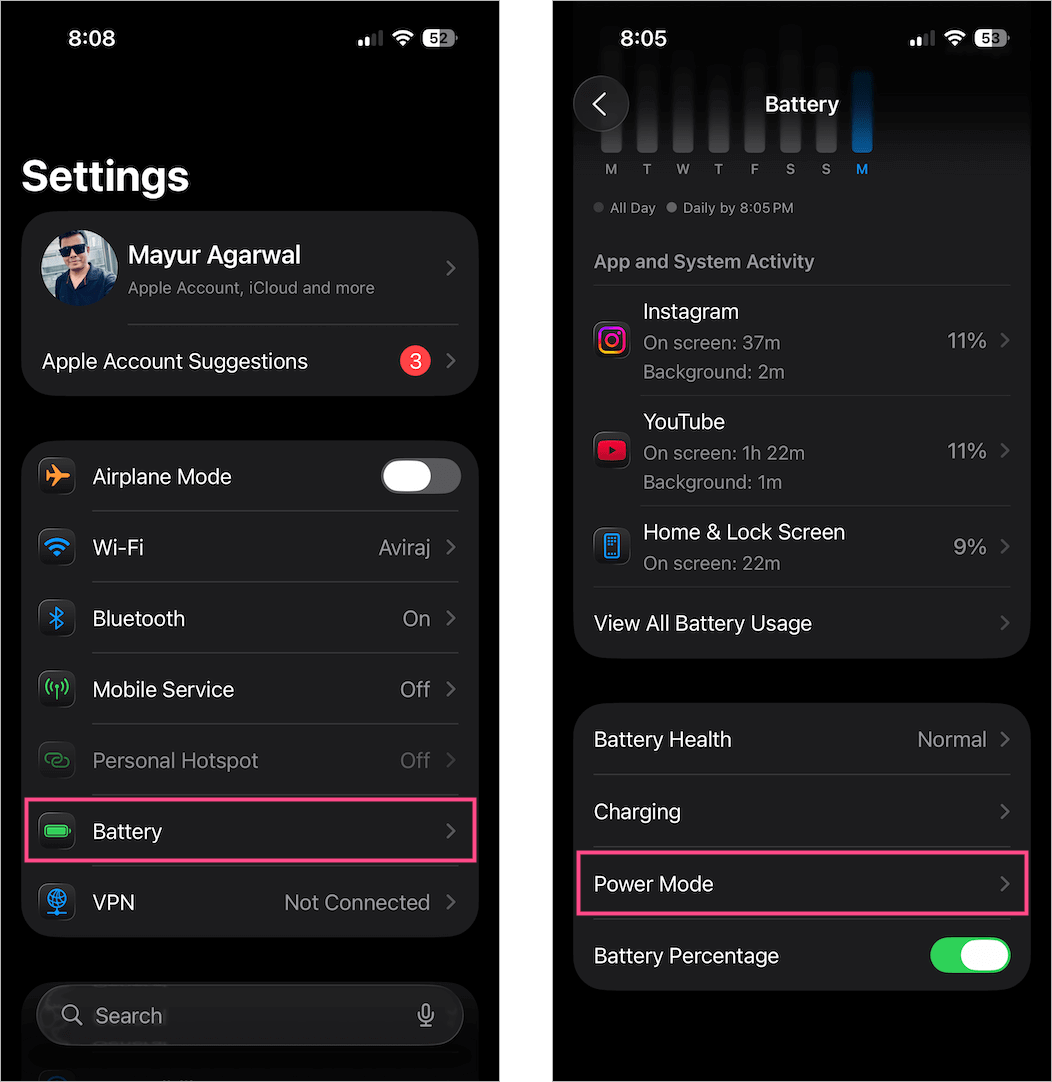
  1. Open the Settings app.
  2. Go to Battery.
  3. Tap Power Mode. where is adaptive battery mode on ios 26
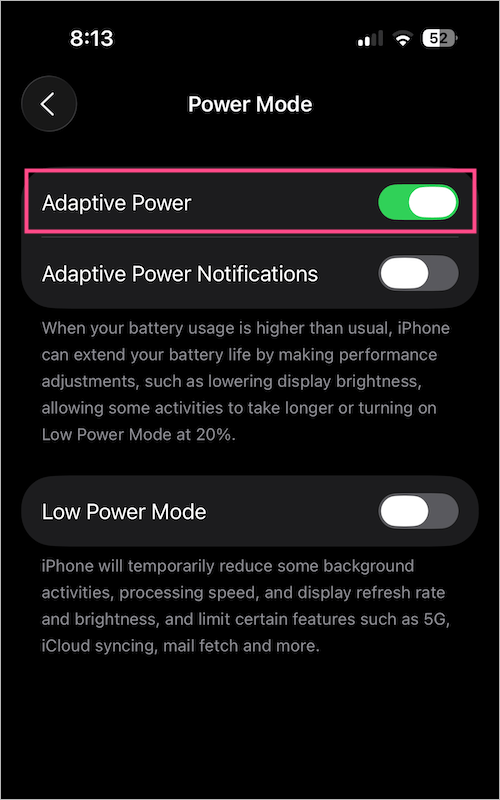
  4. Toggle on Adaptive Power to turn on Adaptive Power Mode. how to turn on adaptive power mode in ios 26 on iphone
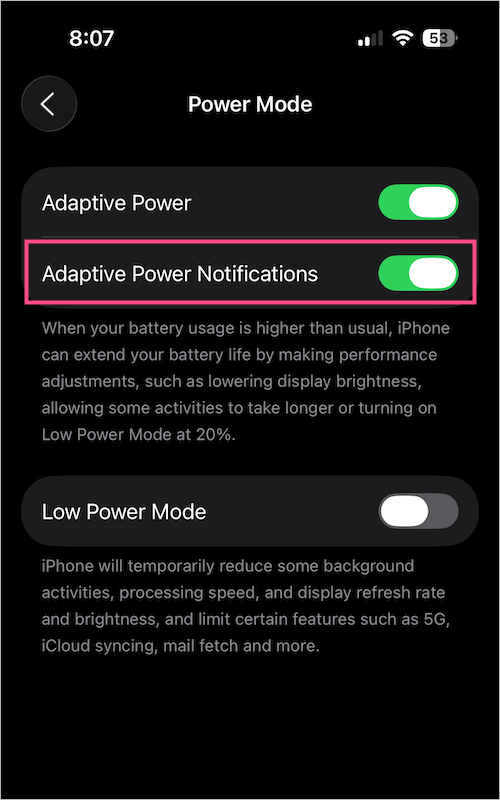
  5. (Optional) Turn on Adaptive Power Notifications to receive alerts whenever your iPhone makes adjustments to extend battery life. how to enable adaptive power in ios 26
Here’s what an Adaptive Power notification looks like:
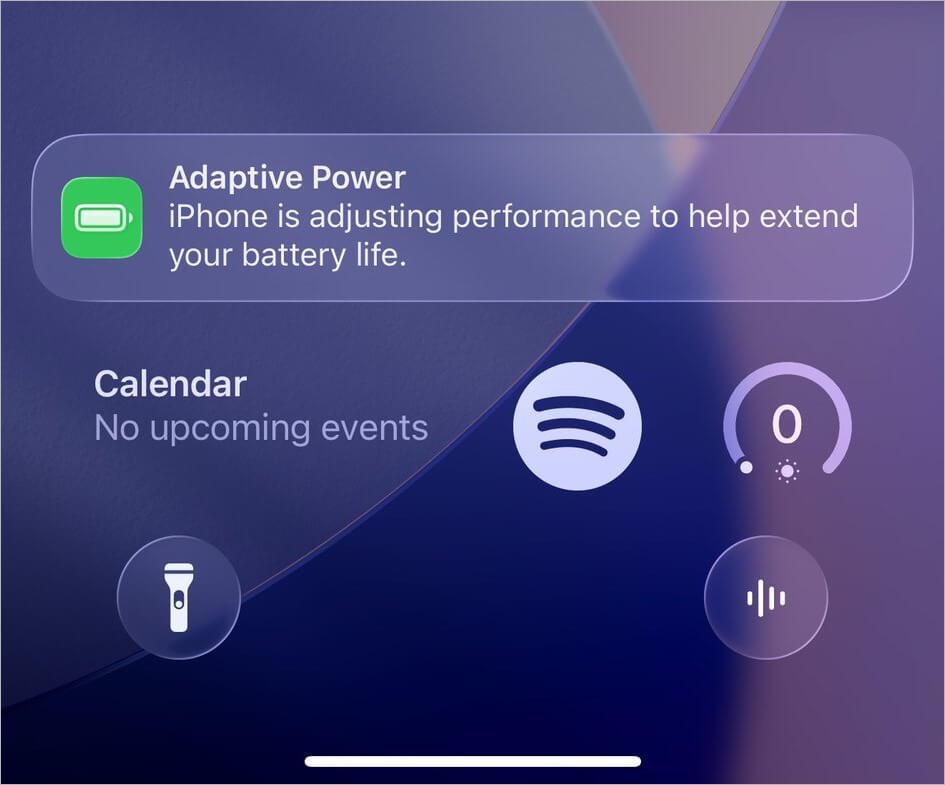
adaptive power notification on iphone
Adaptive Power Mode in action

Disable Adaptive Power Mode

To get out of Adaptive Power Mode, head back to Settings > Battery > Power Mode and simply turn off the Adaptive Power toggle.
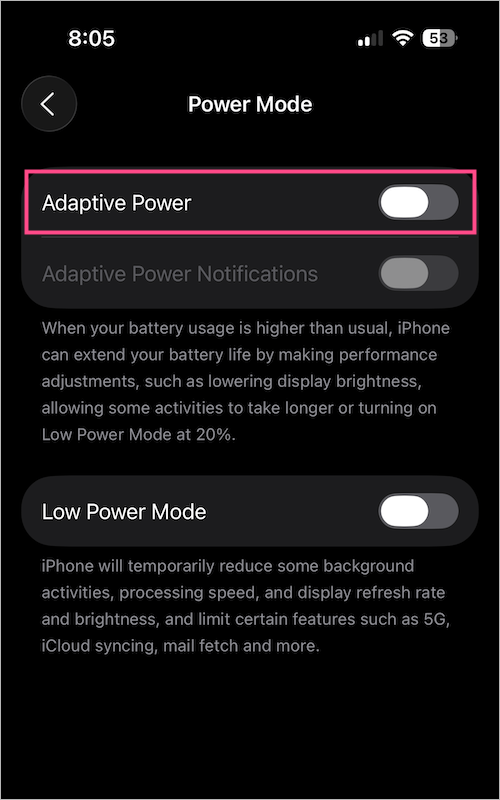
how to turn off adaptive power mode on iphone

You can switch it on when you expect a long day away from the charger, or off if you prefer maximum performance at all times.

Adaptive Power Mode vs. Low Power Mode

Here’s how iOS 26 Adaptive Power Mode differs from the Low Power Mode:

Adaptive Power Mode Low Power Mode
Introduced in iOS 26 Available in earlier iOS versions
Works proactively with small, context-based tweaks Activates at 20% battery with big system-wide changes
Reduces brightness, delays background tasks, can trigger Low Power Mode automatically Pauses background refresh, disables visual effects, slows performance
Available only on supported iPhones with Apple Intelligence Available on all iPhones running iOS
More seamless and less noticeable More aggressive and immediately noticeable

In short, Adaptive Power is like a quiet assistant, while Low Power Mode is a quick emergency switch.

RELATED TIPS:

  • How to Save Screenshots in HDR Format on iOS 26
  • Turn off Always-On Display on iPhone 17 Series or iPhone Air
  • How to Permanently Keep Your iPhone on Low Power Mode
Tags: iOS 26iPhone 16iPhone 17iPhone 17 ProiPhone AirTips
ShareTweetSend
Previous Post

How to Turn Off McAfee Antivirus 2025 in Windows 11 or 10

Next Post

How to Turn Off Always-On Display on iPhone 17 & iPhone Air

Mayur Agarwal

Mayur Agarwal

Mayur Agarwal, the founder and editor of WebTrickz, is a tech enthusiast with a Bachelor's degree in Computer Applications and over 15 years of experience in tech writing. His passion for technology and gadgets drives him to create insightful how-to articles and troubleshooting guides.

Next Post
apple iphone 17

How to Turn Off Always-On Display on iPhone 17 & iPhone Air

Leave a Reply Cancel reply

Your email address will not be published. Required fields are marked *

Latest Stories

copilot logo

How to Turn Off Copilot Search in Bing on Edge & Chrome

June 10, 2026
microsoft edge new logo

How to Turn Off Notifications in Microsoft Edge (2026 Guide)

June 8, 2026
chatgpt logo

How to Clear or Delete ChatGPT Memory on PC and Mobile

June 5, 2026
1337x logo

1337x Proxy List 2026: Working Proxy & Mirror Sites

June 2, 2026

How to Find Saved Reels on Facebook App & Desktop (2026)

June 8, 2026
microsoft edge browser

How to Restore or Reopen Closed Tabs in Microsoft Edge

June 9, 2026
Facebook app on iPhone

How to See Recently Watched Reels on Facebook (2026 Guide)

June 5, 2026

Trending Stories

  • microsoft family safety settings

    How to Turn Off Microsoft Family Safety on Windows 11 & 10

  • 1337x Proxy List 2026: Working Proxy & Mirror Sites

  • How to Turn Off Microsoft Edge Game Assist in Windows 11

  • How to See Recently Watched Reels on Facebook (2026 Guide)

  • How to Turn Off Fn Lock or Fn Key on Windows 11/10 Laptop

  • About Us
  • Contact Us
  • Privacy Policy
  • Advertise

© 2026 WebTrickz. All Rights Reserved.

No Result
View All Result
  • Reviews
  • Apps
  • How To’s
  • Android
  • Google
  • iPhone
  • Mac
  • About Us
  • Contact Us
  • Privacy Policy

© 2026 WebTrickz. All Rights Reserved.