

WebTrickz
TRENDING
  • Turn Off Copilot Search in Bing (Official Extension)
No Result
View All Result
  • Reviews
  • Editorials
  • Social Media
    • Facebook
    • Twitter
    • YouTube
    • Messenger
    • Instagram
    • Snapchat
    • WhatsApp
    • TikTok
  • Apps
  • How To’s
  • Apple
  • iPhone
  • Google
  • Android
  • Mac
  • Security
  • About Us
    • About Us
    • Contact Us
    • Privacy Policy
  • Reviews
  • Editorials
  • Social Media
    • Facebook
    • Twitter
    • YouTube
    • Messenger
    • Instagram
    • Snapchat
    • WhatsApp
    • TikTok
  • Apps
  • How To’s
  • Apple
  • iPhone
  • Google
  • Android
  • Mac
  • Security
  • About Us
    • About Us
    • Contact Us
    • Privacy Policy
No Result
View All Result
WebTrickz
No Result
View All Result
Home How To's

How to Turn Off MacBook/MacBook Pro Display Screen

Mayur Agarwal by Mayur Agarwal
June 5, 2021
in How To's, Mac

If you have a laptop or notebook, then it’s recommended to turn off its screen before leaving for a short break to save the battery. Though the display turns off itself after some time and on closing the lid but your device may go off to sleep, thus preventing any ongoing tasks like downloading files at night. So, it’s better to manually turn off the LCD screen to save power. Now let’s see how you can do it on your MacBook or MBP.

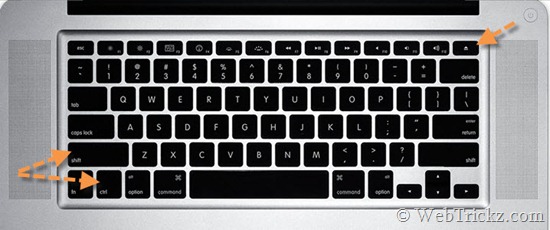
Turning off the monitor or display on MacBook & MacBook Pro – This can be easily done using a simple keyboard shortcut, just press Shift + Ctrl + Eject key (located at the top right corner) at the same time. The display screen will turn off instantly, press any key or touch the trackpad to turn on the screen again.
macbookpro_keyboard

Tip: Lower down the screen brightness if the battery is running short on your MacBook.

Tags: AppleMacMacBookMacBook ProTipsTricks
ShareTweetSend
Previous Post

How to get ‘Save and Quit’ option in Firefox 4 on Mac OS X

Next Post

How to Turn off/Disable Font Smoothing on Mac OS X

Mayur Agarwal

Mayur Agarwal

Mayur Agarwal, the founder and editor of WebTrickz, is a tech enthusiast with a Bachelor's degree in Computer Applications and over 15 years of experience in tech writing. His passion for technology and gadgets drives him to create insightful how-to articles and troubleshooting guides.

Next Post

How to Turn off/Disable Font Smoothing on Mac OS X

Comments 3

  1. Pingback: Atajo de teclado para apagar la pantalla de la MacBook | Punto Geek
  2. Balum says:
    13 years ago

    Thank You!

    Reply
  3. Scott says:
    12 years ago

    Thank you! My Mac OS install DVD got stuck and found that Shift+Control+Eject button (upper far right on keyboard) WORK! after trying all the other methods!

    Reply

Leave a Reply Cancel reply

Your email address will not be published. Required fields are marked *

Latest Stories

google chrome logo

Google Chrome Offline Installer: Direct Download Links

June 17, 2026
X logo

How to Remove All Bookmarks on X (Twitter) At Once in 2026

June 15, 2026
X logo

How to Find Bookmarks on X (Twitter) in 2026

June 15, 2026
copilot logo

How to Turn Off Copilot Search in Bing on Edge & Chrome

June 10, 2026
microsoft edge new logo

How to Turn Off Notifications in Microsoft Edge (2026 Guide)

June 8, 2026
chatgpt logo

How to Clear or Delete ChatGPT Memory on PC and Mobile

June 5, 2026
1337x logo

1337x Proxy List 2026: Working Proxy & Mirror Sites

June 2, 2026

Trending Stories

  • 1337x logo

    1337x Proxy List 2026: Working Proxy & Mirror Sites

  • How to Turn Off Microsoft Family Safety on Windows 11 & 10

  • How to Turn Off Microsoft Edge Game Assist in Windows 11

  • How to See Recently Watched Reels on Facebook (2026 Guide)

  • How to Turn Off Fn Lock or Fn Key on Windows 11/10 Laptop

  • About Us
  • Contact Us
  • Privacy Policy
  • Advertise

© 2026 WebTrickz. All Rights Reserved.

No Result
View All Result
  • Reviews
  • Apps
  • How To’s
  • Android
  • Google
  • iPhone
  • Mac
  • About Us
  • Contact Us
  • Privacy Policy

© 2026 WebTrickz. All Rights Reserved.






