WebTrickz
TRENDING
  • Complete list of 1337x Proxy and Mirror Sites
No Result
View All Result
  • Reviews
  • Editorials
  • Social Media
    • Facebook
    • Twitter
    • YouTube
    • Messenger
    • Instagram
    • Snapchat
    • WhatsApp
    • TikTok
  • Apps
  • How To’s
  • Apple
  • iPhone
  • Google
  • Android
  • Mac
  • Security
  • About Us
    • About Us
    • Contact Us
    • Privacy Policy
  • Reviews
  • Editorials
  • Social Media
    • Facebook
    • Twitter
    • YouTube
    • Messenger
    • Instagram
    • Snapchat
    • WhatsApp
    • TikTok
  • Apps
  • How To’s
  • Apple
  • iPhone
  • Google
  • Android
  • Mac
  • Security
  • About Us
    • About Us
    • Contact Us
    • Privacy Policy
No Result
View All Result
WebTrickz
No Result
View All Result
Home Google

How to Chat with People in your Google+ Circle

Mayur by Mayur
May 16, 2020
in Google, How To's

Google+ has been introduced as a game changer for popular social networks like Facebook and Twitter. In just few days, a lot of people specially techies have joined Google+ and the experience is simply awesome. Yes, it’s pretty addictive and interesting too because I’ve never seen such prompt and ongoing interaction before between the members in a circle and unknown people too.

We recently shared 20 Google+ Tips that surely powers user experience on Google Plus. Now, here is another useful tip about which most don’t know “Chatting with Friends in your circle on Google+”. Of course, you can chat with people included in your Gmail contacts but furthermore, Google+ allows you to chat with people added to your Circle.

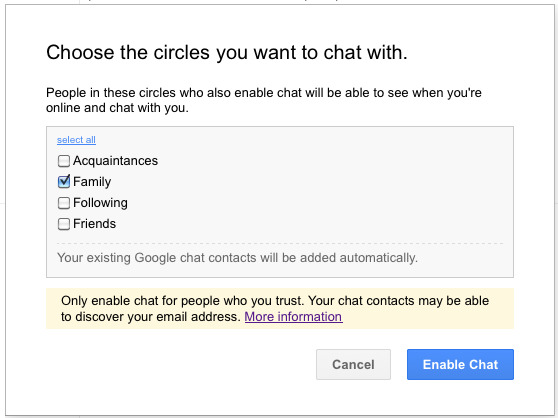
To enable this feature, just hover your mouse cursor over Chat option in Google+ and click on the grey drop-down arrow. Select ‘Circles’ and then Choose the circles you want to chat with. You can select several Circles namely: Acquaintances, Family, Friends and Following. It’s better to add circles with people whom you know like family and friends.
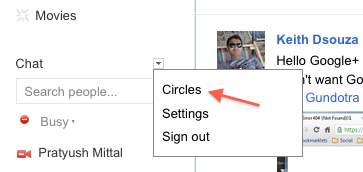
google+ chat

google+ chat options

Note: Chatting would be possible only when People (whom you have added for Chat) have also enabled the Chat feature. You will then be able to chat when they’re online and available for Chat.

Only enable chat for people who you trust because:

When you appear in someone’s chat list in Google+, it’s possible that person could discover your email address. While your email address won’t be displayed in the chat list in Google+, it is displayed in the chat lists of other Google products (Gmail and iGoogle, for instance).

Hope you found this tip handy, do share it with your friends on Google+.

Update – The feature to Chat with people in your circles was removed back in July but Google has now added it back. You can now chat with anyone in your circles who also have you in their circles. You can also choose Custom circles who can chat with you. Any new circles created by you are allowed to chat with you by default.
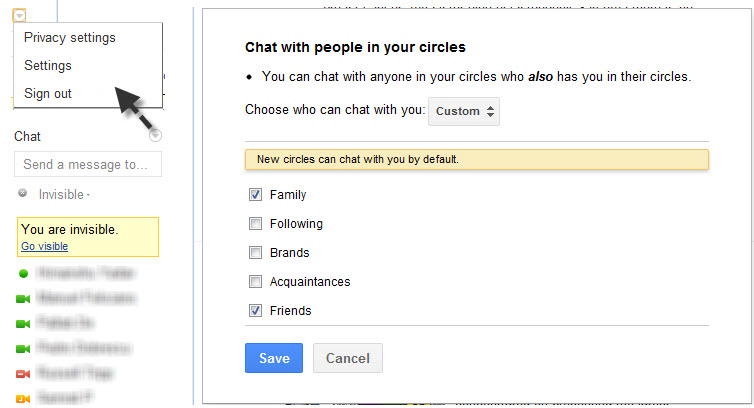
Google+ chat settings

If you prefer NOT to chat with anyone in your circles on Google+, then just go to Chat settings (select Privacy settings from drop-down menu), select Custom and uncheck all the circles to hide Google+ users from appearing in your Chat list.


Tags: ContactsGmailGoogleGoogle PlusTricks
ShareTweetSend
Previous Post

Download Android vs Apple HD Desktop Wallpapers

Next Post

Why the Built-In Photo Editor on Google+ Rocks

Mayur

Mayur

Mayur Agarwal, the founder and editor of WebTrickz, is a tech enthusiast with a Bachelor's degree in Computer Applications and over 15 years of experience in tech writing. His passion for technology and gadgets drives him to create insightful how-to articles and troubleshooting guides.

Next Post

Why the Built-In Photo Editor on Google+ Rocks

Comments 5

  1. Rajesh says:
    15 years ago

    By the way you can use the key Q twice to search and add people to chat in Google + .

    Reply
  2. krishna says:
    15 years ago

    that circle option is not available in my chat box, only settings and sign out option.
    What to do? please suggest.

    Reply
    • Mayur says:
      15 years ago

      @krishna Unfortunately, they’ve removed Circles option now. You need to manually add people from circles you want to chat with.

      Reply
  3. Pingback: 25 Google+ tips and tricks | Webdesigner Depot

Leave a Reply Cancel reply

Your email address will not be published. Required fields are marked *

Latest Stories

chatgpt logo

How to Clear or Delete ChatGPT Memory on PC and Mobile

June 5, 2026
1337x logo

1337x Proxy List 2026: Working Proxy & Mirror Sites

June 2, 2026

How to Find Saved Reels on Facebook App & Desktop (2026)

April 1, 2026
microsoft edge browser

How to Restore or Reopen Closed Tabs in Microsoft Edge

March 26, 2026
Facebook app on iPhone

How to See Recently Watched Reels on Facebook (2026 Guide)

April 3, 2026
microsoft edge new logo

Download Microsoft Edge Offline Installer [Latest Version]

March 16, 2026

How to Turn Off Bing SafeSearch in Microsoft Edge

March 12, 2026

Trending Stories

  • microsoft family safety settings

    How to Turn Off Microsoft Family Safety on Windows 11 & 10

  • How to Turn Off Microsoft Edge Game Assist in Windows 11

  • How to Turn Off Fn Lock or Fn Key on Windows 11/10 Laptop

  • How to See Recently Watched Reels on Facebook (2026 Guide)

  • 1337x Proxy List 2026: Working Proxy & Mirror Sites

  • About Us
  • Contact Us
  • Privacy Policy
  • Advertise

© 2026 WebTrickz. All Rights Reserved.

No Result
View All Result
  • Reviews
  • Apps
  • How To’s
  • Android
  • Google
  • iPhone
  • Mac
  • About Us
  • Contact Us
  • Privacy Policy

© 2026 WebTrickz. All Rights Reserved.