WebTrickz
TRENDING
  • Claude vs ChatGPT: Which Is Better in 2026?
No Result
View All Result
  • Reviews
  • Editorials
  • Social Media
    • Facebook
    • Twitter
    • YouTube
    • Messenger
    • Instagram
    • Snapchat
    • WhatsApp
    • TikTok
  • Apps
  • How To’s
  • Apple
  • iPhone
  • Google
  • Android
  • Mac
  • Security
  • About Us
    • About Us
    • Contact Us
    • Privacy Policy
  • Reviews
  • Editorials
  • Social Media
    • Facebook
    • Twitter
    • YouTube
    • Messenger
    • Instagram
    • Snapchat
    • WhatsApp
    • TikTok
  • Apps
  • How To’s
  • Apple
  • iPhone
  • Google
  • Android
  • Mac
  • Security
  • About Us
    • About Us
    • Contact Us
    • Privacy Policy
No Result
View All Result
WebTrickz
No Result
View All Result
Home How To's

How to Switch to Windows 7 basic theme [Non Aero]

Mayur Agarwal by Mayur Agarwal
February 25, 2024
in How To's, Windows 7

If you are using Windows 7 on an old PC with low-end graphics or want to make Windows 7 faster, then you must use the Basic theme. Windows 7 basic theme is without Aero and is certainly very light as compared to the Aero theme.

The basic theme is non-transparent, doesn’t show applications preview in the taskbar, and disables Aero Peek.

To enable the Basic theme on Windows 7, open Control Panel > Appearance and Personalization > Personalization. Under ‘Basic and high contrast themes’ select Windows 7 Basic.
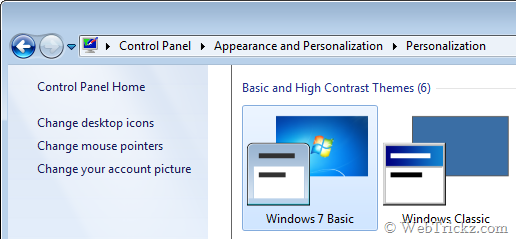
Windows 7 Basic theme

Now you’ll notice a huge improvement in your Windows 7 system speed. It is highly recommended for office users and people who prefer a simple look.


Add WebTrickz as a preferred source on Google
Tags: MicrosoftTips
ShareTweetSend
Previous Post

How to Automatically Preview songs in WMP 12 on mouse hover in Windows 7 ?

Next Post

USB Flash Tools – Backup/Restore/Erase/Verify Capacity of a memory card or USB drive

Mayur Agarwal

Mayur Agarwal

Mayur Agarwal, the founder and editor of WebTrickz, is a tech enthusiast with a Bachelor's degree in Computer Applications and over 15 years of experience in tech writing. His passion for technology and gadgets drives him to create insightful how-to articles and troubleshooting guides.

Next Post

USB Flash Tools – Backup/Restore/Erase/Verify Capacity of a memory card or USB drive

Comments 2

  1. Gurudatta says:
    15 years ago

    Changing theme to windows 7 basic improved the performance.

    Thank you for your post.

    Reply
  2. Jordan says:
    13 years ago

    Windows 7 Basic theme is much better than Aero.

    Reply

Leave a Reply Cancel reply

Your email address will not be published. Required fields are marked *

Latest Stories

Closing Apps on iPhone 18 Pro and 18 Pro Max

How to Close Apps on iPhone 18 Pro and 18 Pro Max

September 19, 2026

How to Screen Record on iPhone 18 Pro and 18 Pro Max

September 19, 2026
iPhone 18 Pro and 18 Pro Max

How to Take a Screenshot on iPhone 18 Pro or 18 Pro Max

September 23, 2026
silent mode popup in dynamic island

How to Put iPhone 18 Pro on Silent or Vibrate Mode

September 18, 2026
Closing Apps on iPhone 18 Pro and 18 Pro Max

How to Restart or Force Restart iPhone 18 Pro and 18 Pro Max

September 23, 2026
iPhone 18 Pro and 18 Pro Max

How to Turn Off iPhone 18 Pro or 18 Pro Max

September 23, 2026
instagram logo

How to Find Scheduled Posts on Instagram

July 29, 2026

Trending Stories

  • Photo by Jeff Hardi on Unsplash

    How to Turn Off Fn Lock on a Windows Laptop

  • Easiest Way to Change Galaxy Nexus from Yakjuxw (Non-Yakju) to Android 4.2 Yakju/Takju and Get future Updates from Google

  • How to Turn Off Microsoft Edge Game Assist in Windows 11

  • How to Turn Off Microsoft Family Safety on Windows 11 & 10

  • Guide to Update Galaxy Nexus (YAKJUXW) to Android 4.0.4 YAKJU and Get future Updates from Google

  • About Us
  • Contact Us
  • Privacy Policy
  • Advertise

© 2026 WebTrickz. All Rights Reserved.

No Result
View All Result
  • Reviews
  • Apps
  • How To’s
  • Android
  • Google
  • iPhone
  • Mac
  • About Us
  • Contact Us
  • Privacy Policy

© 2026 WebTrickz. All Rights Reserved.