WebTrickz
TRENDING
  • Turn Off Copilot Search in Bing (Official Extension)
No Result
View All Result
  • Reviews
  • Editorials
  • Social Media
    • Facebook
    • Twitter
    • YouTube
    • Messenger
    • Instagram
    • Snapchat
    • WhatsApp
    • TikTok
  • Apps
  • How To’s
  • Apple
  • iPhone
  • Google
  • Android
  • Mac
  • Security
  • About Us
    • About Us
    • Contact Us
    • Privacy Policy
  • Reviews
  • Editorials
  • Social Media
    • Facebook
    • Twitter
    • YouTube
    • Messenger
    • Instagram
    • Snapchat
    • WhatsApp
    • TikTok
  • Apps
  • How To’s
  • Apple
  • iPhone
  • Google
  • Android
  • Mac
  • Security
  • About Us
    • About Us
    • Contact Us
    • Privacy Policy
No Result
View All Result
WebTrickz
No Result
View All Result
Home Telecom

How to Check Airtel Broadband Unused Carry Over Data

Mayur Agarwal by Mayur Agarwal
April 5, 2024
in Telecom, Tips & Tricks

As a long-time Airtel broadband user, I always felt bad when plenty of my high-speed broadband data goes unused and I couldn’t do anything about it. This situation usually arises when at times you’ve limited Internet usage or are out of town for work or vacation. Well, Airtel curbed this issue with the introduction of the “Data Rollover” facility for home broadband users. This means that all unused broadband data is now carried forward to the next billing cycle, hence users will never waste any data they actually pay for.

RELATED: How to temporarily deactivate Airtel broadband using Safe Custody

This facility was initially introduced for Airtel Postpaid users in July 2017 wherein the unused monthly mobile data (up to 200GB) was added to the next monthly cycle. Soon after in November, Airtel announced the data rollover feature for its home broadband users, ensuring zero wastage of data. The data accumulation limit in the case of broadband service is up to 1000GB. It’s worth noting that users need to have a broadband plan that offers added benefits such as data rollover, bonus data, and Amazon Prime Subscription to avail of this facility.

That said, let’s now find out how Airtel broadband users can check the carry-over data for their accounts. Though Airtel says that one can easily track the usage and balance data using the MyAirtel app but that feature is apparently removed from their app. Without further ado, let’s see how to find out the unused Airtel broadband data on a desktop and mobile.

Note: This is only for Airtel home broadband subscribers in India.

Quickly check your Airtel Broadband Carry Over Data

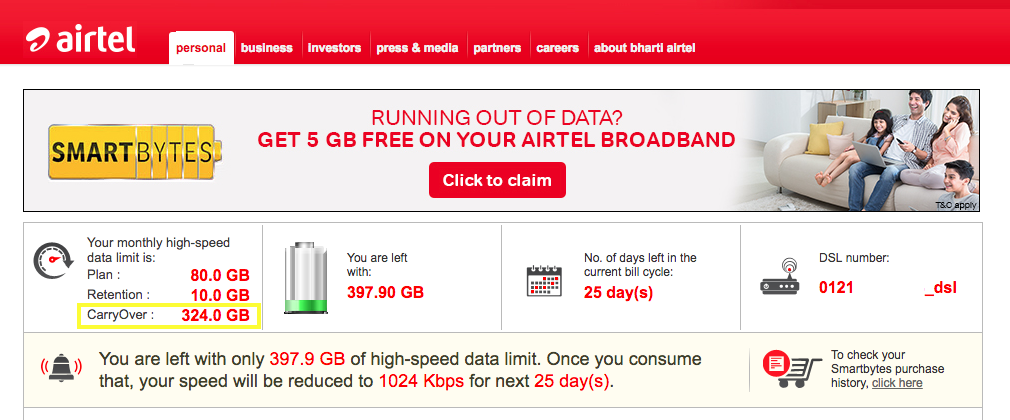
To check on desktop or mobile browser without logging in to Airtel selfcare website, simply visit www.airtel.in/smartbyte-s/page.html from your Airtel broadband connection. The webpage will show details of your account for the current bill cycle including CarryOver data. Tip: Mobile users can add a shortcut to the Smartbytes site on their phone’s home screen for faster access.
Airtel Smartbytes

On Android (Using an App) –

check airtel broadband data usage
check Airtel broadband carry over data

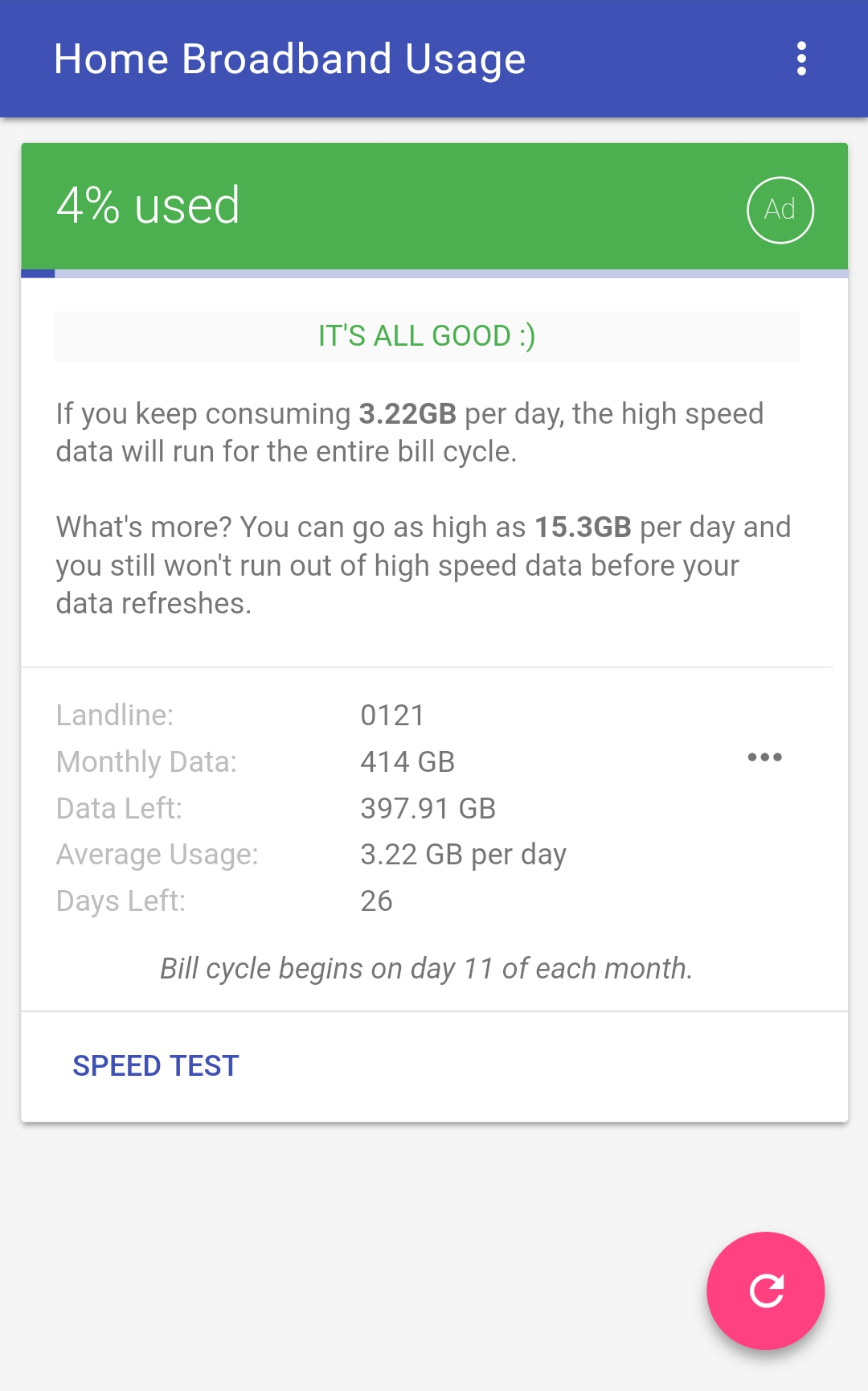
Home Broadband Usage is a nifty app for Android that lets you check your Internet broadband usage right from your mobile device. The app fetches the data from the official Airtel Smartbytes webpage without the need to log into your Airtel account. It allows users to check the details of any Airtel connection to which their phone is connected via Wi-Fi. The information shown includes:

  • Total monthly data
  • Used and remaining high-speed data (non-FUP)
  • Days left
  • Average daily usage and recommended usage
  • Billing cycle time period

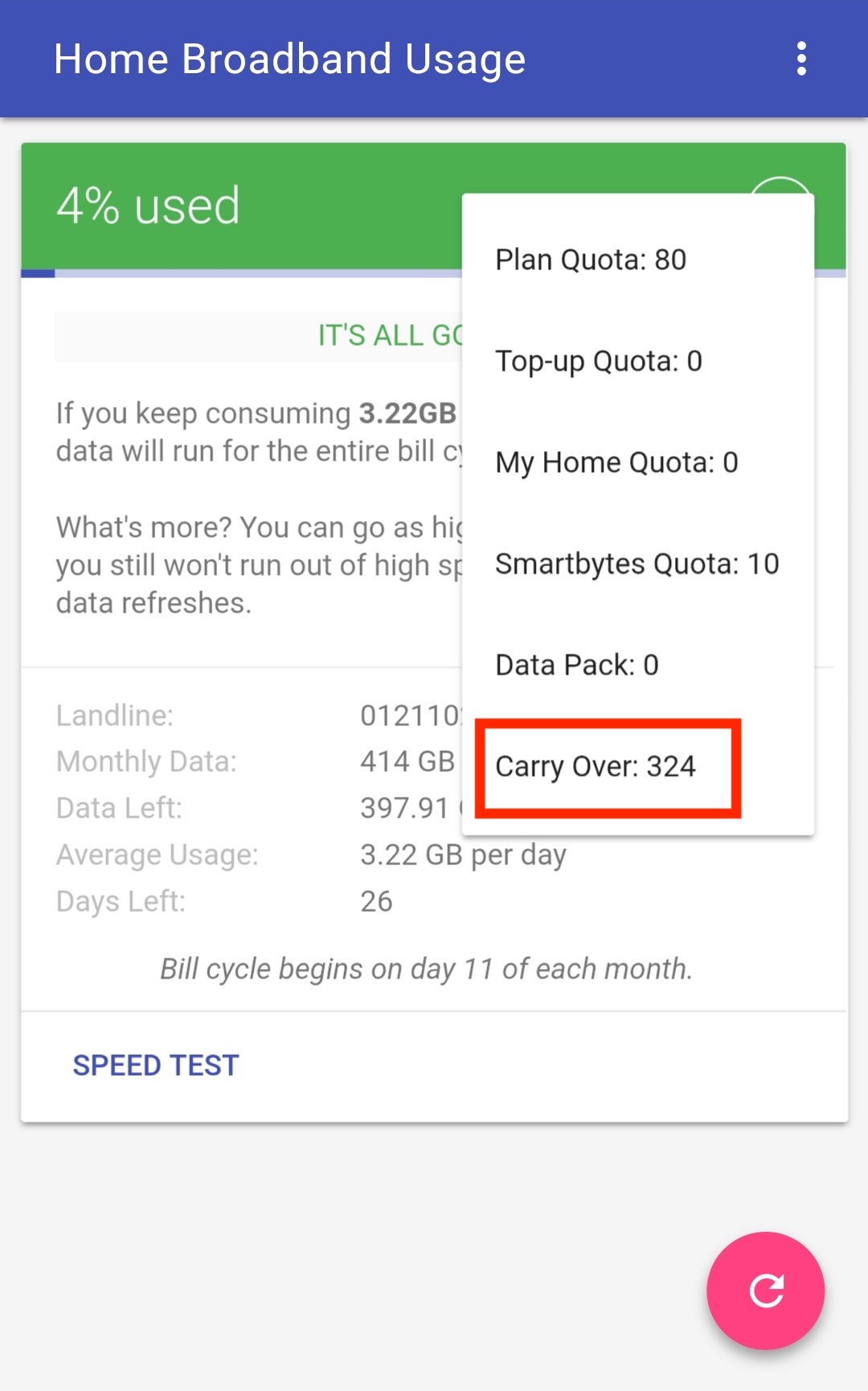
Here the monthly data option includes stats for Plan quota, My Home quota, Carry Over, and more.

Tags: AirtelAndroidBroadbandTelecomTips
Share3TweetSend
Previous Post

Chrome 65 for Android removes the ability to take screenshots in Incognito Mode

Next Post

How to Change Image URLs from HTTP to HTTPS in WordPress

Mayur Agarwal

Mayur Agarwal

Mayur Agarwal, the founder and editor of WebTrickz, is a tech enthusiast with a Bachelor's degree in Computer Applications and over 15 years of experience in tech writing. His passion for technology and gadgets drives him to create insightful how-to articles and troubleshooting guides.

Next Post
change all image urls to https in wordpress

How to Change Image URLs from HTTP to HTTPS in WordPress

Leave a Reply Cancel reply

Your email address will not be published. Required fields are marked *

Latest Stories

copilot logo

How to Turn Off Copilot Search in Bing on Edge & Chrome

June 10, 2026
microsoft edge new logo

How to Turn Off Notifications in Microsoft Edge (2026 Guide)

June 8, 2026
chatgpt logo

How to Clear or Delete ChatGPT Memory on PC and Mobile

June 5, 2026
1337x logo

1337x Proxy List 2026: Working Proxy & Mirror Sites

June 2, 2026

How to Find Saved Reels on Facebook App & Desktop (2026)

June 8, 2026
microsoft edge browser

How to Restore or Reopen Closed Tabs in Microsoft Edge

June 9, 2026
Facebook app on iPhone

How to See Recently Watched Reels on Facebook (2026 Guide)

June 5, 2026

Trending Stories

  • microsoft family safety settings

    How to Turn Off Microsoft Family Safety on Windows 11 & 10

  • 1337x Proxy List 2026: Working Proxy & Mirror Sites

  • How to Turn Off Microsoft Edge Game Assist in Windows 11

  • How to See Recently Watched Reels on Facebook (2026 Guide)

  • How to Turn Off Fn Lock or Fn Key on Windows 11/10 Laptop

  • About Us
  • Contact Us
  • Privacy Policy
  • Advertise

© 2026 WebTrickz. All Rights Reserved.

No Result
View All Result
  • Reviews
  • Apps
  • How To’s
  • Android
  • Google
  • iPhone
  • Mac
  • About Us
  • Contact Us
  • Privacy Policy

© 2026 WebTrickz. All Rights Reserved.