

WebTrickz
TRENDING
  • Complete list of 1337x Proxy and Mirror Sites
No Result
View All Result
  • Reviews
  • Editorials
  • Social Media
    • Facebook
    • Twitter
    • YouTube
    • Messenger
    • Instagram
    • Snapchat
    • WhatsApp
    • TikTok
  • Apps
  • How To’s
  • Apple
  • iPhone
  • Google
  • Android
  • Mac
  • Security
  • About Us
    • About Us
    • Contact Us
    • Privacy Policy
  • Reviews
  • Editorials
  • Social Media
    • Facebook
    • Twitter
    • YouTube
    • Messenger
    • Instagram
    • Snapchat
    • WhatsApp
    • TikTok
  • Apps
  • How To’s
  • Apple
  • iPhone
  • Google
  • Android
  • Mac
  • Security
  • About Us
    • About Us
    • Contact Us
    • Privacy Policy
No Result
View All Result
WebTrickz
No Result
View All Result
Home Instagram

Here’s how to Like a Story on Instagram [2024]

Like someone’s Instagram story without sending a DM.

Taigun by Taigun
June 3, 2026
in How To's, Instagram

As Instagram head Adam Mosseri announced on Twitter, Instagram is rolling out Private Story Likes. The new feature allows users to react to an Instagram story without sending a DM.

Previously, sending a message or a quick reaction was the only option, and it appeared as a response in Instagram Direct Messenger, potentially starting a DM conversation even if the recipient wasn’t willing, adding unwanted clutter.

Now, users will be able to like any story on Instagram, just like liking a post, video, or reels. This allows people to express love and support for each other while keeping DMs clean.

How the Instagram Like Story feature works

While viewing a story, you will see a new heart icon between ‘Send message’ and the paper plane icon at the bottom. Tapping the heart icon will like that particular story.

Like Quick Reactions, Likes on Instagram stories are private and visible only to the person sharing the story. Likes are not public, so you cannot see the number of likes on someone else’s story.

The story likes will appear in the viewer sheet and not in the DM conversation with the relevant person. This is great as you can now like an Instagram story without cluttering up someone’s DM or your messages.

Now let’s see how you can like a story on Instagram on iPhone and Android.

How to like someone’s story on Instagram

  1. View a story that you want to like.
  2. Look for the heart button, next to the paper plane icon at the bottom. how to like a story on instagram
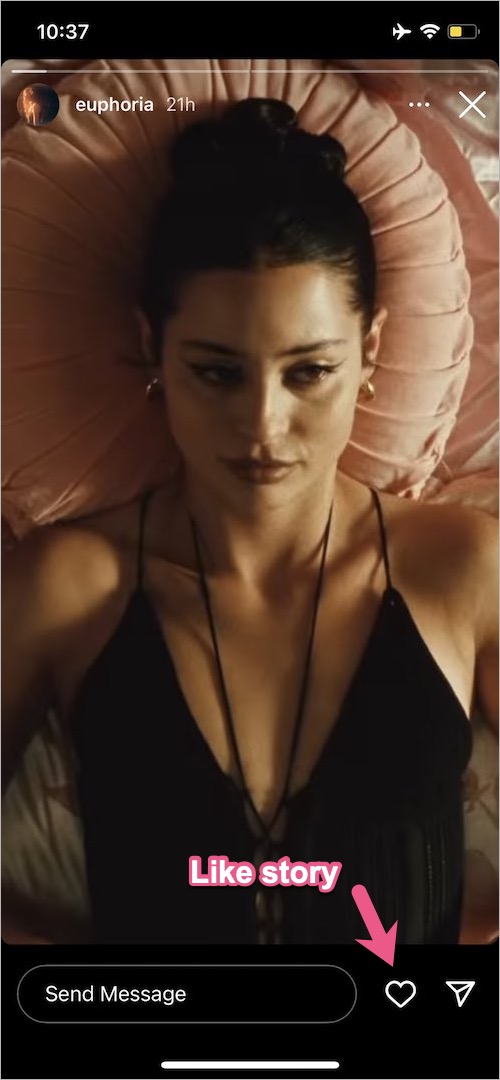
  3. Tap the ‘Heart‘ to like the story without sending a message. How to like someone's story on instagram
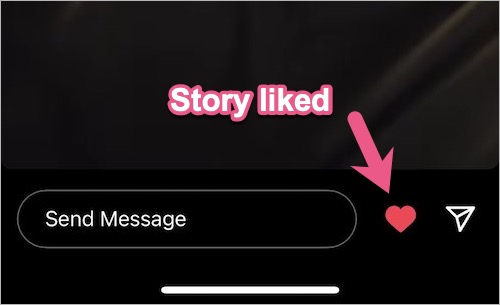
The heart symbol below the story will turn red from white, indicating that you’ve liked that story.

To remove or undo like on a story, go to the particular story and tap the heart again.
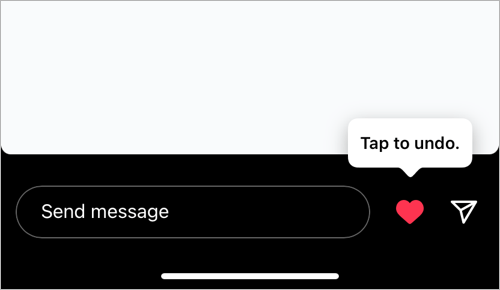
how to delete like on instagram story
Undo like on Instagram story

Instagram also shows a notification in the ‘Activity‘ tab when someone likes your story.
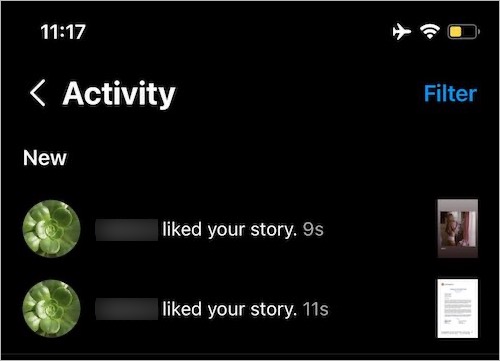
liked your story notification on instagram

RELATED: How to like someone’s reaction on your Instagram story

How to see who liked your story on Instagram

To see the likes you got on an Instagram story, view your story and swipe up on the screen. In the Viewers list, you will see a little heart icon next to the profile photo of the person who liked that story. Only you can see the likes you got on your story.
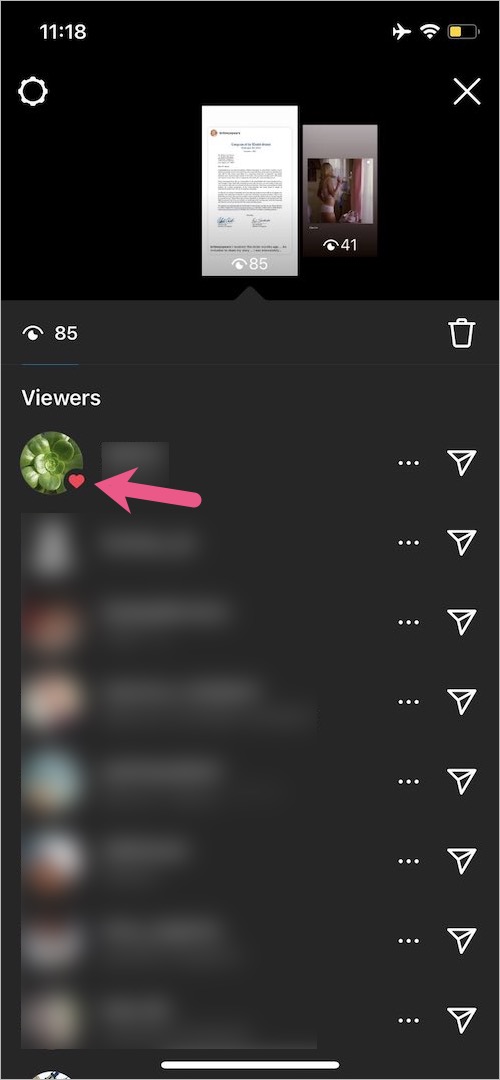
how to see likes on your Instagram story

Additionally, you can still send a quick emoji reaction by swiping up a story and tapping the desired emoji.

Thanks, @its_miltond for the screenshots.

ALSO READ: How to check liked posts on Instagram’s new update

Tags: EmojiInstagramInstagram StoriesSocial MediaTips
ShareTweetSend
Previous Post

How to go to Recently Deleted on Instagram 2024

Next Post

How to Hide Reels from Someone on Instagram & Facebook

Taigun

Taigun

Mayur Agarwal, the founder and editor of WebTrickz, is a tech enthusiast with a Bachelor's degree in Computer Applications and over 15 years of experience in tech writing. His passion for technology and gadgets drives him to create insightful how-to articles and troubleshooting guides.

Next Post
reels on Instagram

How to Hide Reels from Someone on Instagram & Facebook

Leave a Reply Cancel reply

Your email address will not be published. Required fields are marked *

Latest Stories

1337x logo

1337x Proxy List 2026: Working Proxy & Mirror Sites

June 2, 2026

How to Find Saved Reels on Facebook App & Desktop (2026)

April 1, 2026
microsoft edge browser

How to Restore or Reopen Closed Tabs in Microsoft Edge

March 26, 2026
Facebook app on iPhone

How to See Recently Watched Reels on Facebook (2026 Guide)

April 3, 2026
microsoft edge new logo

Download Microsoft Edge Offline Installer [Latest Version]

March 16, 2026

How to Turn Off Bing SafeSearch in Microsoft Edge

March 12, 2026
google chrome logo

Download Google Chrome Offline Installer [Latest Version]

June 3, 2026

Trending Stories

  • microsoft family safety settings

    How to Turn Off Microsoft Family Safety on Windows 11 & 10

  • How to Turn Off Fn Lock or Fn Key on Windows 11/10 Laptop

  • How to Turn Off Microsoft Edge Game Assist in Windows 11

  • How to See Recently Watched Reels on Facebook (2026 Guide)

  • How to Restore or Reopen Closed Tabs in Microsoft Edge

  • About Us
  • Contact Us
  • Privacy Policy
  • Advertise

© 2026 WebTrickz. All Rights Reserved.

No Result
View All Result
  • Reviews
  • Apps
  • How To’s
  • Android
  • Google
  • iPhone
  • Mac
  • About Us
  • Contact Us
  • Privacy Policy

© 2026 WebTrickz. All Rights Reserved.







