WebTrickz
TRENDING
  • Claude vs ChatGPT: Which Is Better in 2026?
No Result
View All Result
  • Reviews
  • Editorials
  • Social Media
    • Facebook
    • Twitter
    • YouTube
    • Messenger
    • Instagram
    • Snapchat
    • WhatsApp
    • TikTok
  • Apps
  • How To’s
  • Apple
  • iPhone
  • Google
  • Android
  • Mac
  • Security
  • About Us
    • About Us
    • Contact Us
    • Privacy Policy
  • Reviews
  • Editorials
  • Social Media
    • Facebook
    • Twitter
    • YouTube
    • Messenger
    • Instagram
    • Snapchat
    • WhatsApp
    • TikTok
  • Apps
  • How To’s
  • Apple
  • iPhone
  • Google
  • Android
  • Mac
  • Security
  • About Us
    • About Us
    • Contact Us
    • Privacy Policy
No Result
View All Result
WebTrickz
No Result
View All Result
Home How To's

How to View Archived Chats on ChatGPT App and Website

Quick guide to find archived conversations in ChatGPT on PC, iPhone, and Android.

Mayur Agarwal by Mayur Agarwal
June 18, 2026
in AI, How To's

ChatGPT offers a simple way to manage your conversation history using the Delete and Archive options. If your chat list is getting cluttered, archiving chats is a smart way to keep things organized without losing important conversations.

This quick guide shows how to find archived chats in ChatGPT on desktop, Android, and iPhone, and also explains how to unarchive or permanently delete them.

Why You Should Archive a ChatGPT Chat?

Archiving chats is useful when you want to clean up your ChatGPT conversation list without permanently removing chats you may need later.

Here’s why archiving is better than deleting in many cases:

  • Keeps your chat history clean and clutter-free
  • Let’s you hide completed or less important conversations
  • Allows you to revisit old chats anytime
  • Prevents accidental permanent data loss

Unlike deleting, archived chats remain accessible and can be restored with just a tap or click. That’s why it’s important to know how to access archived conversations in ChatGPT.

If you’re exploring AI tools beyond ChatGPT, check out our Claude vs ChatGPT comparison to see how OpenAI’s chatbot stacks up against Anthropic’s AI assistant.

How to Find Archived Chats in ChatGPT

ChatGPT allows you to view archived chats from both the mobile app and the web version. The steps may vary slightly depending on the device you’re using.

On Web Browser (Desktop)

To see archived chats in ChatGPT on a computer, follow these steps:

  1. Open ChatGPT in a web browser and log in to your account.
  2. Look at the left sidebar where your recent chats are listed.
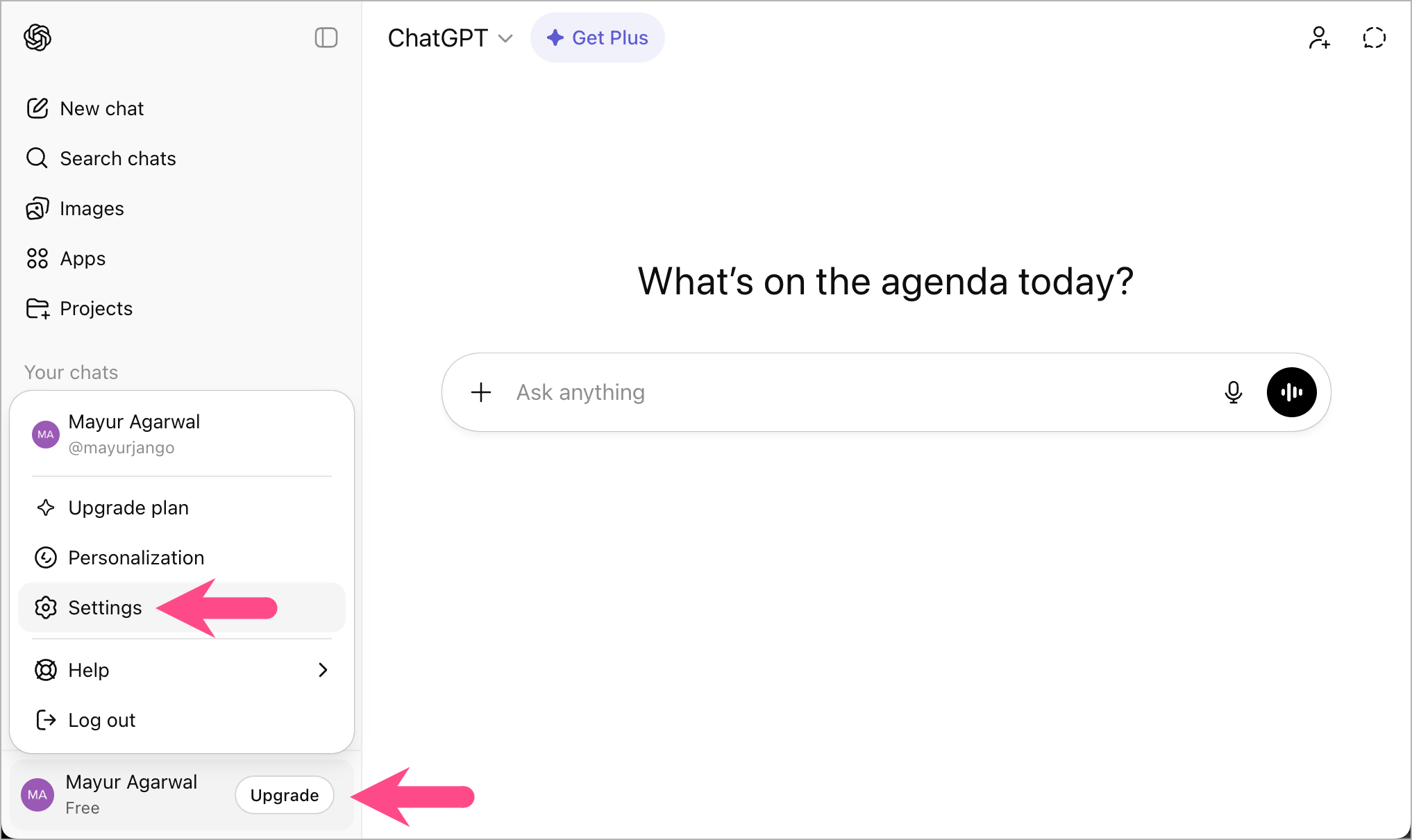
  3. Click on your profile icon at the bottom of the sidebar.
  4. Select Settings. how to see archived chats in chatgpt on pc and laptop
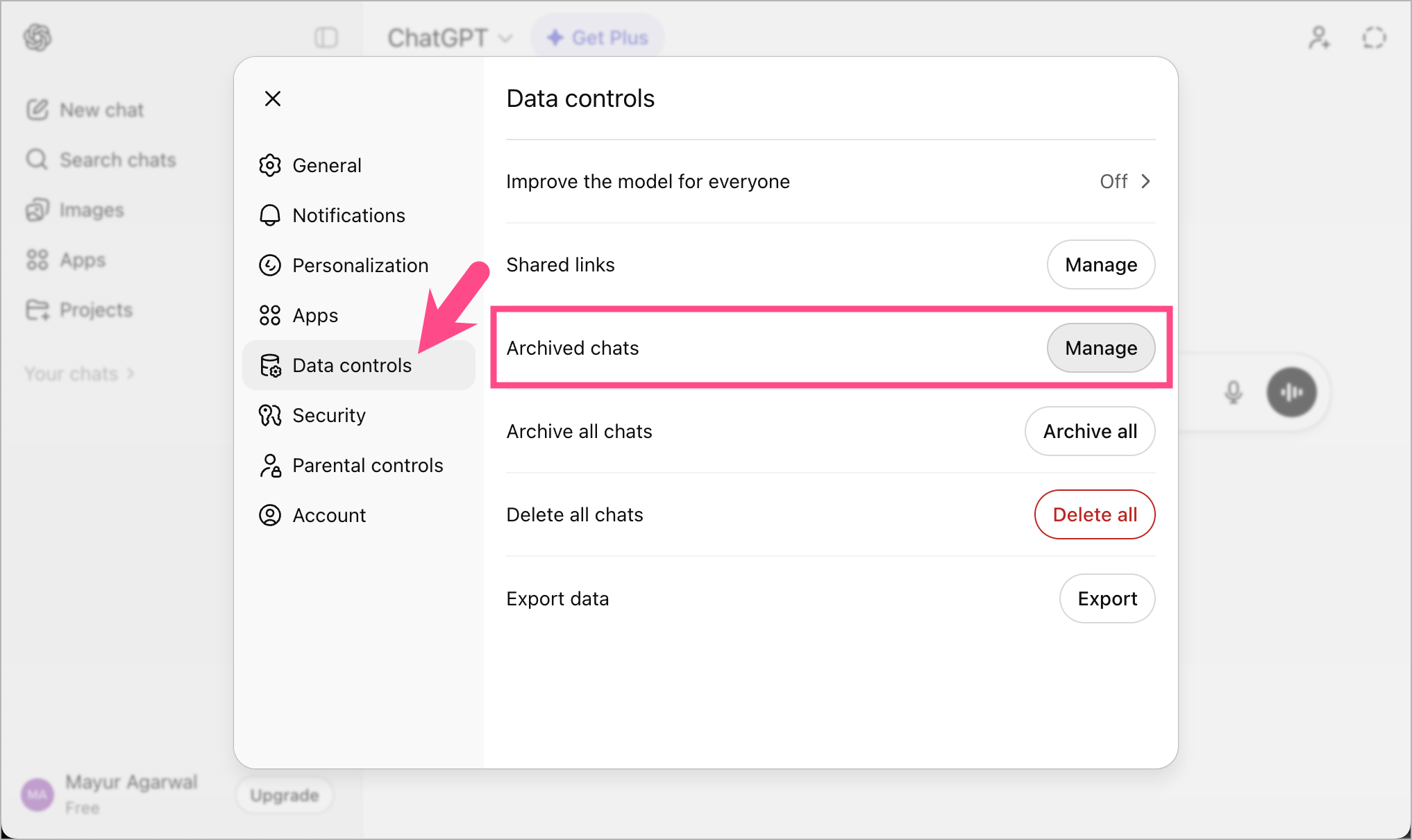
  5. Open Data controls.
  6. Click the Manage option next to Archived chats. where are archived chats in chatgpt account

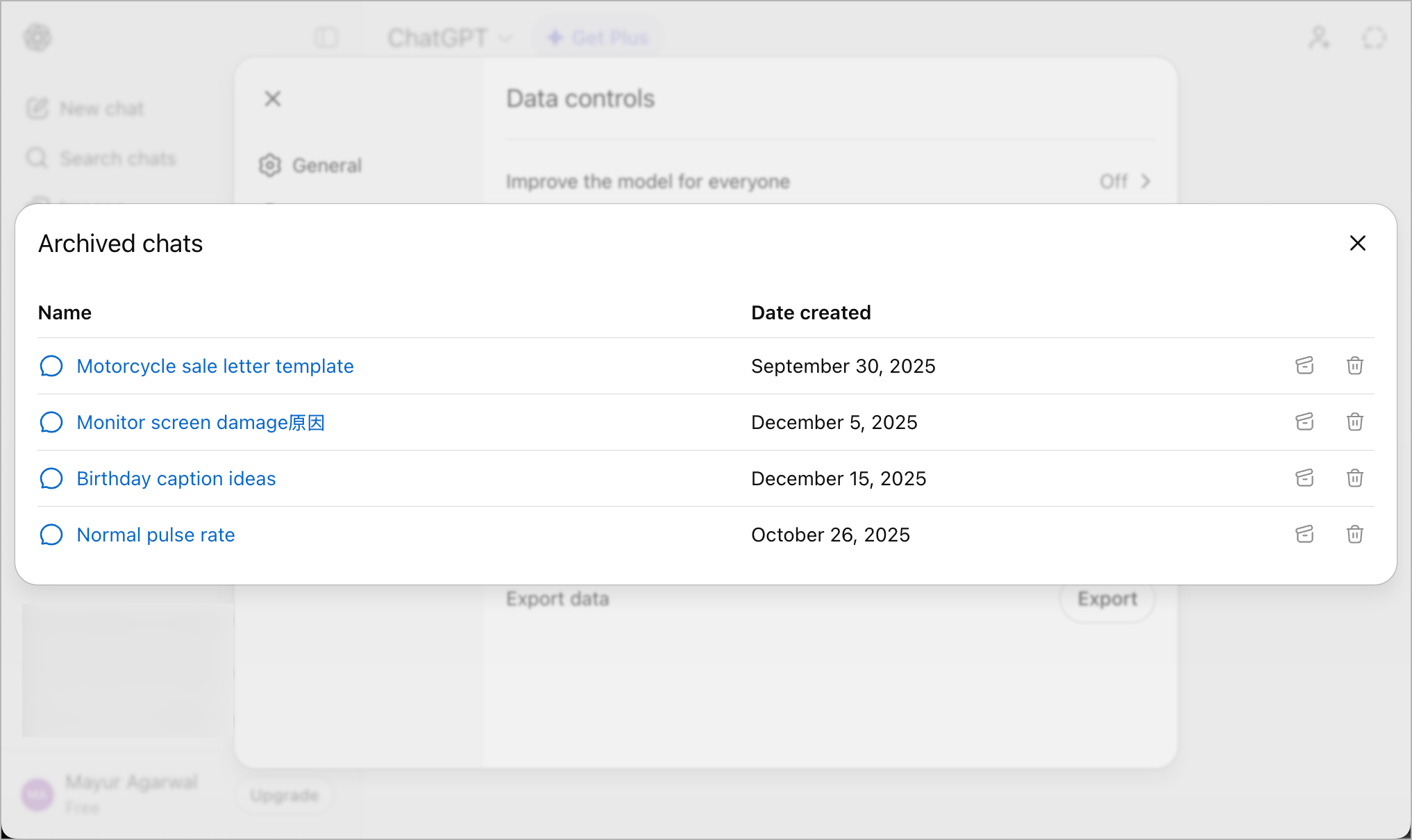
You’ll now see all your archived ChatGPT conversations in one place. You can also view the archived chat without the need to unarchive it.

how to view your archived chats on chatgpt website

On iPhone

Here’s how to access your ChatGPT archive on an iPhone or iPad:

  1. Open the ChatGPT app on your iPhone.
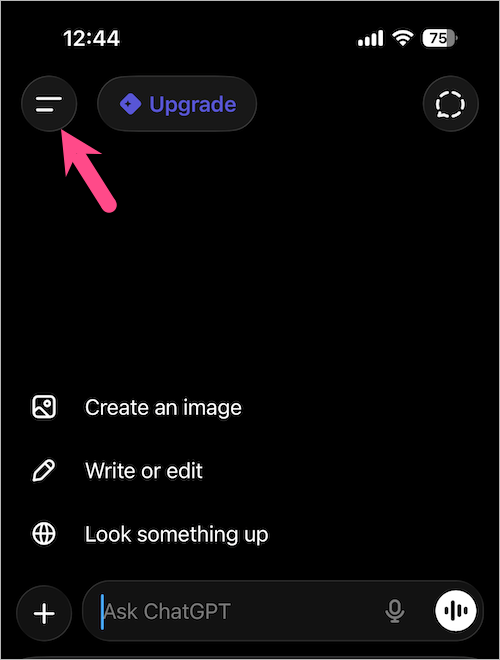
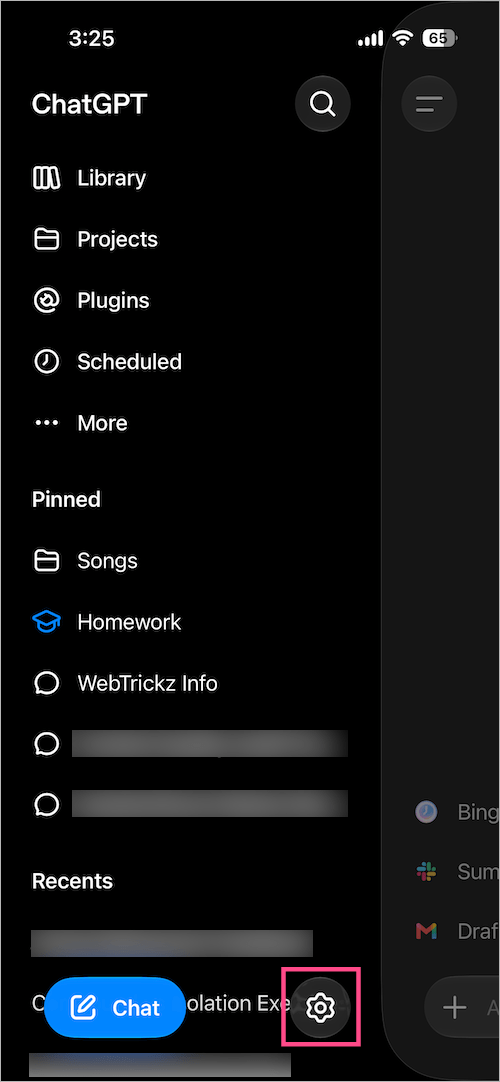
  2. Tap the Menu icon at the top-left corner. chatgpt app for iphone
  3. Tap your profile icon in the top right to open Settings. view archived conversations in chatgpt app on iphone
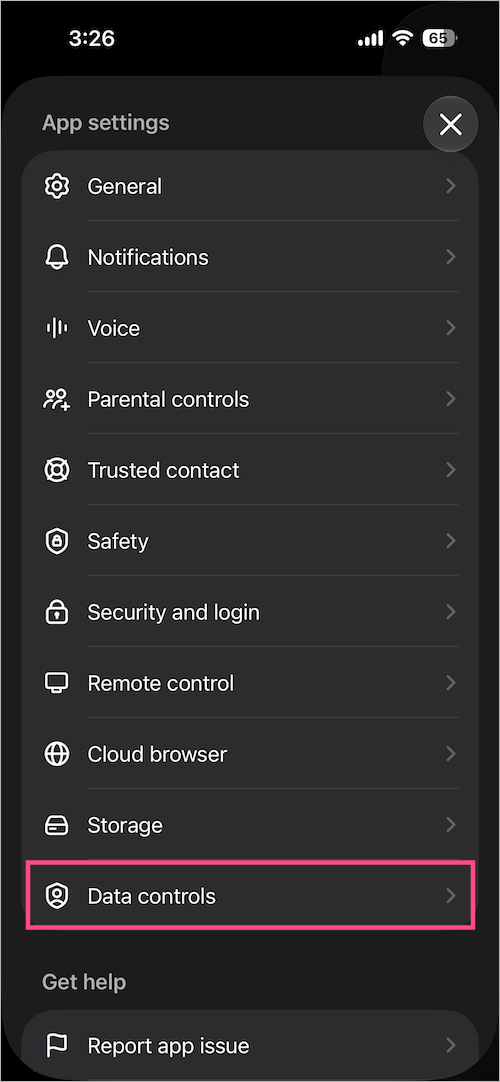
  4. In the App settings section, go to Data controls. data controls in chatgpt on iphone
  5. Under Chat history, select Archived chats. how to find archived conversations in chatgpt on iphone
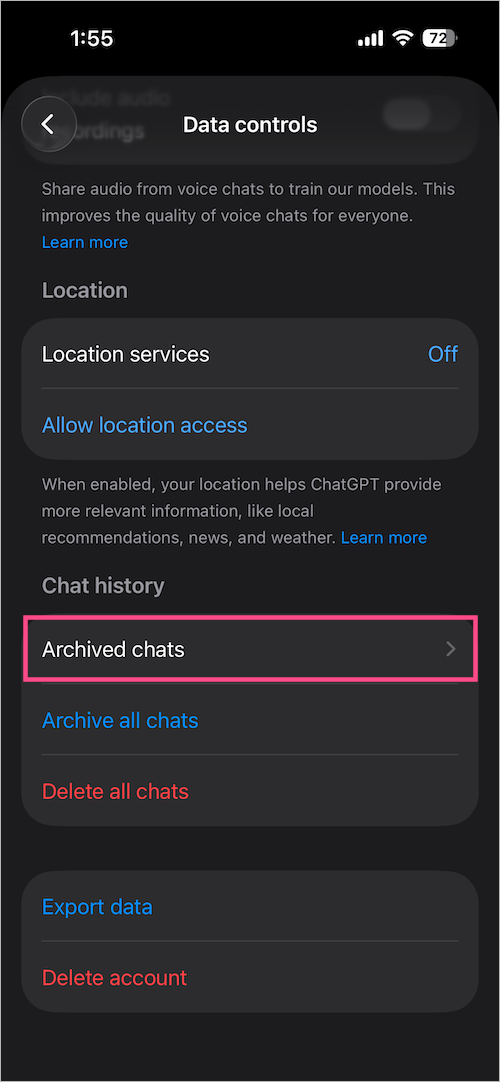
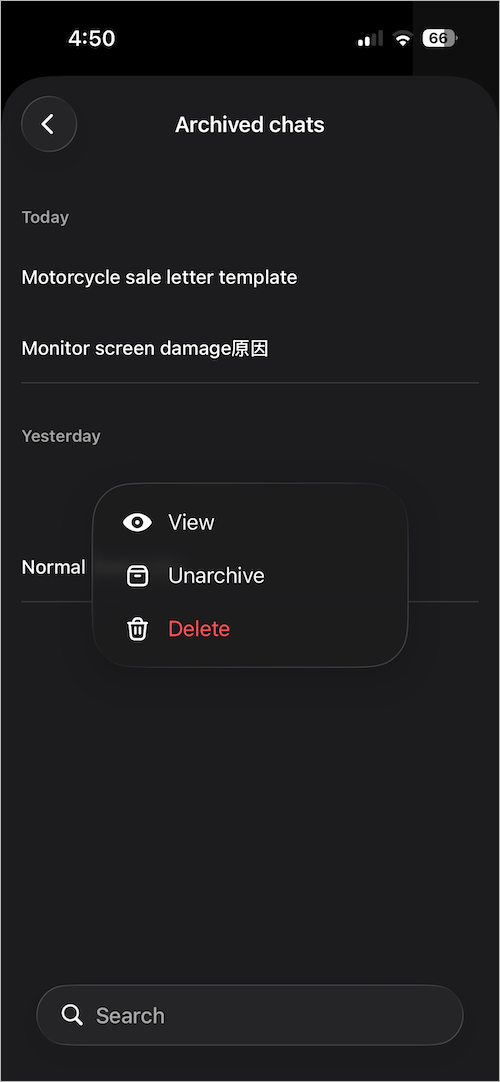
All your archived conversations will be displayed here. You can either view, unarchive, or delete them.

how to access chatgpt archive on iphone

On Android

  1. Open the ChatGPT app on your Android phone.
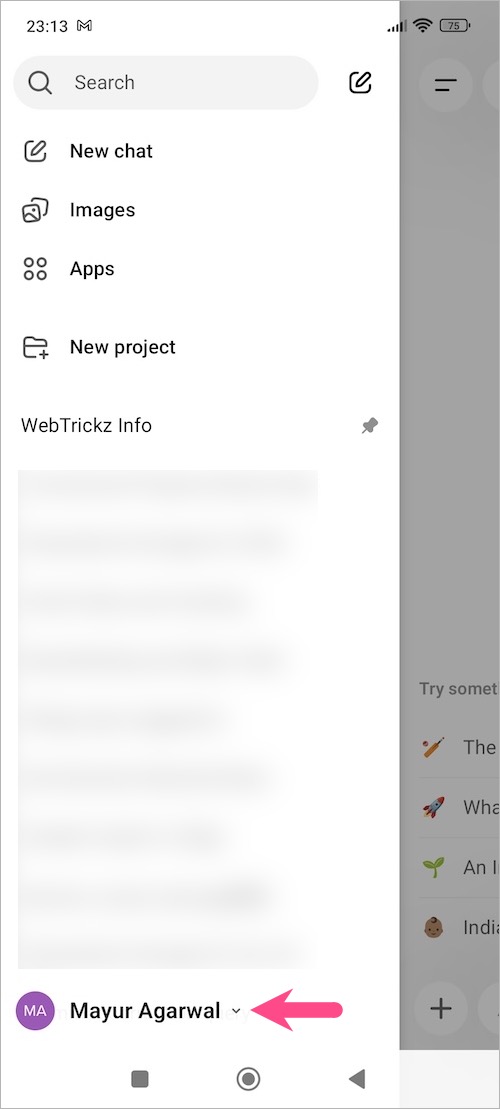
  2. Tap the Menu icon (at the top left) to open the chat history section.
  3. Tap your profile icon to go to Settings. see chatgpt archived conversations on android
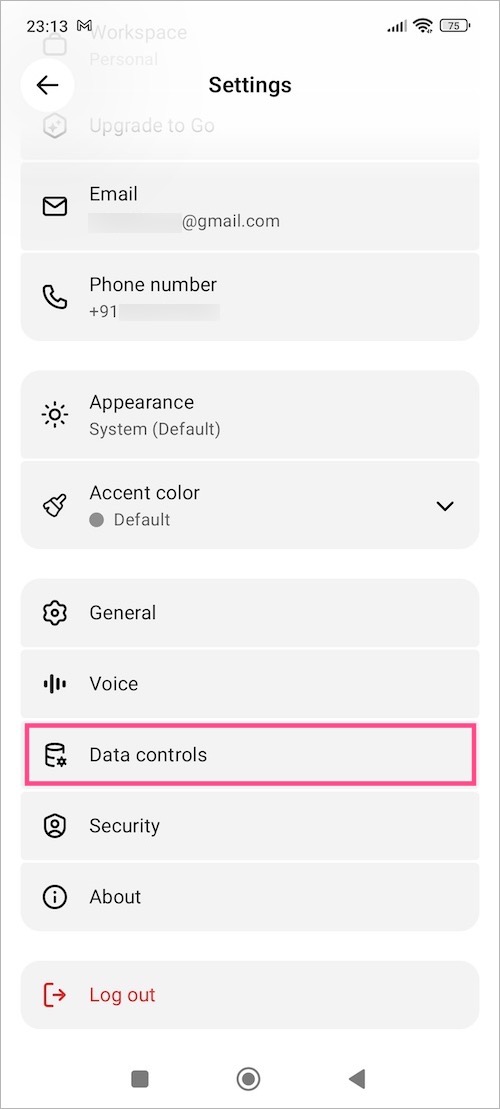
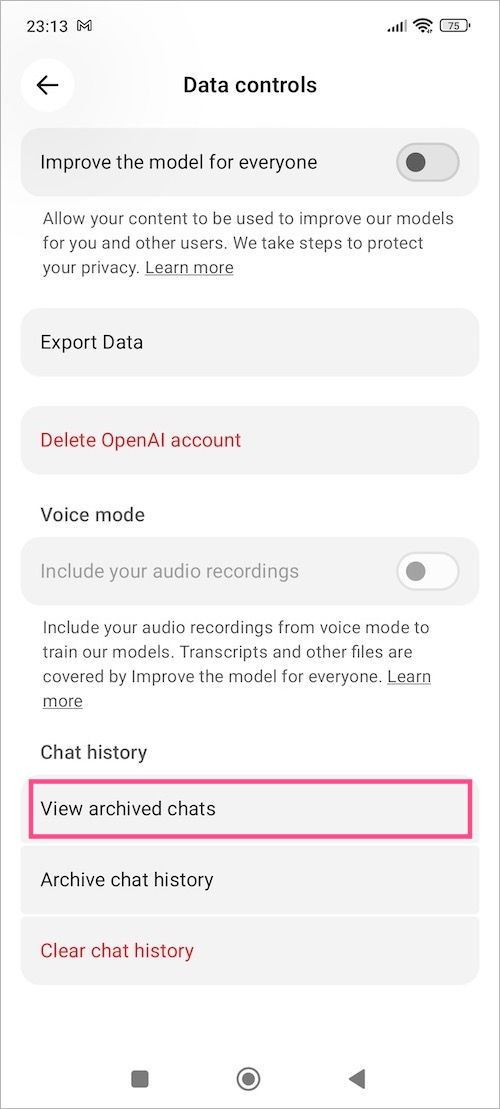
  4. Open Data controls. data controls in chatgpt app
  5. Under the Chat history section, tap View archived chats. how to view archived chats in chatgpt on android

You can now view all archived ChatGPT conversations linked to your account.

How to Unarchive Chats in ChatGPT

If you want an archived chat to appear again in your main chat list, you can easily unarchive it.

To unarchive a chat conversation in ChatGPT:

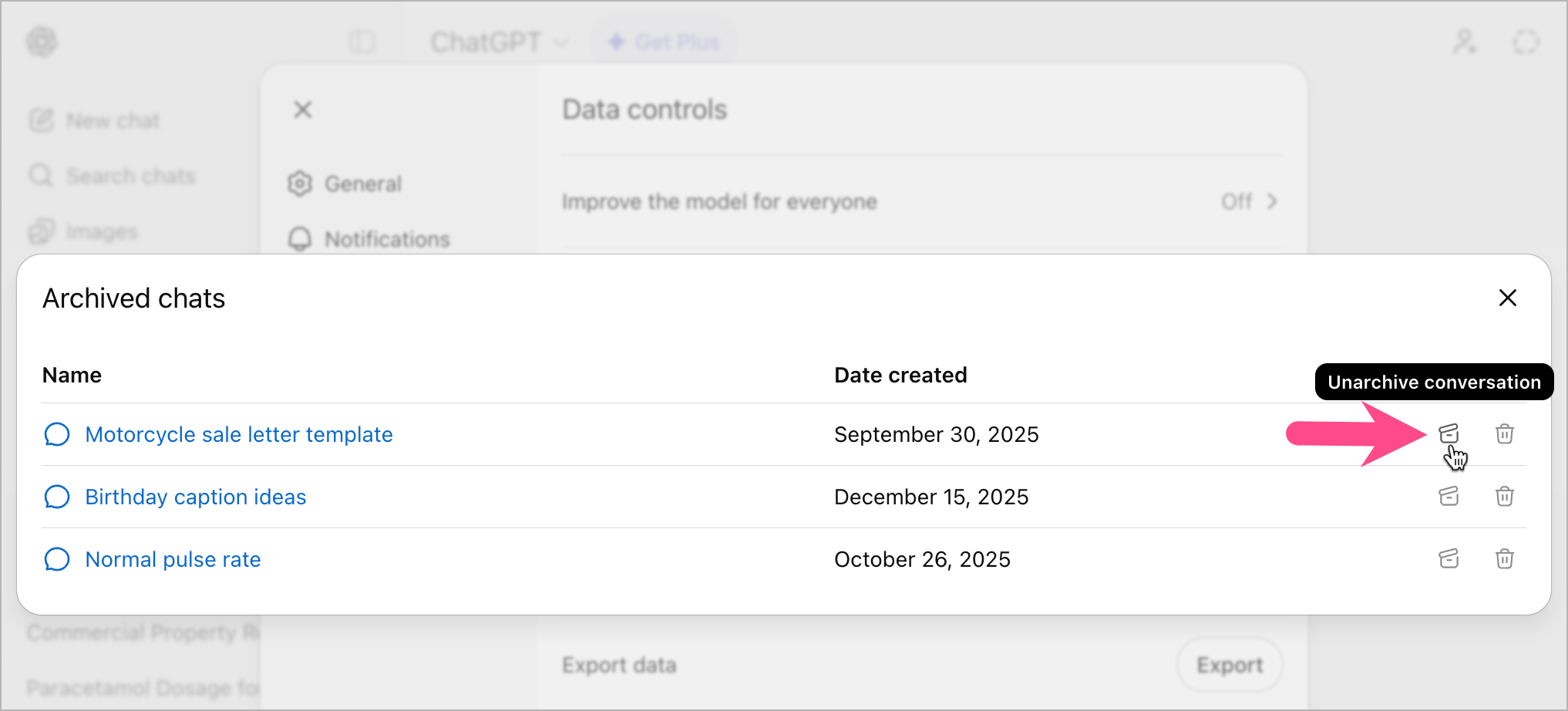
  1. Open Archived chats from ChatGPT settings (follow the above-stated steps).
  2. Select the conversation you want to restore.
  3. Tap or click Unarchive.

how to unarchive a chat conversation on chatgpt website

The chat will instantly move back to your regular chat history.

RELATED: How to Delete Saved Memories in ChatGPT

FAQs

How to Archive a Chat in ChatGPT?

To archive a conversation in ChatGPT:

  • On mobile: Long-press on the chat in the chat list and tap Archive.
  • On desktop: Click the three-dot menu next to a chat and select Archive.

The chat will be hidden from your main history, but will remain saved in your account.

Can You Delete a Chat Permanently from Archived Chats?

Yes, you can permanently delete archived chats. To do so,

  1. Navigate to Archived chats.
  2. Select the conversation you want to delete.
  3. Tap Delete.

Once deleted, the chat is permanently removed and cannot be recovered.

Add WebTrickz as a preferred source on Google
Tags: AIAppsChatGPTTips
ShareTweetSend
Previous Post

How to See Recently Watched Reels on Instagram (2026)

Next Post

How to Clear or Delete Copilot History in Edge on Windows 11/10

Mayur Agarwal

Mayur Agarwal

Mayur Agarwal, the founder and editor of WebTrickz, is a tech enthusiast with a Bachelor's degree in Computer Applications and over 15 years of experience in tech writing. His passion for technology and gadgets drives him to create insightful how-to articles and troubleshooting guides.

Next Post
copilot logo

How to Clear or Delete Copilot History in Edge on Windows 11/10

Leave a Reply Cancel reply

Your email address will not be published. Required fields are marked *

Latest Stories

Google Gemini

How to Cancel Your Gemini Subscription (2026 Guide)

June 21, 2026
difference between chatgpt and claude

Claude vs ChatGPT: Which AI Should You Use in 2026?

June 21, 2026
google chrome logo

Google Chrome Offline Installer: Direct Download Links

June 17, 2026
X logo

How to Remove All Bookmarks on X (Twitter) At Once in 2026

June 15, 2026
X logo

How to Find Bookmarks on X (Twitter) in 2026

June 15, 2026
copilot logo

How to Turn Off Copilot Search in Bing on Edge & Chrome

June 10, 2026
microsoft edge new logo

How to Turn Off Notifications in Microsoft Edge (2026 Guide)

June 8, 2026

Trending Stories

  • 1337x logo

    1337x Proxy List 2026: Working Proxy & Mirror Sites

  • How to Turn Off Microsoft Family Safety on Windows 11 & 10

  • How to Turn Off Microsoft Edge Game Assist in Windows 11

  • How to Turn Off Fn Lock or Fn Key on Windows 11/10 Laptop

  • How to See Recently Watched Reels on Facebook (2026 Guide)

  • About Us
  • Contact Us
  • Privacy Policy
  • Advertise

© 2026 WebTrickz. All Rights Reserved.

No Result
View All Result
  • Reviews
  • Apps
  • How To’s
  • Android
  • Google
  • iPhone
  • Mac
  • About Us
  • Contact Us
  • Privacy Policy

© 2026 WebTrickz. All Rights Reserved.