


There is great news for all Adsense publishers in India as Google is finally introducing an Electronic Funds Transfer (EFT) payment facility for India. Back in December, we told you that Google is testing electronic payments in India and would make EFT available soon. Fortunately, the day has finally come as Google has officially announced the arrival of Wire transfer payment or EFT in India. We and the majority of Indian publishers were eagerly waiting for this news, as until now Google used to offer payments via standard check delivery.
The benefit of EFT over Cheque payment –
Now, with the introduction of Wire Transfer Payments in India, Adsense publishers will be able to receive their income through a faster, more reliable, and secure alternative to cheques. Certainly, EFT payments are more quicker and convenient for everyone as the money gets directly deposited into your bank account. Now, you no longer need to wait for around 2 weeks to receive the check, then visit the branch to deposit it and eventually wait for its clearance.
Also, the checks issued by Adsense are payable at Citibank branches only and Citibank has a limited number of branches in India. Thus, this resulted in a longer clearance time than usual for outstation checks and the bank charges a fee for their collection too. Though with EFT you won’t be able to show your Adsense checks as proof of payment, that’s fine! 🙂
Opting-In to Receive Adsense Payments in India via Wire Transfer –
Google is currently testing this new form of payment with interested publishers only in India. To opt-in for wire transfer payments for the upcoming March scheduled payment, you simply need to apply a “self-hold” to your payments. Doing so will make your account eligible for the new update. To apply self-hold, visit the “payment settings” option in your Adsense account.
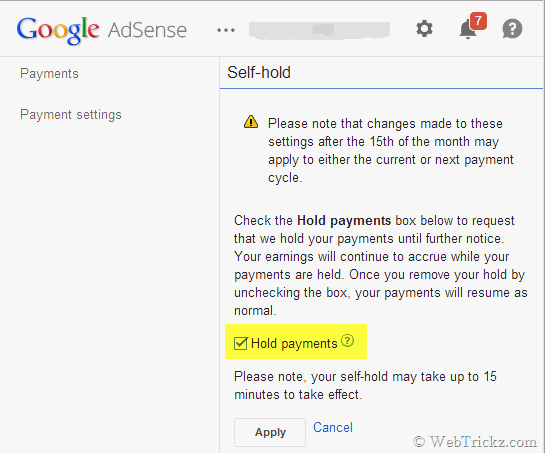
Availability – Over the coming weeks, Google will be upgrading all accounts in India ‘with self-hold enabled’ to their new payments system. To receive this month’s payment via Wire, make sure to make this preference change before Sunday, 16 March, 06:00 (AM) IST.
Adsense Wire Payment Charges in India – As per Google, the cheque payments will be replaced with U.S. Dollar international wire transfers. Therefore, minimal fees (typically Rs. 56/- to Rs. 110/-, approximately $0.90 to $1.78) and favorable exchange rates will be charged on your transactions via WIRE. Google pays most fees involved with sending payments by wire transfer and does not charge a fee for this service. However, USD to INR currency conversion will be performed by your bank in India. This will perhaps give you a lesser exchange rate than that usually offered by Google and a service tax fee will be levied too.
Receiving Adsense Payment via Wire – After your account is upgraded, you need to provide wire transfer instructions for your bank account to receive USD wire transfer payments from abroad. The bank wire information usually includes – your exact name on the bank account, bank name, bank account number, and your bank’s SWIFT code. Also, the name on your bank account should completely match the one on your Adsense account.
Google is working to make wire transfer payments fully available to all publishers in India soon. Those interested can try it now by opting in as stated above. Do share your views!
– Read the official announcement at the Google product forum.
UPDATE (March 9th) – Publishers in India who opted for the Wire Transfer facility by holding their payments should have received an email notifying their account has been upgraded. On visiting your account, you’ll now notice a redesigned payment summary and payment settings page.

The Wire Transfer form of payment offers more flexibility with your payment settings:
– Now change your payment information until the 20th of any month.
– Now choose any minimum payment threshold greater than the default payment threshold.
– Now delay future payments until a specified date (1 year maximum)
To get paid through wire transfer, open your Adsense account, select Payment settings, and click on ‘Add a new form of payment’. Then you’ll need to provide your bank account information to receive payments via Wire Transfer or EFT. Besides your personal bank account details, providing an IFSC code (11 letters and numbers) for your branch and a SWIFT-BIC code (8 or 11 characters) is mandatory. If your bank involves an intermediary bank to receive international wire transfers, then provide the corresponding bank name and Swift code.
Note – Make sure you make the changes to your form of payment before the 21st of the month to affect the current month’s payment cycle.










Do you think this is a good thing? It does remove the hassle of cheques, but might come at an additional fee.
Let’s see, it’s still in testing stage. Though, I wont mind a small fee as I still get charged 100+ bucks on account of outstation check.
Finally 🙂
It’s like a dream come true, for me it usually takes more than 3 weeks for the check to arrive.
Many bank branches in small cities in India are not SWIFT enabled. What about them…?
Yup! For me also it’s a cause of concern. My bank has also no SWIFT-BIC code!
wonderful information – as this is what i was searching for thank you