

WebTrickz
TRENDING
  • Claude vs ChatGPT: Which Is Better in 2026?
No Result
View All Result
  • Reviews
  • Editorials
  • Social Media
    • Facebook
    • Twitter
    • YouTube
    • Messenger
    • Instagram
    • Snapchat
    • WhatsApp
    • TikTok
  • Apps
  • How To’s
  • Apple
  • iPhone
  • Google
  • Android
  • Mac
  • Security
  • About Us
    • About Us
    • Contact Us
    • Privacy Policy
  • Reviews
  • Editorials
  • Social Media
    • Facebook
    • Twitter
    • YouTube
    • Messenger
    • Instagram
    • Snapchat
    • WhatsApp
    • TikTok
  • Apps
  • How To’s
  • Apple
  • iPhone
  • Google
  • Android
  • Mac
  • Security
  • About Us
    • About Us
    • Contact Us
    • Privacy Policy
No Result
View All Result
WebTrickz
No Result
View All Result
Home How To's

How to Recharge Airtel digital TV/DTH online

Mayur Agarwal by Mayur Agarwal
August 3, 2021
in How To's, Telecom

airtel_logo Airtel DTH or Satellite TV is like any prepaid service in which no monthly bills are generated and users need to recharge their Airtel DTH account in order to continue using the DTH service. Below is an easy way to recharge your account online using Net Banking, Credit, or Debit Card.

Note – The customer ID provided by Airtel is required to recharge your DTH account.

To Recharge Airtel DTH account online:

1. Visit the Airtel Pay Bills section.

2. Choose the ‘Net Banking’ or ‘Credit or Debit Card – Processing through Bank Gateways’ option by clicking the ‘click here’ button.

3. Select service as “DTH Services”.

  • Enter your customer ID, recharge amount (from Rs. 100 – 9999) and select the bank. Now follow the onscreen steps to make the payment. (For Net banking)
  • Enter your customer ID, registered mobile number and valid date of birth. A password will be sent via SMS to your registered telephone no. Enter the password on the webpage and recharge amount. (VISA/Master credit card supported). Now follow the onscreen steps to make the payment. (For Credit or Debit Card)

Upon successful recharge, you will get a unique transaction ID for reference.
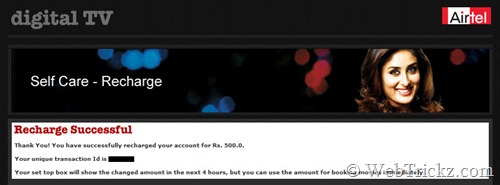
Airtel digital tv_recharge

The amount will be credited to your account immediately and will reflect on your TV within 4 working hours. You’ll also receive an SMS about the recharge and new balance.

To check the DTH balance, SMS BAL to 54325 from your registered mobile number.

Tags: AirtelDTHTelevisionTipsTricks
ShareTweetSend
Previous Post

APN Settings to Run BSNL 3G/MTNL 3G on iPhone & iPad

Next Post

Grooveshark Windows Application – Listen to Free Music online without using any browser

Mayur Agarwal

Mayur Agarwal

Mayur Agarwal, the founder and editor of WebTrickz, is a tech enthusiast with a Bachelor's degree in Computer Applications and over 15 years of experience in tech writing. His passion for technology and gadgets drives him to create insightful how-to articles and troubleshooting guides.

Next Post

Grooveshark Windows Application – Listen to Free Music online without using any browser

Comments 5

  1. Satish Dhiman says:
    16 years ago

    I want to sms or call free all india and roaming two year. I am deaf. Inform u.

    Reply
  2. Radheshyam says:
    16 years ago

    sir,

    Please send me Airtel disital TV recharge by hdfc netbanking link.

    Reply
  3. ezRecharge Support says:
    16 years ago

    ezRecharge.in offers three mode of Recharge methods

    1. Online Web based Recharge
    2. SMS Recharge
    3. Dial a Recharge (Launched First time in india on 10/10/10 10:10:10)

    How to Recharge:
    Visit http://www.ezrecharge.in and create an account with your valid mobile
    number and valid email ID.

    Three clicks to get instant Recharge. Click the link to know how

    SMS Recharge:
    Inorder to use SMS Recharge, you need to topup your ezWallet.
    Click the link to know, how to topup your ezWallet

    Once you have sufficient balance in your ezWallet, send following
    SMS format to 0-99625 39767(Remember as 99625 EZSMS)

    SMS Format: EZ
    Code - Airtel - AT, Vodafone-VF, Uninor-UN, Docomo-TD,Videocon-VI
    eg. EZ VF 9962539767 10

    DIAL A RECHARGE:
    Inorder to use Dial a Recharge, you need to topup your ezWallet.
    Click the link to know, how to topup your ezWallet

    Once you have sufficient balance in your ezWallet,
    dial 93 46 392255(Remember as WE-GO-EZCALL). Interactive voice response will help you to do a instant recharge.

    Reply
  4. sandeep malhan says:
    15 years ago

    SIR
    Please sand me information how to airtel degital tv recharge by hdfc debit & cradit card.

    Reply
  5. ananta phukan says:
    13 years ago

    how to check my monthly rental of my airtel digital tv please reply

    Reply

Leave a Reply Cancel reply

Your email address will not be published. Required fields are marked *

Latest Stories

Google Gemini

How to Cancel Your Gemini Subscription (2026 Guide)

June 21, 2026
difference between chatgpt and claude

Claude vs ChatGPT: Which AI Should You Use in 2026?

June 21, 2026
google chrome logo

Google Chrome Offline Installer: Direct Download Links

June 17, 2026
X logo

How to Remove All Bookmarks on X (Twitter) At Once in 2026

June 15, 2026
X logo

How to Find Bookmarks on X (Twitter) in 2026

June 15, 2026
copilot logo

How to Turn Off Copilot Search in Bing on Edge & Chrome

June 10, 2026
microsoft edge new logo

How to Turn Off Notifications in Microsoft Edge (2026 Guide)

June 8, 2026

Trending Stories

  • 1337x logo

    1337x Proxy List 2026: Working Proxy & Mirror Sites

  • How to Turn Off Microsoft Family Safety on Windows 11 & 10

  • How to See Recently Watched Reels on Facebook (2026 Guide)

  • How to Turn Off Microsoft Edge Game Assist in Windows 11

  • How to Turn Off Fn Lock or Fn Key on Windows 11/10 Laptop

  • About Us
  • Contact Us
  • Privacy Policy
  • Advertise

© 2026 WebTrickz. All Rights Reserved.

No Result
View All Result
  • Reviews
  • Apps
  • How To’s
  • Android
  • Google
  • iPhone
  • Mac
  • About Us
  • Contact Us
  • Privacy Policy

© 2026 WebTrickz. All Rights Reserved.





