


Google has finally rolled out Google+ which is not yet another service like Google Wave and Buzz, but is an amazing and power-packed social networking website that is deemed to rise very high and compete with today’s biggies Facebook and Twitter.

I tried out Google+ after getting an invite and found it really interesting, may it be its simple and cool design or the variety of features it offers. One has to accept that Google has done some really good and hard work in bringing out Google+. After all, it was their longtime wish to have a Google Social Network that can dominate the web.
# Here are some useful Google+ Tips shared by Matt Cutts and users who responded to Matt’s post at Google+. All these tips are handy and let you experience the actual power of Google+ (PLUS). Check them below:
1. Click on Profile pictures to rotate through them.
2. Click ‘j‘ to navigate down to the next item or ‘k‘ to navigate up when checking the stream using a keyboard.
3. To add formatting to your text, use the simple trick below.
- (*)bold(*): Add * before and after the message.
- (_)italics(_): Add _ before and after the message.
- (-)strike-through(-): Add – before and after the message.
For example, *Hello* _everyone_ -Mayur- will appear as shown below:

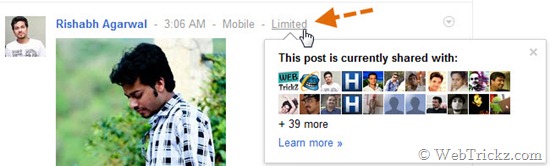
4. Click on “Limited” next to the timestamp to find out the actual list of persons with whom you are sharing a particular post.
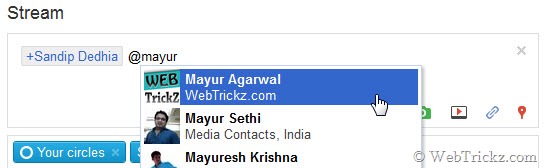
5. Add a + or @ signal to mention someone specifically in a post.
6. Click on the Timestamp to get the permalink (web URL) of any post.

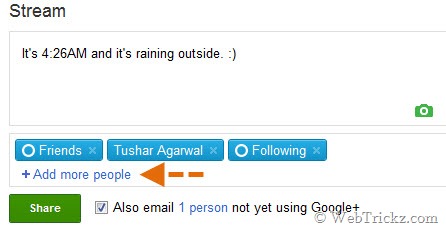
7. Share your post with the Public or Circle/Circles only. You can even share a post with an individual by typing their name or email address. A very useful one!
8. What’s more, you can even edit the photos uploaded by you. It’s easy and flawless.
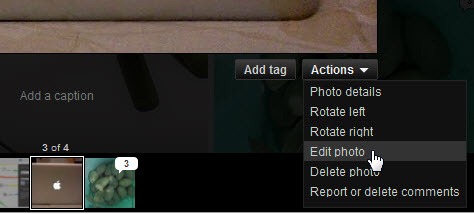
Open any picture uploaded by you or visit the gallery. Select Actions > Edit photo.
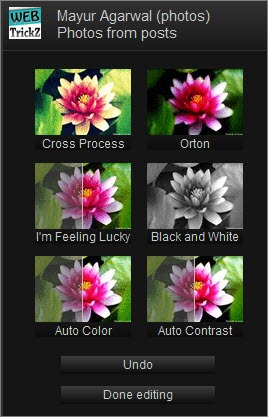
Then improve your not-so-good photos by adding some smart effects to them in a click.
Read: Why the Built-In Photo Editor on Google+ Rocks
9. Unlike Gmail, you can Resize the Chat Box in Google+. To do so, just drag the box by its corner or sides.
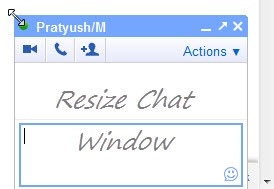
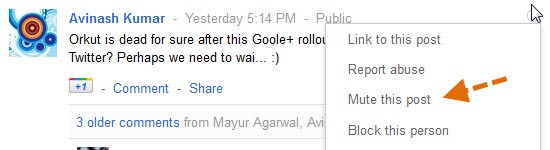
10. If you’re annoyed with some post that is getting lots of comments and thus irritating you with notifications. Just Mute the post. You can even Block any person and can Report Abuse against him.
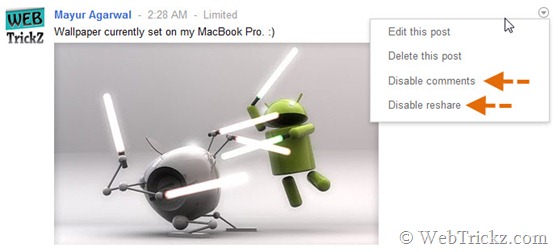
11. Set Options for any post made by you by clicking the grey drop-down ‘Options’ icon. You can choose to Edit it, Delete it, Disable comment or Disable Resharing a post.
12. Tired of receiving notifications for a particular post you made or commented on? Just hit “Mute this post” to get rid of it.
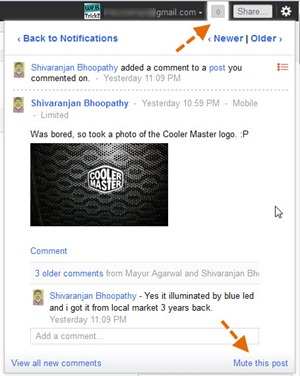
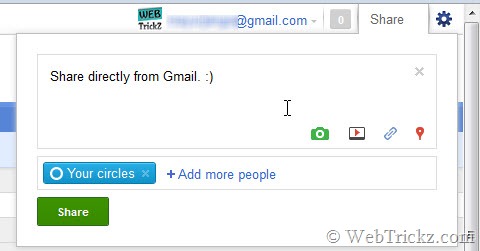
13. Share a post or check notifications on Google+ directly from within your Gmail account without opening a separate webpage for Google+. Now that’s seamless integration. 🙂
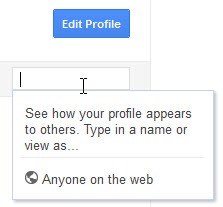
14. See how your profile appears to others – Input his/her username, select Edit profile, make the alterations to your profile only for that specific person. Something unique!
15. While on the Home tab, press twice the q key on the keyboard to search and add people to your chat list. (Press q 2nd time after a gap of sec).
16. Hitting Enter, when focused on a Post, opens up the comment box.
17. Set delivery preferences and tick mark desired entries under “Receive Notifications”. Visit this link to edit the settings: https://plus.google.com/settings/plus
18. What’s that Incoming option under Stream? “Incoming” stream is stuff from people who are sharing with you, but who you haven’t added to a circle.
19. Give feedback – Found any bug or have a tip to suggest? Just click Send feedback from the lower right corner, the cool part is you can highlight the faulty area and report about it.
20. Trick to Invite anyone to Google+ even if you don’t have invites – Make a post, share it with that person using his email address. Then ask him to click Learn more about Google+ in the received email. On opening it, he would be able to Join Google+.
Update – Check more New Tips below:
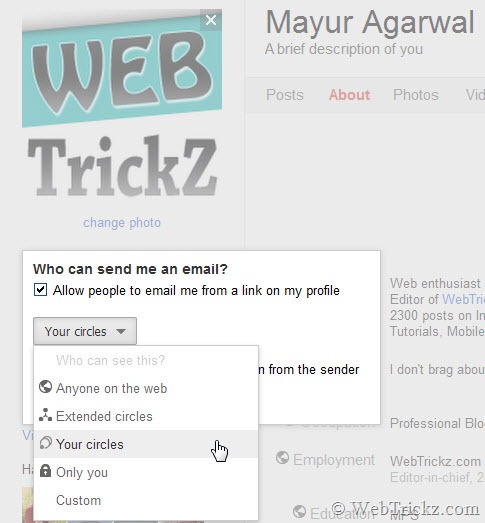
21. New Bonus Tip – How to Enable Email Feature on your Google+ Profile
22. Use the Scroll wheel of your mouse to navigate through the photos in the gallery.
23. Enable Chat for Circles – How to Chat with People in your Google+ Circle
24. Drag and Drop Photos, Videos, and Links directly to the post box from your desktop.
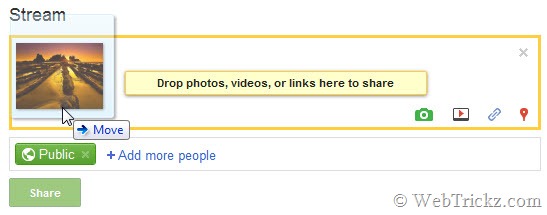
Tip credit: Gerard Sanz
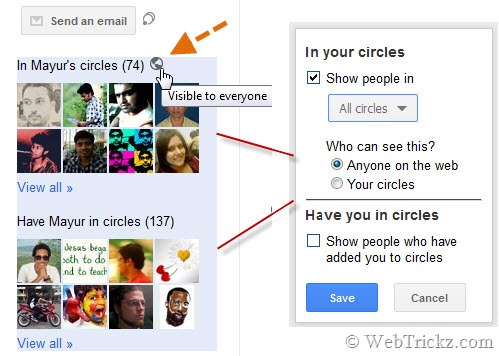
25. Manage how People from your Circles appear to everyone on your Profile – Open your Google+ profile and edit it. Then click the round black-grey icon and select the desired options. You can also choose to hide the “Have you in Circles” box.
Tip credit: Dave Bort
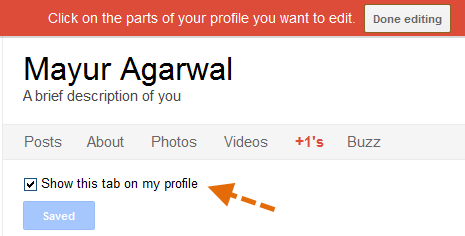
26. Make +1 Tab Public – The +1 tab on your Google+ profile is disabled by default to be seen by anyone else, i.e. only you can see that tab. To make it public, visit your profile > Edit profile. Click on +1’s tab and tick mark the option ‘Show this tab on my profile’. Now everyone would be able to see the +1s by you. (It only lists the +1s that you’ve done on any webpage outside of Google+).
Tip credit: Alex Williams
27. Alternate links to access Google Plus – Besides http://plus.google.com, Google+ can be accessed from http://google.com/+ or http://google.com/plus and from http://m.google.com/plus on mobile phones.
Tip credit: Kanda
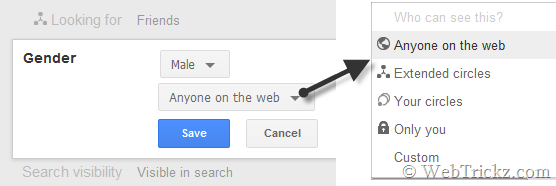
28. Set the privacy setting for Gender on your Google+ Profile – Google+ now allows you to control who sees your gender on your Google+ Profile. Just open your profile, select Edit profile, tap on the Gender option and choose whom you want to make it visible for.
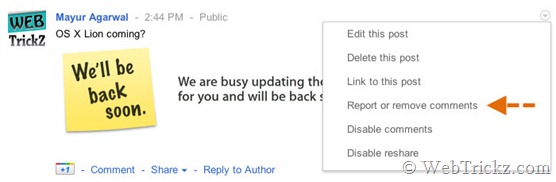
29. Report Abuse or Remove Comments – Seems this option wasn’t present originally and has been added recently. It is very useful, might come in handy when someone spams on your post or make derogatory comments. You can report abuse or remove any desired comment. This option appears only when there is a comment on any post made by you.
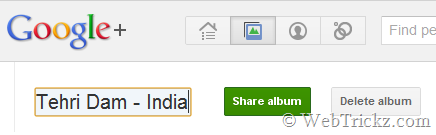
30. Rename albums in Google+ – Google Plus has recently added the functionality to rename photo albums right in Google+. To do so, navigate to Photos > Your albums > click an album and click on the album title. Voila! Edit the album title.
Tip credit: Vincent Mo
Also See: Best Google+ Extensions for Chrome
Also See: Google+ Web App – Adds Google+ to Chrome’s New Tab
Thanks to Matt Cutts and various responders for sharing most of these cool tips.
>> If you’re on Google+ then you can add me to your Circle. [My Google+ Profile]
>> Do post your comments below and share this post with your Google+ friends. 🙂








Please can you invite me for google +. MY email address is [email protected]
Nice Post. But #14 says “See how your profile appears to others – Something unique!”.. It is nothing new and unique, since it is already available in Facebook from years.
@Omkar Oh, I wasn’t aware about it. 🙂
plz invite meeee
[email protected]
@Rinsoy Invite sent, just click ‘Learn more about Google+’ in the email.
Awesome tips .. i am trying most of them now … I did not get to the image rotation one though …
@Nitin If a person has set multiple photos for his profile then you can flip them by clicking the profile pic. Just check this Google+ profile for example: https://plus.google.com/107753428759636856492
very nice and Informative post, learned a lot about Google+ : )
Plz, send me an invitation to this Gmail ID – [email protected]
very interesting
please send me an invite to test google + >> [email protected]
Hey Mayur,
First of all thanks for the invite, coming to G+ its freakingly awesome and i am dying to try it out… will be here with a longer comment soon, for now i am of to try G+
Regards
Ravi
please send me an invite too…thx…
[email protected]
Please can you invite me for google +. MY email address is peratik [at] gmail (dot) com
Thanks. many of them are really useful. By the way, there is no invitation left in My Google + account.. I want to invite my friends.
Please invite me, gmail embedded
@Panya Nice way to hide email from Spam bots. 🙂 Invite sent.
@Mayur @Omkar #14 Facebook had the view profile as another person forever but it was under privacy settings / view settings on the basic profile / preview profile and then the box to enter the name was there. As usual Facebook burying all the nice features that they claim to have. Google+ right in your profile no clicks. Very nice!!!!
Have invites been suspended? I haven’t heard anything from Google. My email is lafleur.michael at gmail.com . Thanks.
Good to have everything in one place.. Have added you to Circle.
Thanx. Tricks isn’t this a sign of bad usability?
@Omkar…. facebook did have the “view profile as” feature, but Google+ allows you to customise your profile per person, which is something that facebook never really mastered. You could lock things from lists, but it was a very tedious process. Google+ has made it much more streamlined.
Thanks for the collection. Managed to join Google+ a couple of days ago (big thanks to Paulina (@sitegefuehl). However all those ‘invite tricks’ seem dysfunctional: Although an email is sent to the specified address, once people click on the ‘learn more’ button, they get redirected to a 404 page 🙁 Very disappointing.
Feel free to add me to you circles: http://bit.ly/kMOfXI
See my thoughts of Google+ at [in German]
I like to have an invite to. Jurjendevries79 at gmail.com
Thanks a lot, also for this 25 tips
@Omkar
“Nice Post. But #14 says “See how your profile appears to others – Something unique!”.. It is nothing new and unique, since it is already available in Facebook from years.”
No. It hasn’t. This allows you to see specifically from one other user (Your mother, your boss, your ex) – because you can have a number of different groups of people who can or can not see – facebook is old hat in this area.
Nice post. Thanks for sharing.
Thanks for the great tips Mayur.. I would like to get an invite and connect with you also on google+ my e-mail is jfscarpelini [at] gmail [dot] com thanks!!!
Thank You! Great Tip’s 🙂
great tips ..m excited to feel these…send me the invite
Pls send me an invitation for the following id –
Invite me to Google +
Plz. Invite me for google plus..
thanx in advance:-)
Hai Mayur! Awesome post covering google+ like an expert.
If possible send me a google+ invite to this email id:
if someone still have an invite I’d be glad 😉 perpipon at] g mail (dot) com
please invite
Guyz, Don’t post your email, this increases the chance of being spammed !
Hej Mayur,
could you be so kind inviting me for google+project?
Thanks and regards
im on GooGLe+ & now i want to know how can i create a GOOGLE+ name like
facebook.com/name
@Vishnu Custom username or vanity URL option is not available currently. Google will introduce them soon!
Guys, you can request for invites but plz don’t post your email in comment. We get it automatically when you input the same in E-mail box. 🙂
Today I think your blog is having the most traffic. It is taking me nearly 10 minutes to post a comment. Every time getting some server error.
I think it is the time to shift hosting package.
@Mayur, There are many tricks doing round for registering @google+ with out any invite, why don’t you post one for your readers 🙂 BTW! nice article!
Requesting invite please
Cool, I’m searching for an invite 🙂
I’ll take an invite if you have any left to give.
thanks,
please invite me ..
Hi,
i’m also interested by an invitation ( mail is correct this time)
Thanks
Please send me an invite; I’m a really nice person 🙂
@Colin Invited. You will no more receive any email about it, just visit https://plus.google.com and see if you’re able to join in.
Pls invite me…tks.
Please send me an invite!)
My e-mail: [email protected]
pls invite me.
Looking forward to the Invite.
Thanks and Peace.
Heya! Nice article dude. I tried to join but no luck. Anybody please send me an invite. Don’t wanna be left alone here! nikkie{dot}dj and u knw am {at}gmail{dot}com 🙂 thnx in advance!
enthusiast post even i don’t know how may features in Google plus but reading these articles i have found so many interesting features in Google plus and i start loving it. 🙂
Great tips!
I really can’t wait to use Google+!!! Could you please invite me in?:P
This is great @Mayur. Nice tips 🙂
Hey AWESOME post! can you invite me pls! thanks
Hey guys!
Can someone invite me too? Please?? I’m a hardcore Google fanboy, I’m dying to try Google+!
Thanks!
invite me please
Wow its so cool, can you please invite me! thanks!
Thanks a lot Mayur! 🙂
Are 10 and 12 not the same?
Hey…yash here..
Exited abt g+…
Plz send me an invite..
i m very very very excited to test google+… plzzzzzzzzz invite me……
Hi Mayur…its too gud n informative..thanks…plz send an invite on [email protected].
This website has provided me with lots of interesting stuff…. I so dsprtly wanna try g+, please send me an invite….. please, thnx in advnce
Hi Mayur! Would you please send me an invitation! I so wanna use google+ , thanks…
Please send me an invitation!my email id is [email protected]
Interesting, _ for italics? _ has traditionally meant underlining and italics has been marked by enclosing in pairs of /
Nice tips Mayur. Its really cool. Thanks for share.
pls send me an invite email [email protected] i soooo wanted to try it out.plssssss
There’s another trick for you: in the circles editor, use the scroll wheel above a circle to see all contacts there.
Nice posts! It was totally awesome when I tried it in Google+.
Make short url for G+
@Keir Hardie They might look same but they aren’t because one CANT mute his/her own post with the option in tip #10. However, that can be done using the mute option in notifications as shown in tip #12. Could be same if you target someone else post. 🙂
Hi,
Can you send me an invitation on [email protected]
looks great, id love to try it out.
would appreciate an invite.
Thanx
@Omkar Chandrachud, : I just invited you, check your mail for invitation and have fun.
How do I redirect an RSS Feed (From my blog for example) to my Google+ Status? Thanks ! 🙂
@zeefred Google+ is not meant for this purpose, I hope this facility never comes to G+. There might be alternative ways though.
Great post and a useful crash course in G+ tricks. Thanks, Mayur!
hi,
Nice post, how can get accessed on google+ after creating google profile.pls send an invitation
Hi Mayur…!!
Thanx for Sharing these tips..
Plz invite me, email id : [email protected]
thnx u so much…!!
Hello
Would u mind if I translate your excellent article into French ? It will of course mention your article. Let me know through my email please if u don’t mind.
Thx! 🙂
Very useful tipps, I had to take my time to work through it, but it really enhances my google plus experience. Thanks a lot
[email protected]
Andre Josue Garra
omkar chandrachud
Vicky Rajput
All been invited 🙂
Please! Invite!
Hi mol could you invite me to?
Tanks a lot for tour help 🙂
Regards
Marty
@Egor and @Marty Invited 🙂
Tanks a lot !!!!
(*) 3rd feature is no more working. (*)
Sorry, my mistake. 🙂
We just launched a Google+ Directory and Short URL creator. We will soon be opening the full directory. Check it out: http://DirPl.us
My partner and I absolutely love your blog and find almost all of your post’s to be exactly I’m looking for. Does one offer guest writers to write content for you? I wouldn’t mind composing a post or elaborating on many of the subjects you write related to here. Again, awesome web log!
What great tips for new users! I especially love the “mute this post” option.
Great post – and some good tips. One I’d like to add is how you can pimp up your pop over people see when scrolling over your name. Just go to edit profile, then to employment, in first input box ONLY, you can put a large amount of text. If you are on G+ just scroll over my name – and let’s connect too https://plus.google.com/103788918112635947241 I have invites left. Just contact me via twitter and DM with your email address @lorirtaylor
Really nice Tricks ,using it 🙂
Thanx for Sharing, TOP Tipps =)
The permalink thing is same kind of as Twitter and Facebook having. Thanks for a list of Google Plus Tricks, will surely try one by one.
great post man. really liked the tips. Google+ is so rich in features that it takes to know all of it and your post was really helpful in finding them
Thanks.Google.03332467669-03422208412
Hi there just wanted to give you a quick heads up. The words in your content seem to be running off the screen in Safari. I’m not sure if this is a formatting issue or something to do with internet browser compatibility but I thought I’d post to let you know. The layout look great though! Hope you get the issue resolved soon. Cheers
quite useful things, thx!
Nice tips!
Hi webtrickz team,
Your tips for google plus is very useful for the newbie like me.I will try out some of the tips in my google plus page.
Google Plus tips are great. Though by time many tips might have changed. Kindly update this post or write a new one. Looking forward to it 🙂
Hey Mayur,
Really helpful post for everyone… Thanks for these great tips to enhance google plus experience.
Keep up the awesome work!
-Rajinder
Thanks for a list of Google Plus Tricks, will surely try one by one.