WebTrickz
TRENDING
  • Complete list of 1337x Proxy and Mirror Sites
No Result
View All Result
  • Reviews
  • Editorials
  • Social Media
    • Facebook
    • Twitter
    • YouTube
    • Messenger
    • Instagram
    • Snapchat
    • WhatsApp
    • TikTok
  • Apps
  • How To’s
  • Apple
  • iPhone
  • Google
  • Android
  • Mac
  • Security
  • About Us
    • About Us
    • Contact Us
    • Privacy Policy
  • Reviews
  • Editorials
  • Social Media
    • Facebook
    • Twitter
    • YouTube
    • Messenger
    • Instagram
    • Snapchat
    • WhatsApp
    • TikTok
  • Apps
  • How To’s
  • Apple
  • iPhone
  • Google
  • Android
  • Mac
  • Security
  • About Us
    • About Us
    • Contact Us
    • Privacy Policy
No Result
View All Result
WebTrickz
No Result
View All Result
Home Facebook

Here’s how to Remove Reactions from a Facebook Story

Undo emoji reaction on Facebook stories sent by mistake

Mayur by Mayur
June 18, 2024
in Facebook, How To's

In addition to the News Feed and Messenger, Reactions are available on Facebook Stories. Reactions on Facebook provide a quick way to express your feelings for a certain post, message, or story. By reacting with a relevant emoji on a story, one can share their emotions without replying with a message.

That said, there are times when you accidentally react to a Facebook story. This happens often as reactions on stories appear at the bottom of the screen and a quick tap initiates them. Thankfully, it is possible to remove a reaction on Messenger.

For those unaware, you can delete reactions on Facebook stories as well. The option comes in handy when you react with an inappropriate emoji or simply didn’t intend to react to a story. Moreover, unlike Messenger, you first need to remove any existing reactions on a story if you want to replace them with a different emoji. Here’s how you can do it.

How to Delete Reaction on Facebook Story

  1. Open the Facebook app.
  2. Navigate to the particular story where you want to remove the reaction.
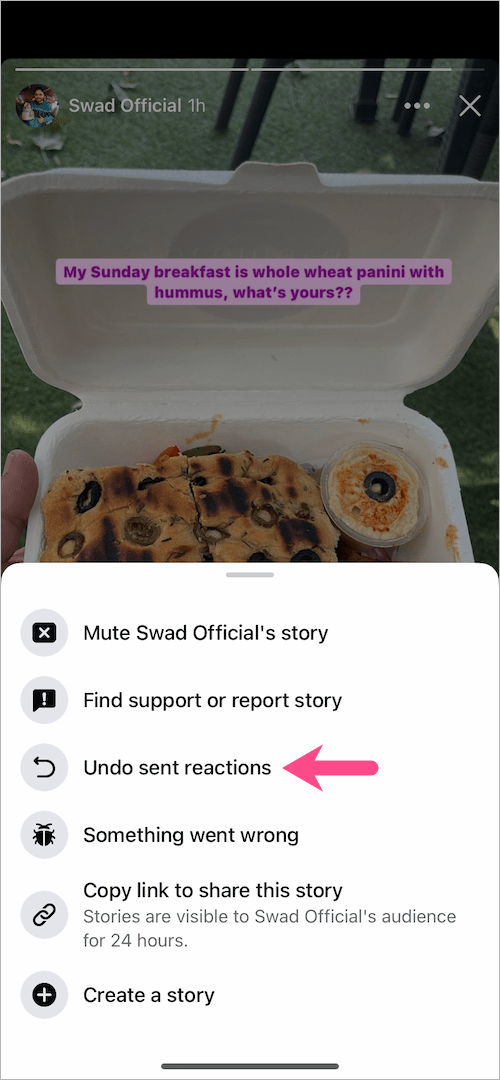
  3. Tap the ellipsis icon (3-dot) at the top-right corner. reactions on a facebook story
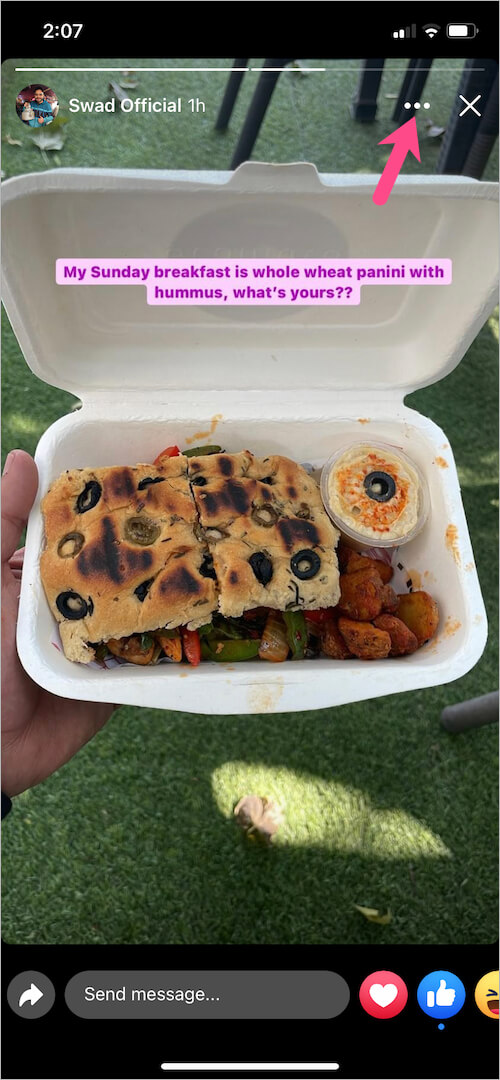
  4. Select ‘Undo sent reactions’. how to delete reaction from facebook story
  5. All the reactions on a certain story will appear. Tip: You can react multiple times with multiple emojis on a single story.
  6. To delete or undo a reaction(s), tap “Undo“. remove reaction from facebook story
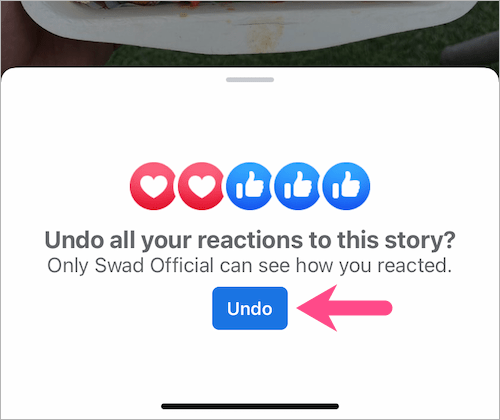
That’s it. The reaction will be instantly removed for you as well as for the person who posted the story. Just make sure to undo your choice before the receiver views your reaction.

removing reactions on facebook story

RELATED: How to turn off comments on a Facebook Story

Remove reaction on a Messenger Story

Though one can react to stories using both Facebook and Messenger apps. However, Messenger lacks the ability to remove a reaction, and hence you need to use the Facebook app to perform this action.

ALSO READ:

  • How to remove a reaction on WhatsApp
  • How to unmute a story on the Facebook app
Tags: EmojiFacebookFacebook StoriesMessenger
Share1TweetSend
Previous Post

How to Save Memoji Stickers as PNG Image to Camera Roll on iPhone

Next Post

How to Set Memoji as Apple ID and Contact Photo in iOS 13

Mayur

Mayur

Mayur Agarwal, the founder and editor of WebTrickz, is a tech enthusiast with a Bachelor's degree in Computer Applications and over 15 years of experience in tech writing. His passion for technology and gadgets drives him to create insightful how-to articles and troubleshooting guides.

Next Post

How to Set Memoji as Apple ID and Contact Photo in iOS 13

Comments 6

  1. Alistair says:
    6 years ago

    After the latest updates, where the \”suggested replies\” features was added on the Facebook stories, I noticed that we can no longer delete reaction or review our reaction on others story. I don\’t know if it a bug or not and if not, why do they do that. That\’s my first thought.

    Reply
    • Mayur Agarwal says:
      6 years ago

      Yes, it seems FB has completely removed this feature. Kinda stupid move.

      Reply
  2. Linda says:
    5 years ago

    How can I delete emojis of my fb posts? So far all I found was you can not. You can delete someone’s comment but not the angry or laughing emoji they so rudely put under your post. Not on fb messenger and not my own emoji. Someone who post on my wall on my post with a rude emoji?

    Reply
  3. Roshan says:
    4 years ago

    its working. Thanks

    Reply
  4. Nick says:
    4 years ago

    How do I do this on pc? Can this only be done on a phone?

    Reply
  5. Michael Batten says:
    4 years ago

    Tried this, but there’s no undo button

    Reply

Leave a Reply Cancel reply

Your email address will not be published. Required fields are marked *

Latest Stories

chatgpt logo

How to Clear or Delete ChatGPT Memory on PC and Mobile

June 5, 2026
1337x logo

1337x Proxy List 2026: Working Proxy & Mirror Sites

June 2, 2026

How to Find Saved Reels on Facebook App & Desktop (2026)

April 1, 2026
microsoft edge browser

How to Restore or Reopen Closed Tabs in Microsoft Edge

March 26, 2026
Facebook app on iPhone

How to See Recently Watched Reels on Facebook (2026 Guide)

April 3, 2026
microsoft edge new logo

Download Microsoft Edge Offline Installer [Latest Version]

March 16, 2026

How to Turn Off Bing SafeSearch in Microsoft Edge

March 12, 2026

Trending Stories

  • microsoft family safety settings

    How to Turn Off Microsoft Family Safety on Windows 11 & 10

  • How to Turn Off Microsoft Edge Game Assist in Windows 11

  • How to Turn Off Fn Lock or Fn Key on Windows 11/10 Laptop

  • How to See Recently Watched Reels on Facebook (2026 Guide)

  • 4 Ways to Remove the Floating Home Button on iPhone

  • About Us
  • Contact Us
  • Privacy Policy
  • Advertise

© 2026 WebTrickz. All Rights Reserved.

No Result
View All Result
  • Reviews
  • Apps
  • How To’s
  • Android
  • Google
  • iPhone
  • Mac
  • About Us
  • Contact Us
  • Privacy Policy

© 2026 WebTrickz. All Rights Reserved.