WebTrickz
TRENDING
  • Complete list of 1337x Proxy and Mirror Sites
No Result
View All Result
  • Reviews
  • Editorials
  • Social Media
    • Facebook
    • Twitter
    • YouTube
    • Messenger
    • Instagram
    • Snapchat
    • WhatsApp
    • TikTok
  • Apps
  • How To’s
  • Apple
  • iPhone
  • Google
  • Android
  • Mac
  • Security
  • About Us
    • About Us
    • Contact Us
    • Privacy Policy
  • Reviews
  • Editorials
  • Social Media
    • Facebook
    • Twitter
    • YouTube
    • Messenger
    • Instagram
    • Snapchat
    • WhatsApp
    • TikTok
  • Apps
  • How To’s
  • Apple
  • iPhone
  • Google
  • Android
  • Mac
  • Security
  • About Us
    • About Us
    • Contact Us
    • Privacy Policy
No Result
View All Result
WebTrickz
No Result
View All Result
Home Facebook

How to See Most Recent Posts on the Facebook App [2024]

Change Facebook News Feed to Most Recent instead of Top Stories.

Taigun by Taigun
September 3, 2024
in Facebook, How To's

Most social networks including Facebook tend to show Top Stories by default instead of Most Recent stuff. Moreover, there isn’t a way to always see the most recent posts on Facebook since the News Feed eventually returns to its default setting. This can be pretty annoying if you prefer to see the latest updates rather than a most popular post made several hours ago.

Though one can always sort Facebook by most recent, doing so is now a little cumbersome. That’s because the Feed Filter Bar (introduced a few months back) to easily switch between Home, Favorites, and Recent has been silently pulled off from the Home tab. This new menu used to appear at the top of News Feed but not anymore. Hence, a lot of Facebook users are asking to bring back the Most Recent button.

Feed filter bar on Facebook app
Feed Filter Bar on the Facebook app

Can I get Facebook News Feed in chronological order?

Thankfully, it is still possible to view your Facebook posts in chronological order. It’s just that the company has moved this certain functionality deep down in the Facebook app. Apparently, Facebook wants its users to see algorithmically ranked stuff first on their News Feed instead of the newest posts, sorted chronologically.

Now let’s see how to switch to Most Recent so that you see posts from friends, groups, and Pages in the order they were posted.

How to sort Facebook posts by Most Recent

Follow the steps below to see the Most Recent posts on Facebook for iPhone and Android.

  1. Make sure you are running the latest version of the Facebook app.
  2. Open Facebook and tap the “Menu” tab at the bottom right corner (on iPhone) or top right (on Android) of the screen. menu tab in Facebook app on iPhone

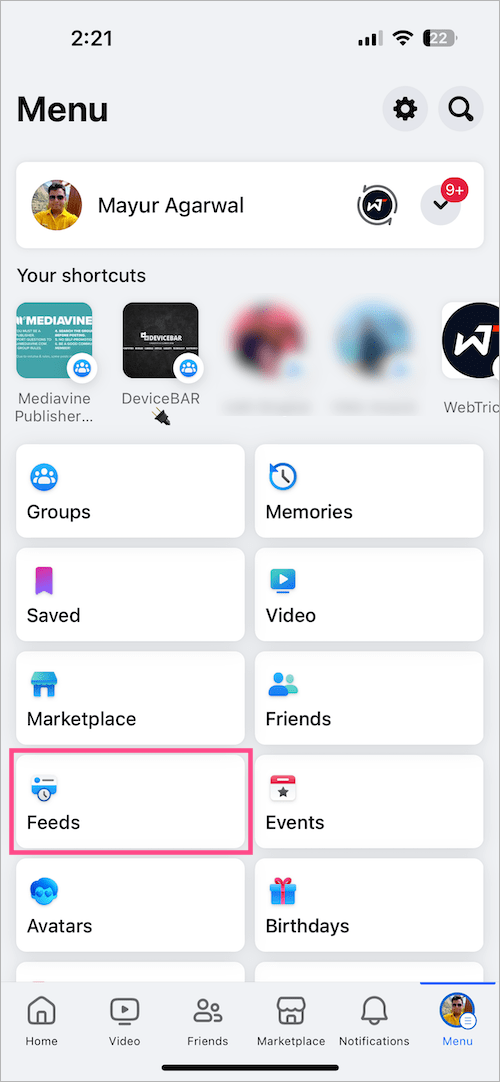
  3. Scroll down on the Menu screen and tap the “Feeds” tab. (Tap ‘See More’ if you can’t find the Feeds tab). view Facebook News Feed in chronological order
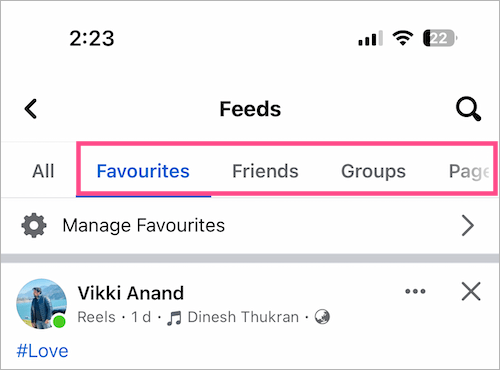
  4. On the Feeds page, the ‘All‘ tab will display all of the most recent posts first. how to see most recent posts on the Facebook app

You can further go to the Favorites, Friends, Groups, or Pages to filter and see the newest posts from those feeds.
How to sort Facebook posts by most recent

Note that Facebook will eventually switch back to Top Stories or most relevant posts first. Unfortunately, there is no way to make this change permanent.

ALSO READ: How to see Saved Items on Facebook Marketplace

How to see Most Recent posts on a Facebook group

Do you want to view posts in the most recent order while navigating through a particular group on the Facebook app?

To sort Facebook group posts by Most Recent:

  1. Go to a certain group using the search option or directly from your News Feed.
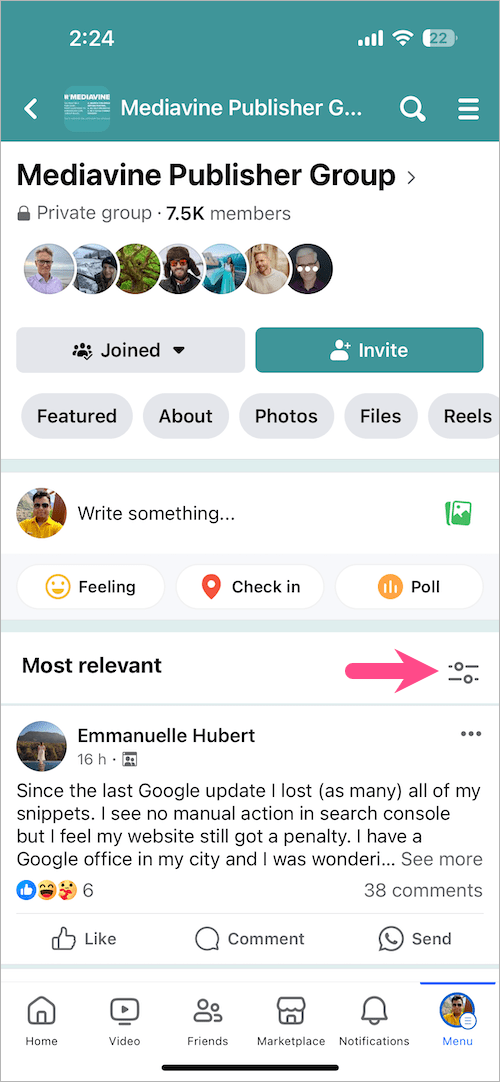
  2. On the Facebook Group, scroll down a bit and look for the “New posts or Most relevant” section.
  3. Tap the “Sort” button seen alongside. sort Facebook group posts by most recent
  4. Select the “New posts” option from the popup at the bottom. By default, the ‘Most relevant’ option is selected that shows the most relevant posts first in a group. How to see most recent posts on a Facebook group
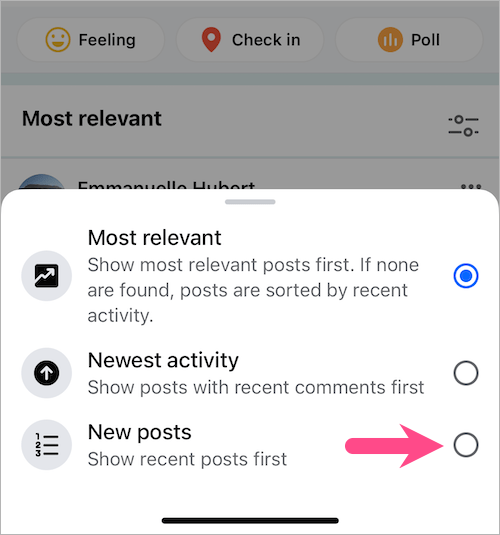
  5. Now you can view Facebook group posts in chronological order.

ALSO READ:

  • How to see Facebook Story Archive on iPhone and Android
  • How to see your trash posts on Facebook
Tags: FacebookSocial MediaTips
ShareTweetSend
Previous Post

How to Find Reels Drafts on Instagram for iPhone & Android

Next Post

Here’s how to See Views on Instagram Reels Video

Taigun

Taigun

Mayur Agarwal, the founder and editor of WebTrickz, is a tech enthusiast with a Bachelor's degree in Computer Applications and over 15 years of experience in tech writing. His passion for technology and gadgets drives him to create insightful how-to articles and troubleshooting guides.

Next Post
instagram reels

Here's how to See Views on Instagram Reels Video

Comments 1

  1. Jason Moffatt says:
    5 years ago

    Short little video explaining this if anyone is interested… https://youtu.be/ffSqE_XPjUE

    Reply

Leave a Reply Cancel reply

Your email address will not be published. Required fields are marked *

Latest Stories

1337x logo

1337x Proxy List 2026: Working Proxy & Mirror Sites

June 2, 2026

How to Find Saved Reels on Facebook App & Desktop (2026)

April 1, 2026
microsoft edge browser

How to Restore or Reopen Closed Tabs in Microsoft Edge

March 26, 2026
Facebook app on iPhone

How to See Recently Watched Reels on Facebook (2026 Guide)

April 3, 2026
microsoft edge new logo

Download Microsoft Edge Offline Installer [Latest Version]

March 16, 2026

How to Turn Off Bing SafeSearch in Microsoft Edge

March 12, 2026
google chrome logo

Download Google Chrome Offline Installer [Latest Version]

June 3, 2026

Trending Stories

  • microsoft family safety settings

    How to Turn Off Microsoft Family Safety on Windows 11 & 10

  • How to Turn Off Fn Lock or Fn Key on Windows 11/10 Laptop

  • How to Turn Off Microsoft Edge Game Assist in Windows 11

  • How to See Recently Watched Reels on Facebook (2026 Guide)

  • How to Restore or Reopen Closed Tabs in Microsoft Edge

  • About Us
  • Contact Us
  • Privacy Policy
  • Advertise

© 2026 WebTrickz. All Rights Reserved.

No Result
View All Result
  • Reviews
  • Apps
  • How To’s
  • Android
  • Google
  • iPhone
  • Mac
  • About Us
  • Contact Us
  • Privacy Policy

© 2026 WebTrickz. All Rights Reserved.