

WebTrickz
TRENDING
  • Complete list of 1337x Proxy and Mirror Sites
No Result
View All Result
  • Reviews
  • Editorials
  • Social Media
    • Facebook
    • Twitter
    • YouTube
    • Messenger
    • Instagram
    • Snapchat
    • WhatsApp
    • TikTok
  • Apps
  • How To’s
  • Apple
  • iPhone
  • Google
  • Android
  • Mac
  • Security
  • About Us
    • About Us
    • Contact Us
    • Privacy Policy
  • Reviews
  • Editorials
  • Social Media
    • Facebook
    • Twitter
    • YouTube
    • Messenger
    • Instagram
    • Snapchat
    • WhatsApp
    • TikTok
  • Apps
  • How To’s
  • Apple
  • iPhone
  • Google
  • Android
  • Mac
  • Security
  • About Us
    • About Us
    • Contact Us
    • Privacy Policy
No Result
View All Result
WebTrickz
No Result
View All Result
Home Instagram

Here’s how to Hide Likes on Instagram Reels

See how to turn off the number of likes on individual reels on Instagram.

Mayur by Mayur
September 3, 2024
in How To's, Instagram

Instagram allows you to turn off likes on your own posts and other people’s posts. To maintain uniformity, Instagram for iPhone and Android now allows users to hide the number of likes on reels.

While most creators wouldn’t want to hide likes and views on their reels, some prefer more control and choose what works best for them. For instance, some users prefer to show views rather than likes.

Can I hide the number of likes on Reels?

Don’t want to show how many likes your reel has got?

Similar to posts, Instagram lets you hide the like count on your reels when you share them and after posting. The procedure to hide and unhide likes on reels is similar to how you hide likes on an Instagram post.

When you hide likes, the number of likes on a particular reel will be only visible to you. You can turn off reel likes using the Instagram app as well as their website on a computer.

Now let’s see how you can hide your likes on Instagram reels.

How to hide like count on Instagram Reels

Follow the steps below to turn off likes before sharing a reel:

  1. Make sure you’re running the latest version of the Instagram app.
  2. Create a new reel or select an existing reel from Reels Drafts.
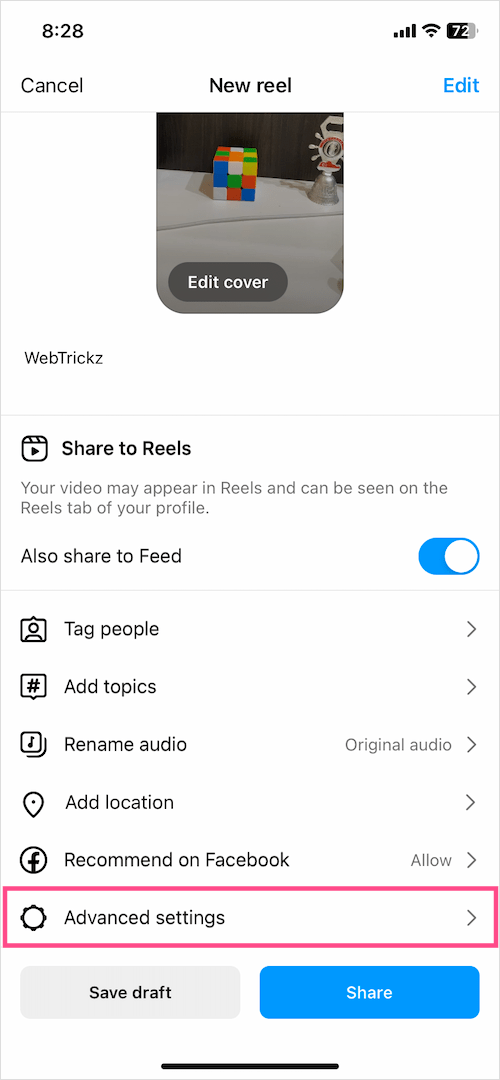
  3. Tap the “Advanced settings” option at the bottom of the Share screen. advanced settings for instagram reel
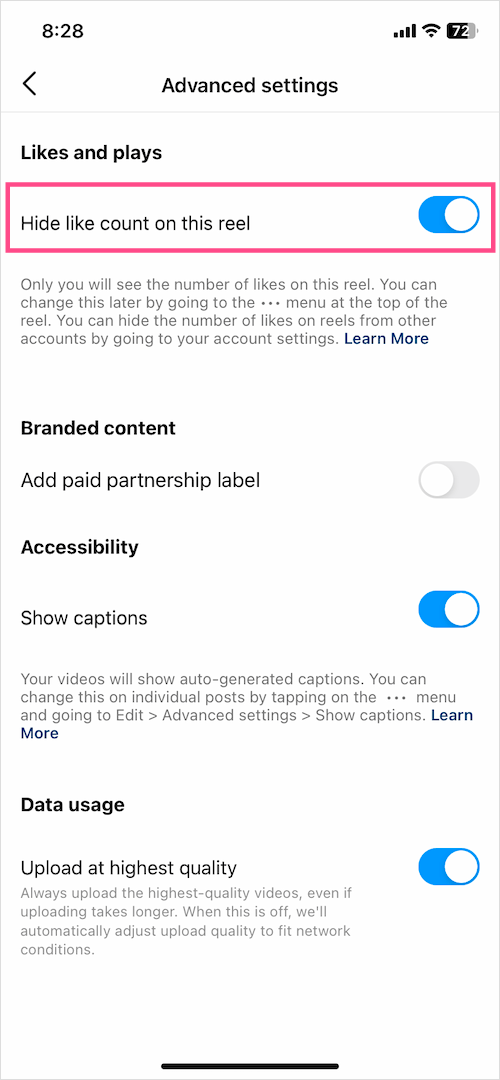
  4. Turn on the toggle for “Hide like count on this reel“. How to hide number of likes on instagram reels
  5. Go back and share the reel or save it as a draft.

The total likes will now be hidden for others in the Instagram app.
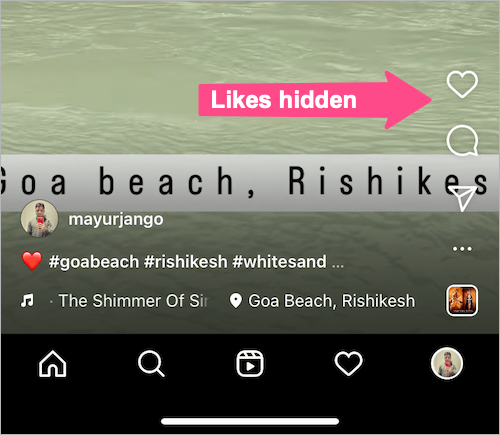
turn off likes on your own reels
Number of likes hidden in Instagram Reel

How to hide likes on Instagram Reels after posting

If you forgot to hide the like count while posting or changed your mind later, you can still hide likes on published reels. To do so:

  1. Go to your profile and open the Reels tab. reels tab in instagram app
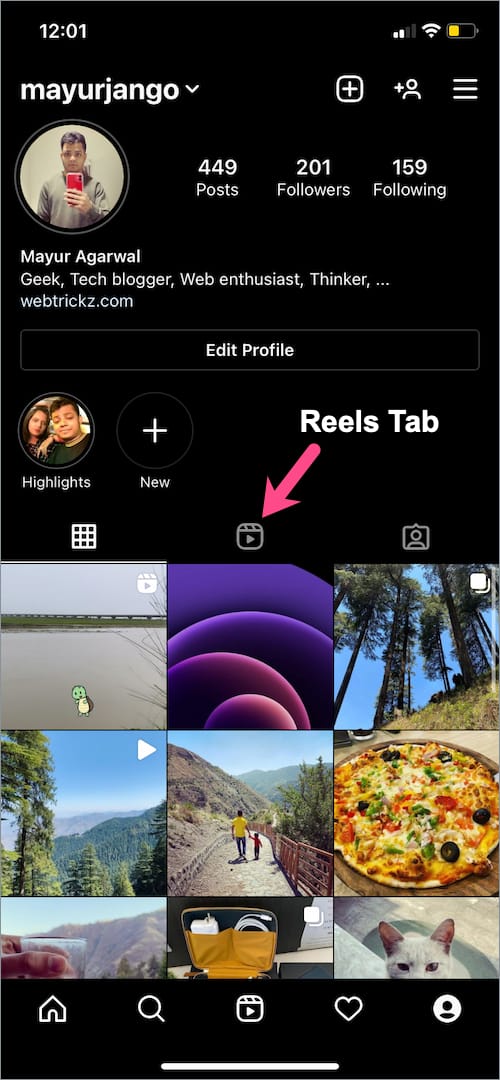
  2. Open the reel whose likes you want to hide.
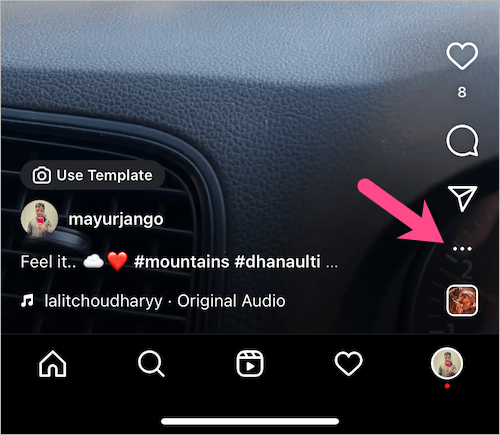
  3. Tap the ellipsis icon (3 dots) at the bottom right. reels options
  4. Go to ‘Manage‘ and tap the “Hide likes” option. How to hide likes on Instagram Reels after posting
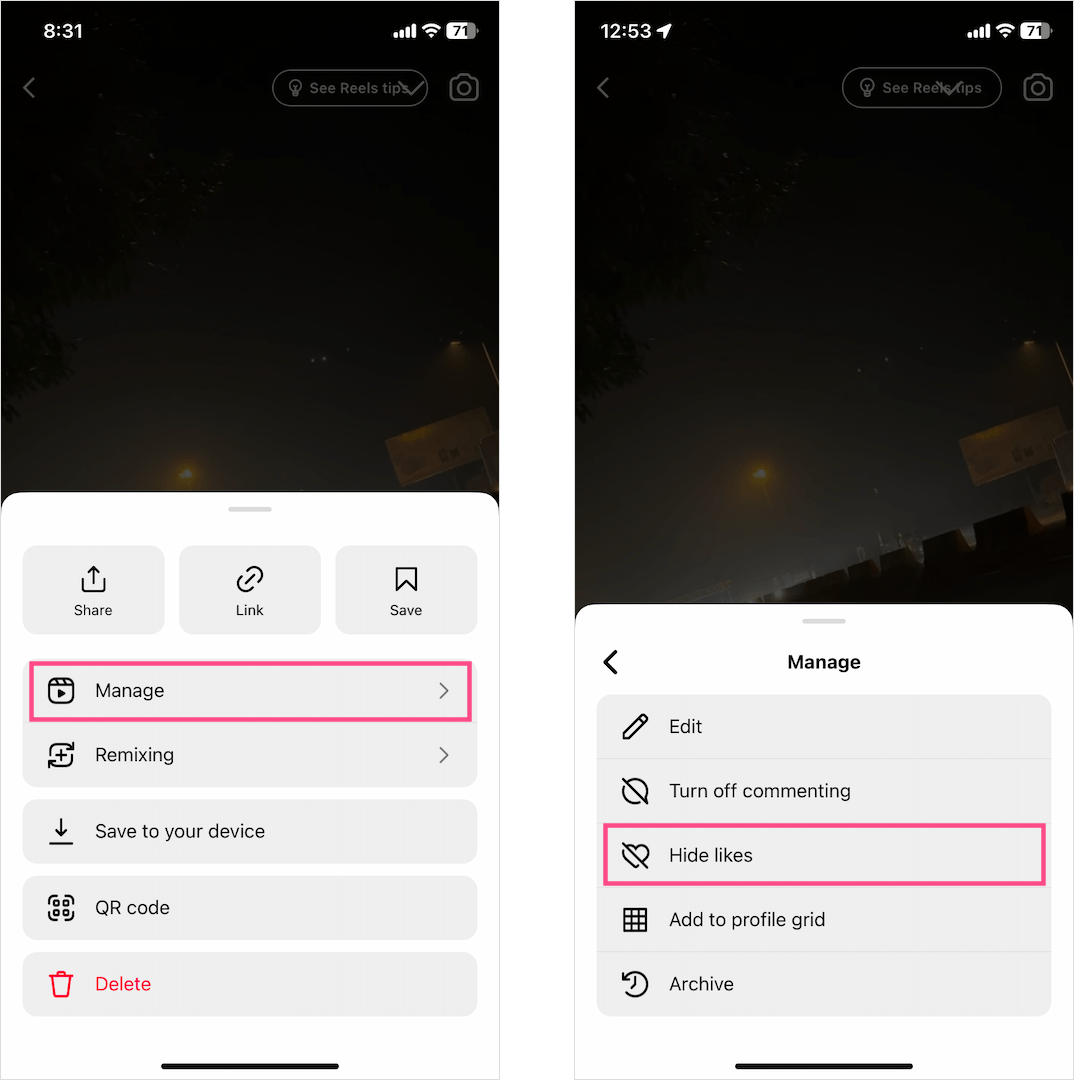
The like count will be hidden for others, but you can still see it.

To confirm the same, tap the numeric text below the Like button (heart icon). An ‘Only you can see the total number of likes on this reel’ text will appear, implying the reel likes are hidden.
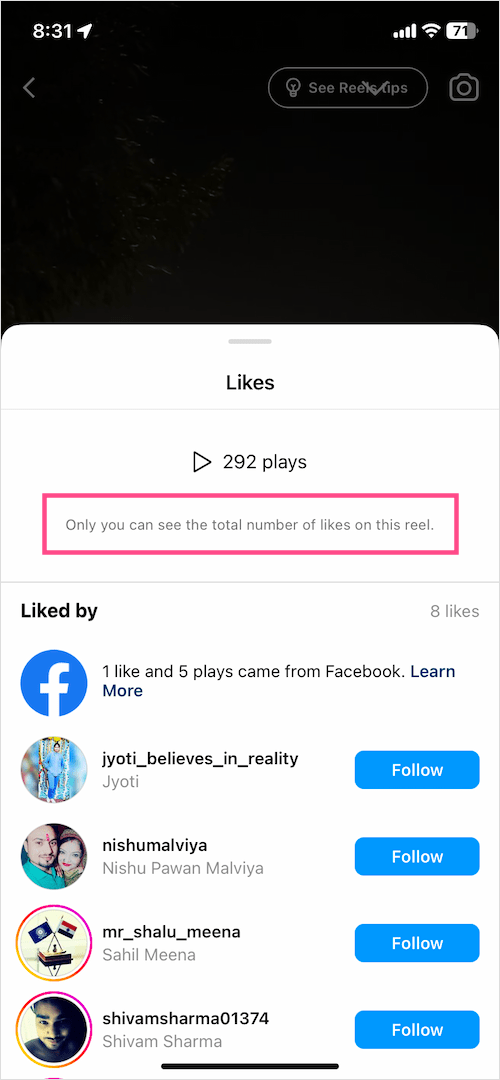
like count hidden on an instagram reel

Similarly, you can unhide like count to show like count again.
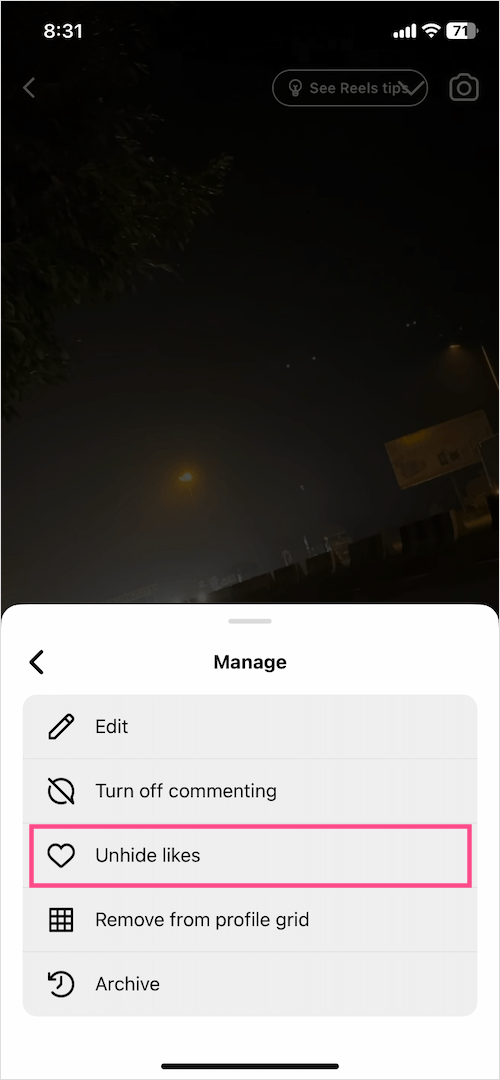
how to unhide likes on instagram reels

On Computer

    1. Visit instagram.com in a browser on your computer and log in to your account.
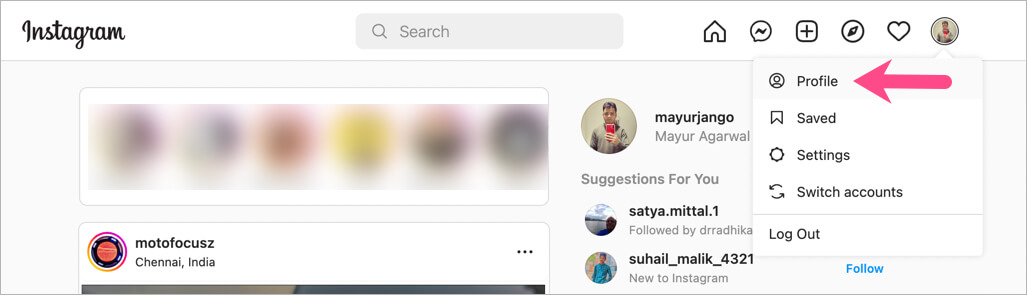
    2. On the Instagram website, click your profile picture and go to “Profile”. instagram web version
    3. Go to the “Reels” tab and open the reel whose like count you want to hide. reels tab in instagram desktop website

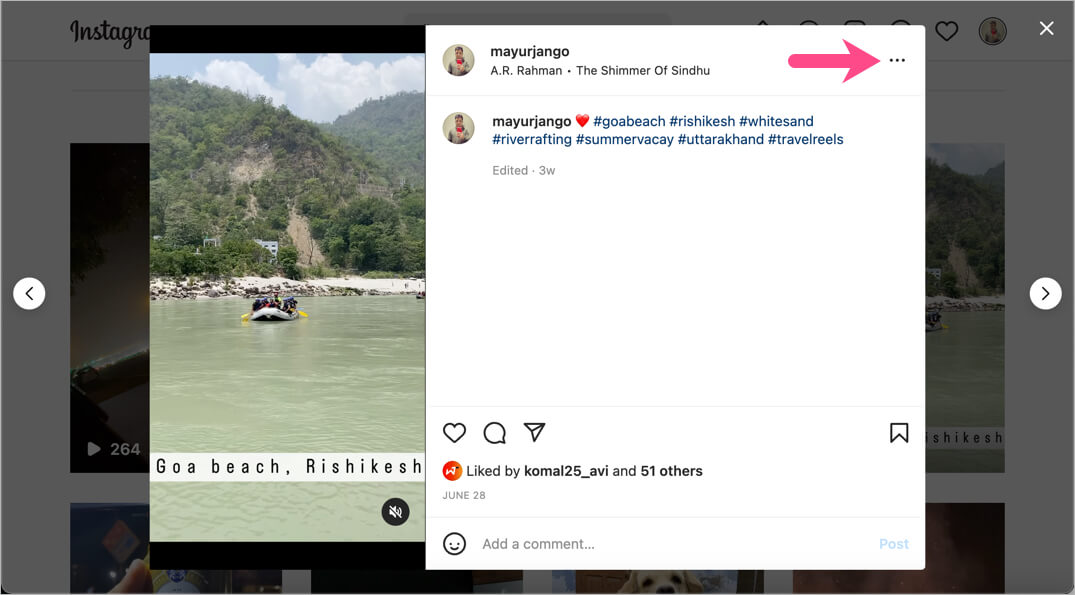
    4. Click the “ellipsis icon” (3 dots) at the top-right. hide like count on instagram reels
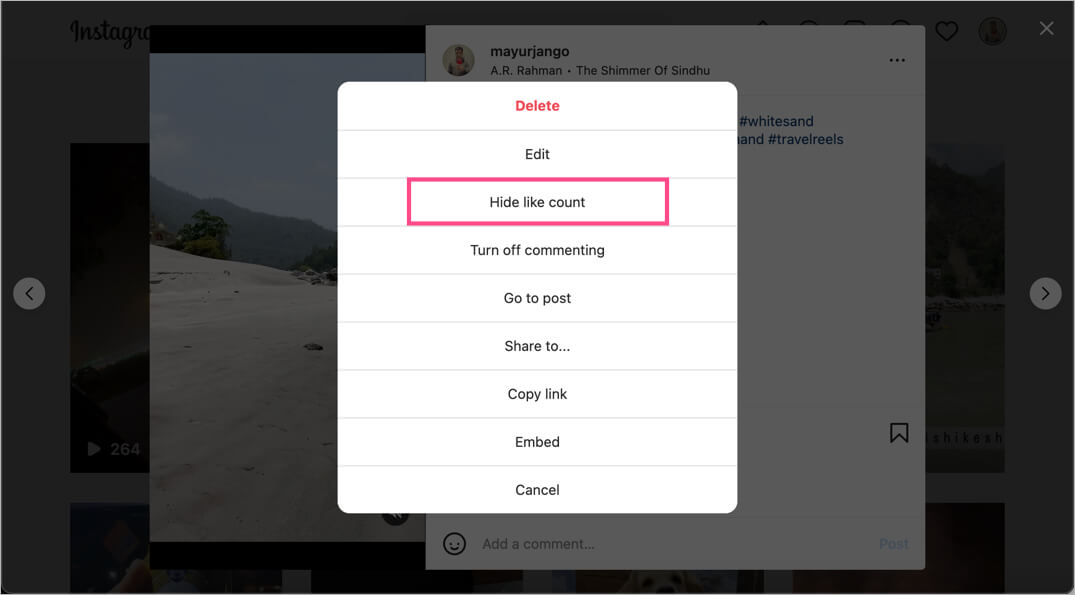
    5. Select the “Hide like count to others” option to turn off the like count. hide likes on instagram reels
Note: One can still view the list of people (up to some extent) who liked a certain reel.

Hope you found this helpful. Do share your thoughts below.

RELATED: How to unhide a comment on an Instagram post

Tags: AppsInstagramSocial MediaTips
ShareTweetSend
Previous Post

Complete Guide to Find and Delete Temp Files in Windows 11

Next Post

How to Stay Private on iOS: 5 Useful Tips

Mayur

Mayur

Mayur Agarwal, the founder and editor of WebTrickz, is a tech enthusiast with a Bachelor's degree in Computer Applications and over 15 years of experience in tech writing. His passion for technology and gadgets drives him to create insightful how-to articles and troubleshooting guides.

Next Post
Photo by Alwin Kroon on Unsplash

How to Stay Private on iOS: 5 Useful Tips

Comments 1

  1. Marlous says:
    4 years ago

    Hi,

    I always had the option to hide like and view counts but now it’s gone. Any idea how to get it back?

    Thanks!

    Reply

Leave a Reply Cancel reply

Your email address will not be published. Required fields are marked *

Latest Stories

chatgpt logo

How to Clear or Delete ChatGPT Memory on PC and Mobile

June 5, 2026
1337x logo

1337x Proxy List 2026: Working Proxy & Mirror Sites

June 2, 2026

How to Find Saved Reels on Facebook App & Desktop (2026)

April 1, 2026
microsoft edge browser

How to Restore or Reopen Closed Tabs in Microsoft Edge

March 26, 2026
Facebook app on iPhone

How to See Recently Watched Reels on Facebook (2026 Guide)

April 3, 2026
microsoft edge new logo

Download Microsoft Edge Offline Installer [Latest Version]

March 16, 2026

How to Turn Off Bing SafeSearch in Microsoft Edge

March 12, 2026

Trending Stories

  • microsoft family safety settings

    How to Turn Off Microsoft Family Safety on Windows 11 & 10

  • How to Turn Off Microsoft Edge Game Assist in Windows 11

  • How to Turn Off Fn Lock or Fn Key on Windows 11/10 Laptop

  • How to See Recently Watched Reels on Facebook (2026 Guide)

  • 1337x Proxy List 2026: Working Proxy & Mirror Sites

  • About Us
  • Contact Us
  • Privacy Policy
  • Advertise

© 2026 WebTrickz. All Rights Reserved.

No Result
View All Result
  • Reviews
  • Apps
  • How To’s
  • Android
  • Google
  • iPhone
  • Mac
  • About Us
  • Contact Us
  • Privacy Policy

© 2026 WebTrickz. All Rights Reserved.







