WebTrickz
TRENDING
  • Claude vs ChatGPT: Which Is Better in 2026?
No Result
View All Result
  • Reviews
  • Editorials
  • Social Media
    • Facebook
    • Twitter
    • YouTube
    • Messenger
    • Instagram
    • Snapchat
    • WhatsApp
    • TikTok
  • Apps
  • How To’s
  • Apple
  • iPhone
  • Google
  • Android
  • Mac
  • Security
  • About Us
    • About Us
    • Contact Us
    • Privacy Policy
  • Reviews
  • Editorials
  • Social Media
    • Facebook
    • Twitter
    • YouTube
    • Messenger
    • Instagram
    • Snapchat
    • WhatsApp
    • TikTok
  • Apps
  • How To’s
  • Apple
  • iPhone
  • Google
  • Android
  • Mac
  • Security
  • About Us
    • About Us
    • Contact Us
    • Privacy Policy
No Result
View All Result
WebTrickz
No Result
View All Result
Home iPhone

iOS 16/17: How to Save a Live Photo as a Video on iPhone

Mayur Agarwal by Mayur Agarwal
April 22, 2024
in How To's, iPhone

Live Photos on iOS adds life to a traditional photo by capturing a 3-second short video instead of a still image. This is a native feature of the iPhone camera that captures both movement and sound to revive the moment. One can add effects to a Live Photo and even share Live Photos on Messenger after converting them into a video.

Can’t save a Live Photo as a Video?

The Photos app (in iOS 13 or later) includes a one-click option to convert a Live Photo to a video. However, the “Save as Video” option in Photos is missing on iOS 16 and iOS 17. Therefore, saving Live Photos as videos on an iPhone running iOS 16 or iOS 17 seems no longer possible.

Worry not, you can still turn a Live Photo into a video without using a third-party app. The fact is, this process has changed in iOS 16 and later. Unlike in iOS 15 and earlier, the ‘Save as Video’ option no longer appears in the Share menu of the Photos app. Similarly, the procedure to hide photos in iOS 16 has also changed.

Now let’s see how you can save Live Photo as video in iOS 16 and iOS 17 on iPhone.

Converting Live Photos to Videos on iOS 16 and iOS 17

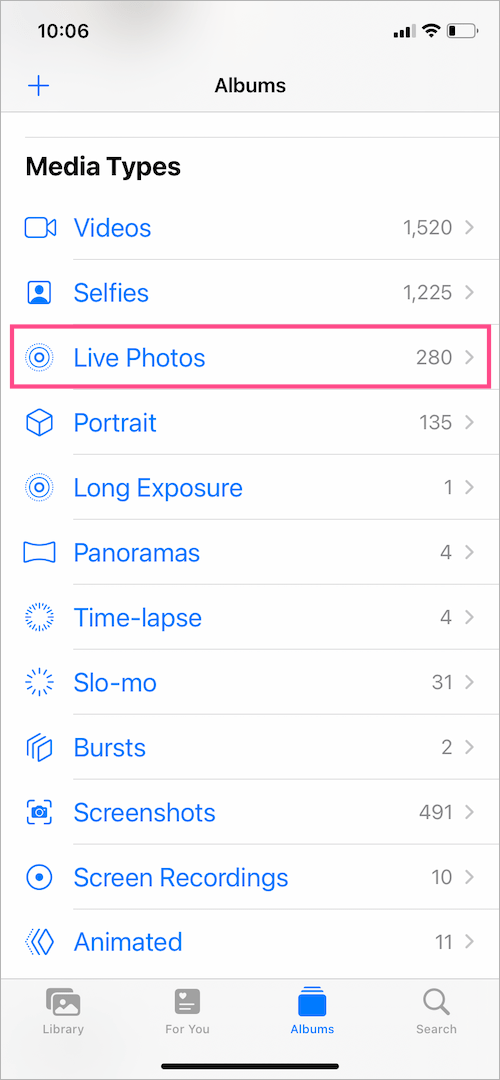
  1. Find and open a Live Photo in the Photos app. Tip: Go to Albums > Live Photos (under Media Types) to quickly see all of them. live photos album on iphone
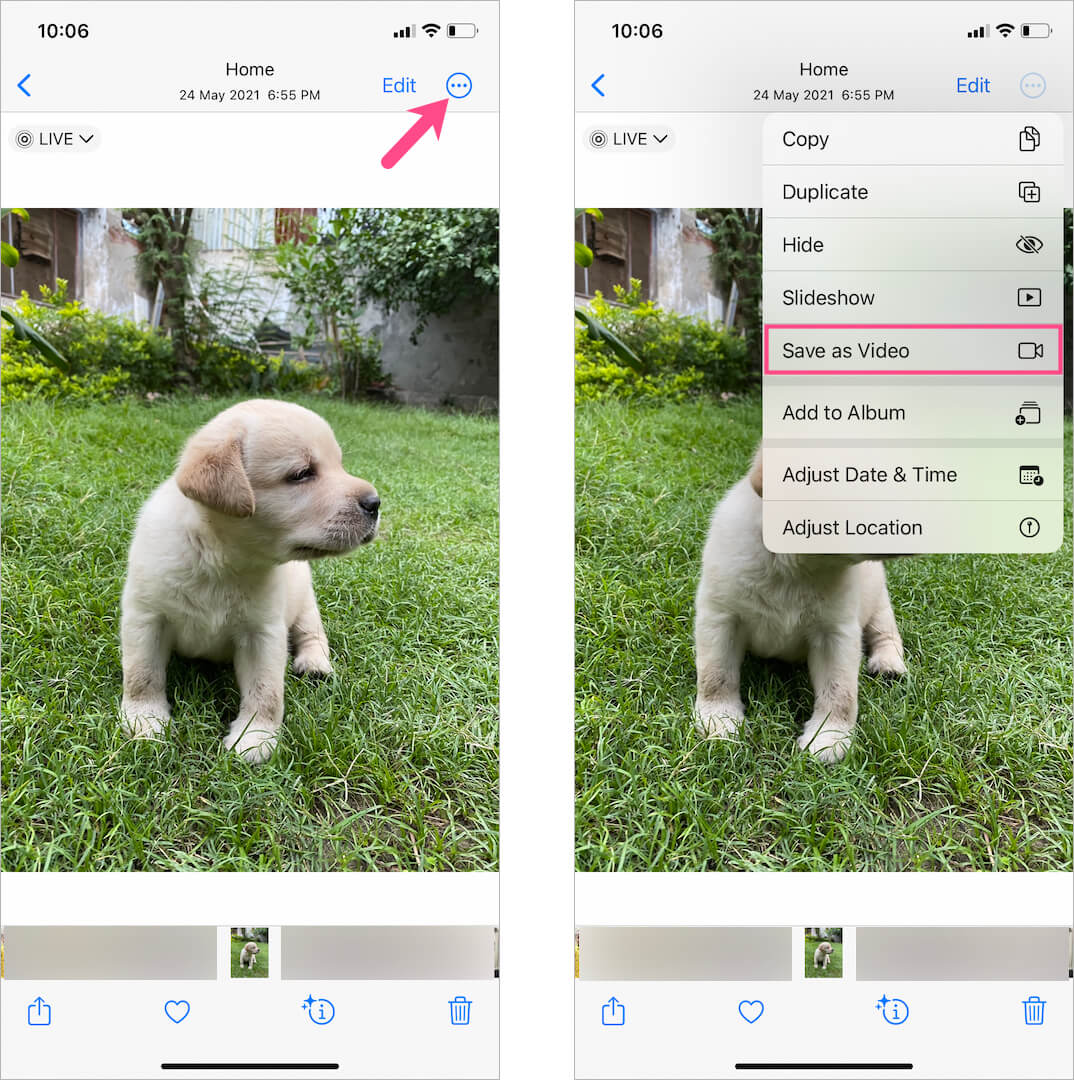
  2. Tap the More button (3 dots) at the top-right corner and select ‘Save as Video‘. how to save a live photo as video on ios 16 and ios 17
  3. Go to the Recents or Videos album to see the saved video.

The saved video is exported in either HEVC or H.264 format and includes audio, which can be muted.

TIP: To quickly find the converted video, long-press the particular Live Photo while it appears in a grid view in Photos. Then select ‘Show in All Photos‘. You can now see the exported video alongside the Live Photo in its original location.
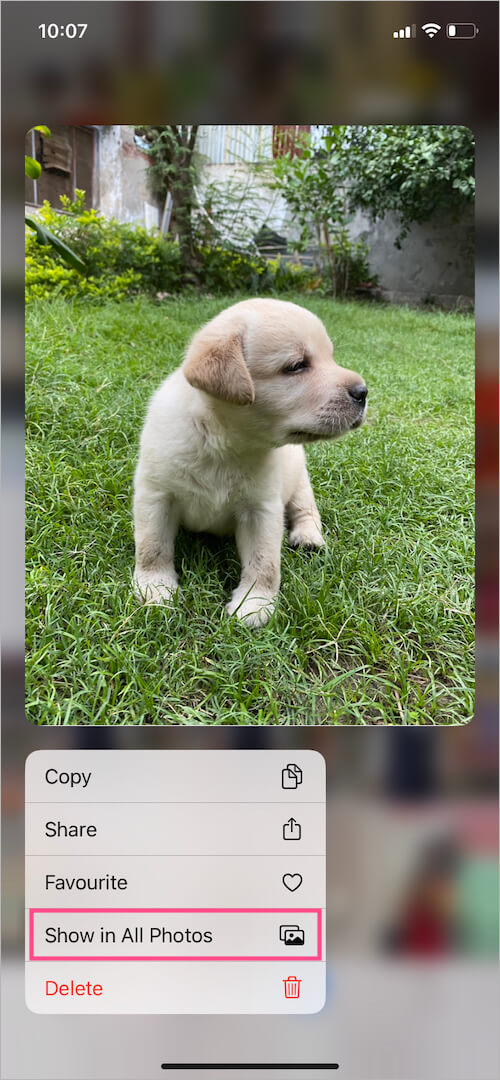
find saved video in all photos on ios

Fix: Save to Video still not appearing?

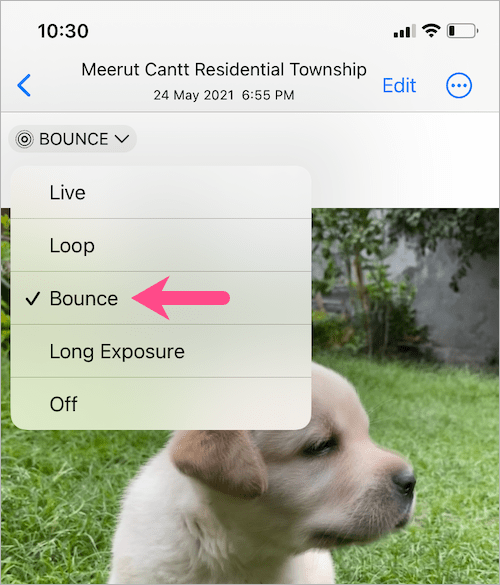
Is the ‘Save as Video’ option still not showing up? The ‘Save as Video’ option doesn’t appear when you apply Live Photo effects (Loop, Bounce, or Long Exposure) to a Live Photo. To get back the ‘Save as Video’ option, simply re-enable the Live effect or follow the below workaround.

To save a Live Photo with a Loop or Bounce effect as a video:

  1. Go to Photos and open the Live Photo you want to export as a video.
  2. Select the Bounce or Loop effect. apply effects to live photo in ios 16
  3. Tap the “Share” button at the bottom left.
  4. Scroll down and select “Save to Files“. Then save the video file in your preferred location. save as video missing in ios 16 and ios 17
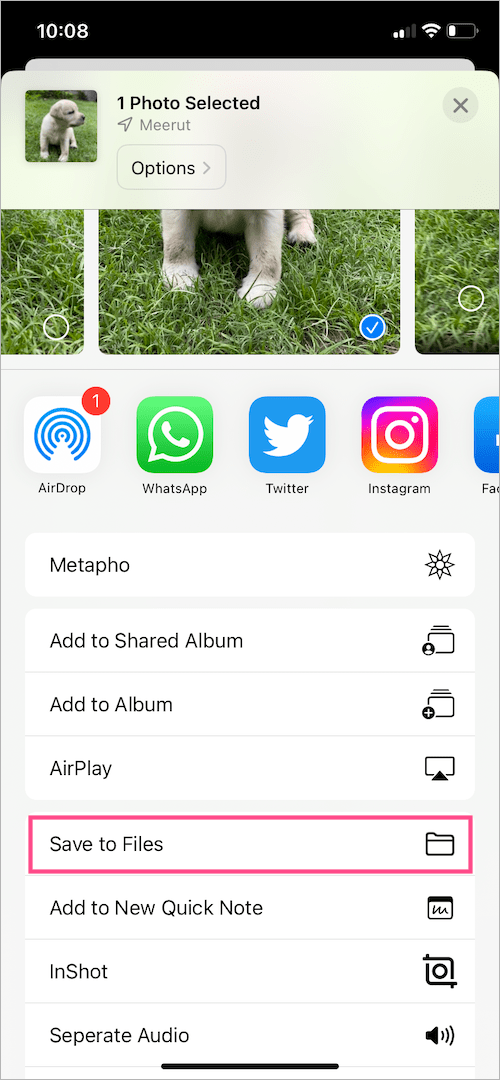
BONUS TIP: To save the video from Files to the Photos app, open the Files app and find the particular video. Then tap the Share button and select ‘Save Video’.
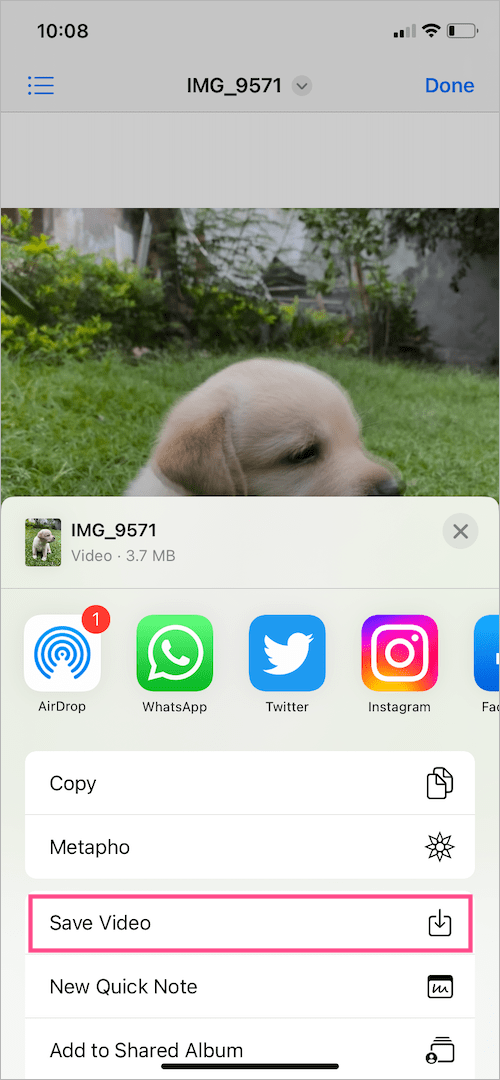
convert live photo with effects to video on iphone

Go ahead and find your video in the Recents album.

Why convert Live Photos into videos?

Since Live Photos are exclusive to iPhone and iPad, non-iOS users cannot view them directly. That’s because a Live Photo is sent as a still image when you share it via email or social media platforms (excluding WhatsApp).

Hence, if you want to post them on Instagram, Twitter, or Facebook or add a Live Photo to a video during editing then you first need to convert it to a video.


Tags: iOS 16iOS 17iPadiPhoneLive PhotosPhotosTips
ShareTweetSend
Previous Post

iOS 18/iOS 26: How to Unblur Home Screen Wallpaper on iPhone

Next Post

How to Add Snapchat Widget to iPhone Lock Screen in iOS 16

Mayur Agarwal

Mayur Agarwal

Mayur Agarwal, the founder and editor of WebTrickz, is a tech enthusiast with a Bachelor's degree in Computer Applications and over 15 years of experience in tech writing. His passion for technology and gadgets drives him to create insightful how-to articles and troubleshooting guides.

Next Post
get snapchat widgets on iphone

How to Add Snapchat Widget to iPhone Lock Screen in iOS 16

Comments 1

  1. Natalie Hachey says:
    3 years ago

    Hi there,

    Thank you for this! I can now save a live photo as a video. My question is:
    Is it possible to save more than one live photo to video?

    Thanks again!

    Reply

Leave a Reply Cancel reply

Your email address will not be published. Required fields are marked *

Latest Stories

difference between chatgpt and claude

Claude vs ChatGPT: Which AI Should You Use in 2026?

June 18, 2026
google chrome logo

Google Chrome Offline Installer: Direct Download Links

June 17, 2026
X logo

How to Remove All Bookmarks on X (Twitter) At Once in 2026

June 15, 2026
X logo

How to Find Bookmarks on X (Twitter) in 2026

June 15, 2026
copilot logo

How to Turn Off Copilot Search in Bing on Edge & Chrome

June 10, 2026
microsoft edge new logo

How to Turn Off Notifications in Microsoft Edge (2026 Guide)

June 8, 2026
chatgpt logo

How to Clear or Delete ChatGPT Memory on PC and Mobile

June 5, 2026

Trending Stories

  • microsoft family safety settings

    How to Turn Off Microsoft Family Safety on Windows 11 & 10

  • 1337x Proxy List 2026: Working Proxy & Mirror Sites

  • How to Turn Off Microsoft Edge Game Assist in Windows 11

  • How to See Recently Watched Reels on Facebook (2026 Guide)

  • How to Turn Off Fn Lock or Fn Key on Windows 11/10 Laptop

  • About Us
  • Contact Us
  • Privacy Policy
  • Advertise

© 2026 WebTrickz. All Rights Reserved.

No Result
View All Result
  • Reviews
  • Apps
  • How To’s
  • Android
  • Google
  • iPhone
  • Mac
  • About Us
  • Contact Us
  • Privacy Policy

© 2026 WebTrickz. All Rights Reserved.