WebTrickz
TRENDING
  • Complete list of 1337x Proxy and Mirror Sites
No Result
View All Result
  • Reviews
  • Editorials
  • Social Media
    • Facebook
    • Twitter
    • YouTube
    • Messenger
    • Instagram
    • Snapchat
    • WhatsApp
    • TikTok
  • Apps
  • How To’s
  • Apple
  • iPhone
  • Google
  • Android
  • Mac
  • Security
  • About Us
    • About Us
    • Contact Us
    • Privacy Policy
  • Reviews
  • Editorials
  • Social Media
    • Facebook
    • Twitter
    • YouTube
    • Messenger
    • Instagram
    • Snapchat
    • WhatsApp
    • TikTok
  • Apps
  • How To’s
  • Apple
  • iPhone
  • Google
  • Android
  • Mac
  • Security
  • About Us
    • About Us
    • Contact Us
    • Privacy Policy
No Result
View All Result
WebTrickz
No Result
View All Result
Home iPhone

How to Screen Record on iPhone 17, 17 Pro, and iPhone Air

Step-by-step guide to recording your screen on iPhone 17 or Air in iOS 26.

Mayur by Mayur
September 17, 2025
in How To's, iPhone

Screen recording on iPhone lets you easily capture gameplay, tutorials, or video calls, with support for both internal audio and microphone input. With iOS 26, recordings now look sharper and higher quality, thanks to full-resolution screen recording for iPhone and iPad.

How Do I Record a Screen on My iPhone?

Want to capture what’s happening on your iPhone? The Screen Recording feature is built into iOS, but you won’t find it in Settings or on the home screen. It’s only available through Control Center.

In iOS 18 and iOS 26, the screen record button isn’t included in Control Center by default, and there’s no option in Settings to add it manually. Since iOS 18 introduced a redesigned Control Center, you’ll need to customize it first to enable Screen Recording.

How to Enable Screen Recording on iPhone 17, 17 Pro, or iPhone Air

If the screen recording control is missing, you’ll need to add it back to Control Center. Here’s how to do it on iPhone 17, 17 Pro, 17 Pro Max, iPhone Air, or any device running iOS 18 or later:

  1. Open Control Center by swiping down from the top-right corner of the screen.
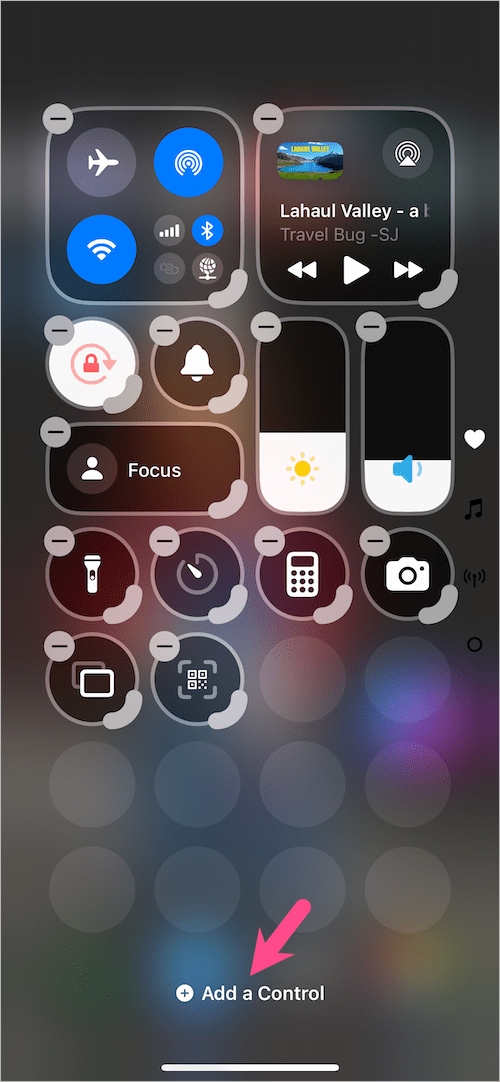
  2. Tap and hold (long-press) an empty area in Control Center.
  3. Tap Add a control at the bottom. how to get screen record on iphone 17 or iphone air
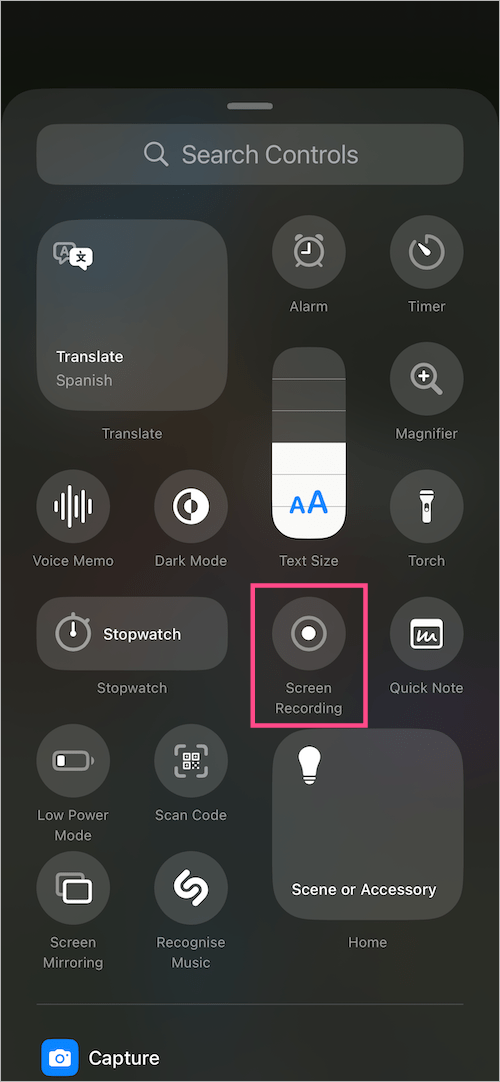
  4. Select the Screen Recording control to add it to Control Center. add screen recording to control center in ios 26 on iphone 17 or Air
  5. Optional: Hold and drag the control to rearrange its position. (Tip: Expand the control icon to show its label). how to screen record on iphone 17 or 17 pro
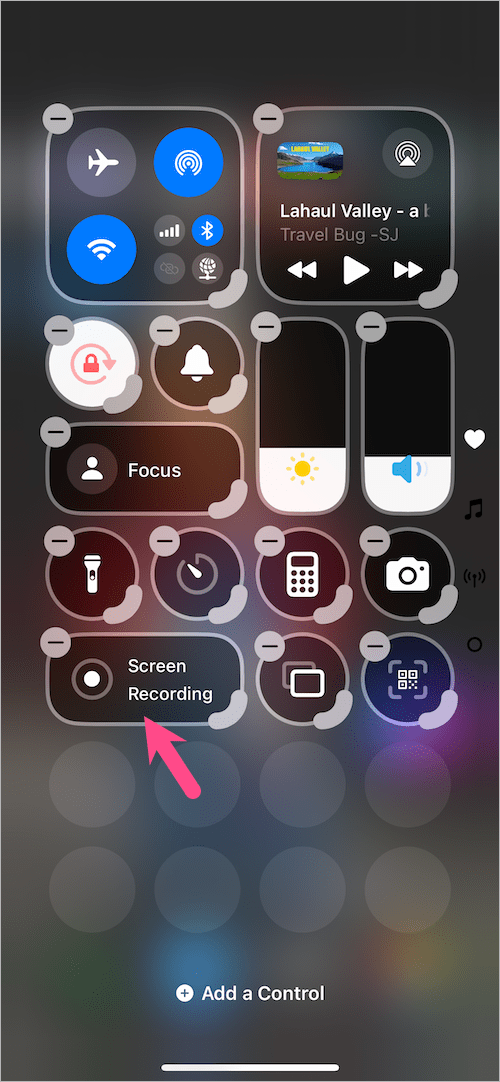
  6. Tap anywhere on the screen to return to Control Center.

How to Screen Record on iPhone 17, 17 Pro, or iPhone Air

Once you’ve added the control, it’s simple to screen record on your iPhone 17, 17 Pro, or iPhone Air. Here’s how:

  1. Open Control Center.
  2. To start recording, tap the Screen Recording button (a white dot within a circle). After a 3-second countdown, your iPhone will begin recording the screen. how to screen record on iphone air
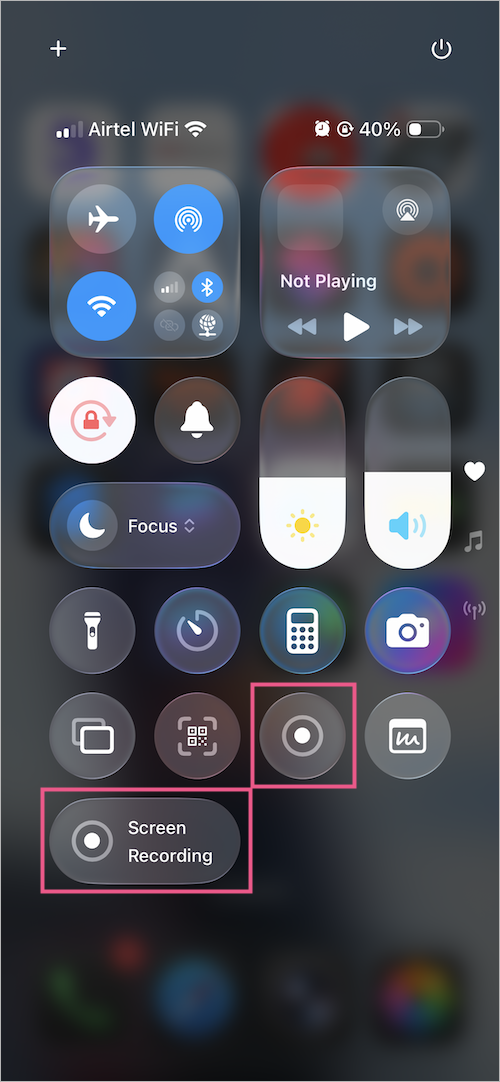
  3. To stop, open Control Center again and tap the Record button. stop screen record on iphone air

Tip: You can also tap the red dot in the Dynamic Island (at the top of your screen) and select Stop to stop recording.
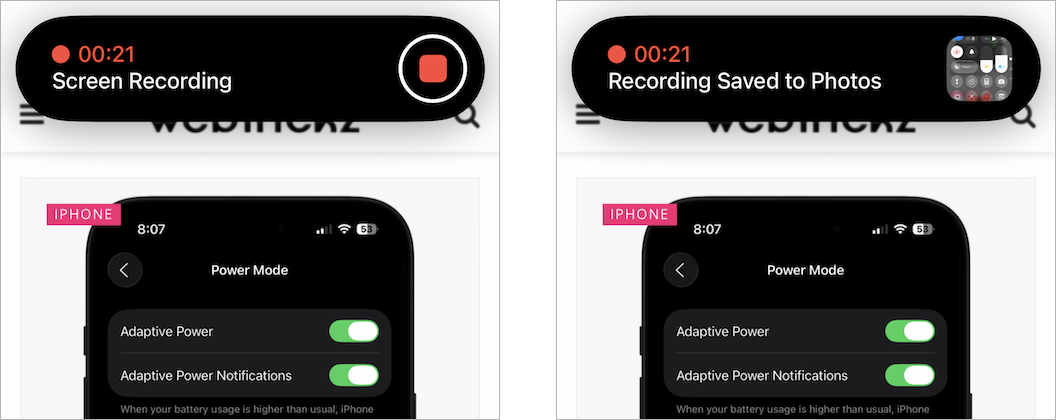
how to stop screen recording on iphone 17 or 17 pro
Stop Recording from Dynamic Island

Your recording will be automatically saved to the Photos app.

How to Record Screen with Microphone Audio

Want to record your voice or audio while capturing the screen? For this:

  1. Open the Control Center.
  2. Long-press (or press and hold) the Screen Recording control.
  3. Tap the Microphone icon to turn it on. screen record on iphone 17 with audio or sound
  4. Tap Start Recording.

Now your video will include both internal audio and your microphone input.

Tip: How to Enable HDR for Screen Recording

If you want more vivid colors and better contrast in your recordings, you can enable HDR screen recording on iOS 26.

To do so, go to Settings > General > Screen Capture and select the HDR format. Screen recordings will now capture in HDR (uses HEVC HDR10) for supported apps and playback.
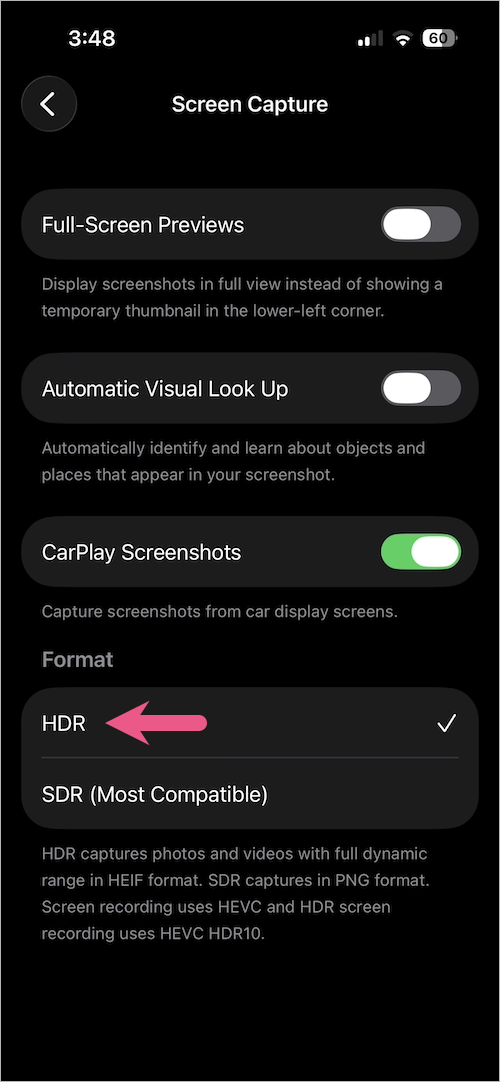
how to record screen in HDR on iphone 17, 17 pro, or iphone Air

Where Are Screen Recordings Saved on iPhone?

All your screen recordings are automatically saved to the Photos app in HEVC format.

To find them, open the Photos app and go to Collections. Scroll down to Media Types and view the Screen Recordings album. You can also quickly access them from the Library.
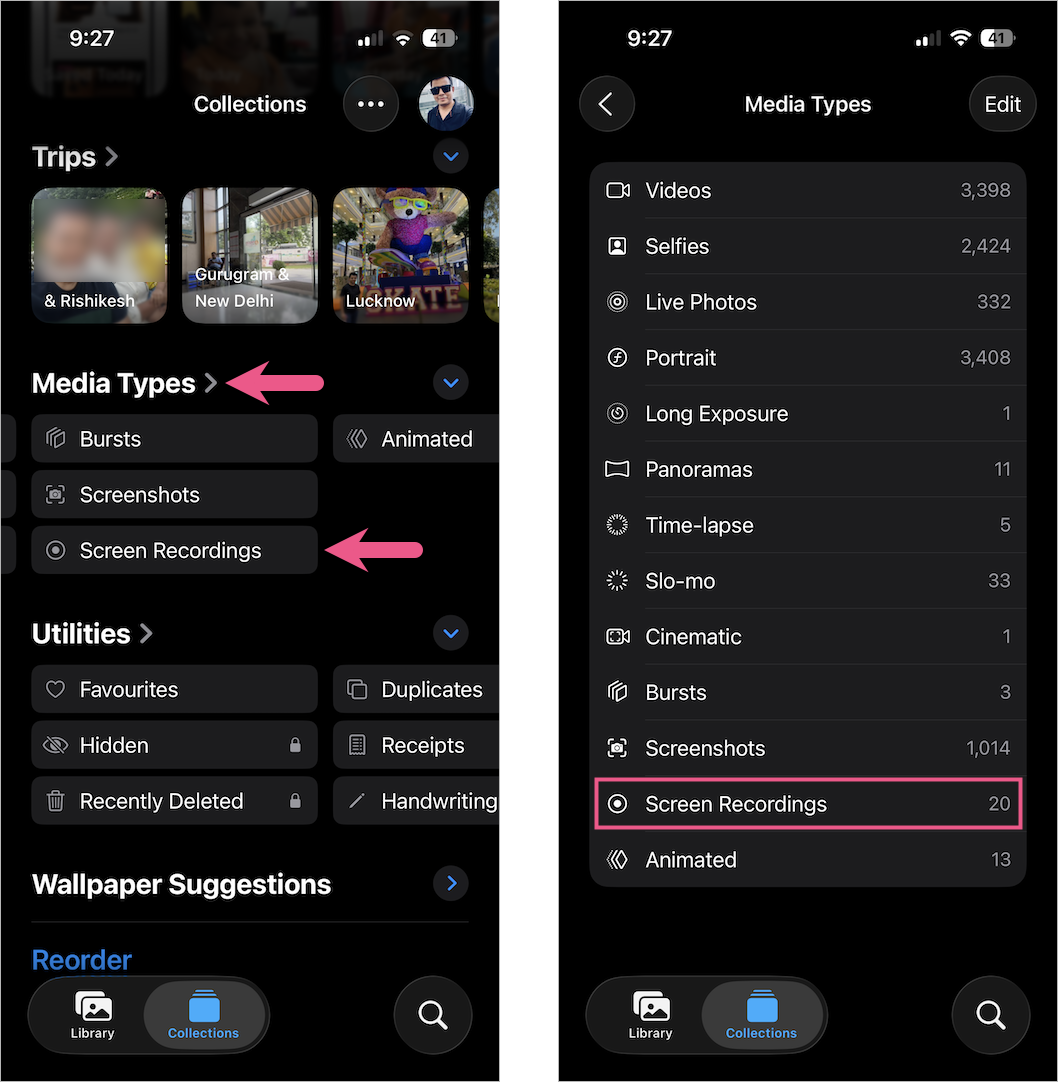
how to find screen recordings on iphone 17 pro or iphone air

From there, you can edit, trim, or share them just like any other video.

RELATED TIPS:

  • How to Set a Timer on Your iPhone 17 Camera
  • How to Reset Control Center to Default on iPhone 17 or Air
  • Taking Screenshots on iPhone 17, 17 Pro, and iPhone Air
  • How to Add Screen Recording to Control Center in iOS 18
Tags: Control CenteriOS 26iPhone 17iPhone 17 ProiPhone AirScreen Recording
ShareTweetSend
Previous Post

How to Turn Off & Restart iPhone 17, 17 Pro, and iPhone Air

Next Post

iOS 26/iOS 18: How to Silence Unknown Calls on iPhone (2026)

Mayur

Mayur

Mayur Agarwal, the founder and editor of WebTrickz, is a tech enthusiast with a Bachelor's degree in Computer Applications and over 15 years of experience in tech writing. His passion for technology and gadgets drives him to create insightful how-to articles and troubleshooting guides.

Next Post
silence unknown callers on iphone

iOS 26/iOS 18: How to Silence Unknown Calls on iPhone (2026)

Leave a Reply Cancel reply

Your email address will not be published. Required fields are marked *

Latest Stories

copilot logo

How to Turn Off Copilot Search in Bing on Edge & Chrome

June 10, 2026
microsoft edge new logo

How to Turn Off Notifications in Microsoft Edge (2026 Guide)

June 8, 2026
chatgpt logo

How to Clear or Delete ChatGPT Memory on PC and Mobile

June 5, 2026
1337x logo

1337x Proxy List 2026: Working Proxy & Mirror Sites

June 2, 2026

How to Find Saved Reels on Facebook App & Desktop (2026)

June 8, 2026
microsoft edge browser

How to Restore or Reopen Closed Tabs in Microsoft Edge

June 9, 2026
Facebook app on iPhone

How to See Recently Watched Reels on Facebook (2026 Guide)

June 5, 2026

Trending Stories

  • microsoft family safety settings

    How to Turn Off Microsoft Family Safety on Windows 11 & 10

  • 1337x Proxy List 2026: Working Proxy & Mirror Sites

  • How to Turn Off Microsoft Edge Game Assist in Windows 11

  • How to Turn Off Fn Lock or Fn Key on Windows 11/10 Laptop

  • How to See Recently Watched Reels on Facebook (2026 Guide)

  • About Us
  • Contact Us
  • Privacy Policy
  • Advertise

© 2026 WebTrickz. All Rights Reserved.

No Result
View All Result
  • Reviews
  • Apps
  • How To’s
  • Android
  • Google
  • iPhone
  • Mac
  • About Us
  • Contact Us
  • Privacy Policy

© 2026 WebTrickz. All Rights Reserved.