


If you don’t want Microsoft’s AI features in Edge, you can turn off Copilot Mode, remove the Copilot button, disable Copilot Search, and switch off other Copilot-powered features. Although Microsoft doesn’t let you completely remove Copilot from Edge, you can disable most AI features in just a few clicks.
Microsoft Copilot is available across Microsoft Edge, Bing Search, and Microsoft 365. This guide shows the different ways to turn off Copilot in Microsoft Edge on Windows 11, Windows 10, and macOS. If you’ve already used Copilot and want to remove previous conversations, see our guide on how to delete Microsoft Copilot history.
What Is Copilot Mode in Microsoft Edge?
Copilot Mode is Microsoft’s AI-powered browsing experience built into Microsoft Edge. It adds AI features such as page summaries, writing assistance, translation, Copilot Vision, and an AI-enhanced new tab page.
Depending on your version of Edge, Copilot Mode may be enabled by default. If you don’t use these features, you can turn them off whenever you want.
How to Turn Off Copilot Mode in Microsoft Edge
Use any of the following methods to turn off Copilot Mode in Microsoft Edge.
Turn Off Copilot Mode Using the Copilot Page
Microsoft provides a dedicated Copilot page where you can turn Copilot Mode on or off.
- Open Edge and visit the Copilot Mode page.
- To turn Copilot off, turn off the toggle next to “You’re in Copilot Mode“.
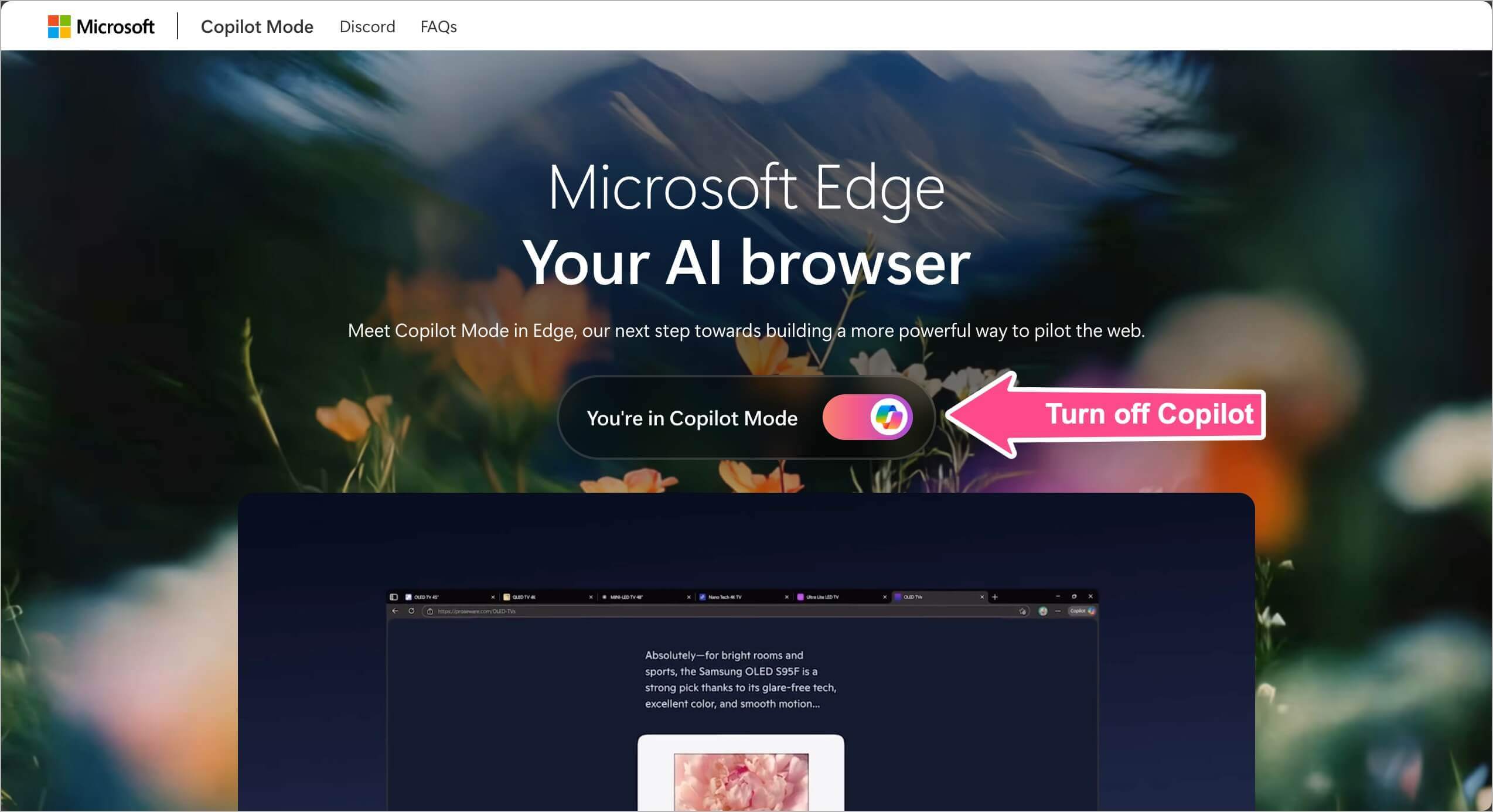
This is Microsoft’s recommended way to disable Copilot Mode.
Turn Off Copilot Mode in Edge Settings
You can also turn off Copilot Mode from Edge Settings.
- Open Microsoft Edge.
- Click the three-dot menu (at the top right) and go to Settings.
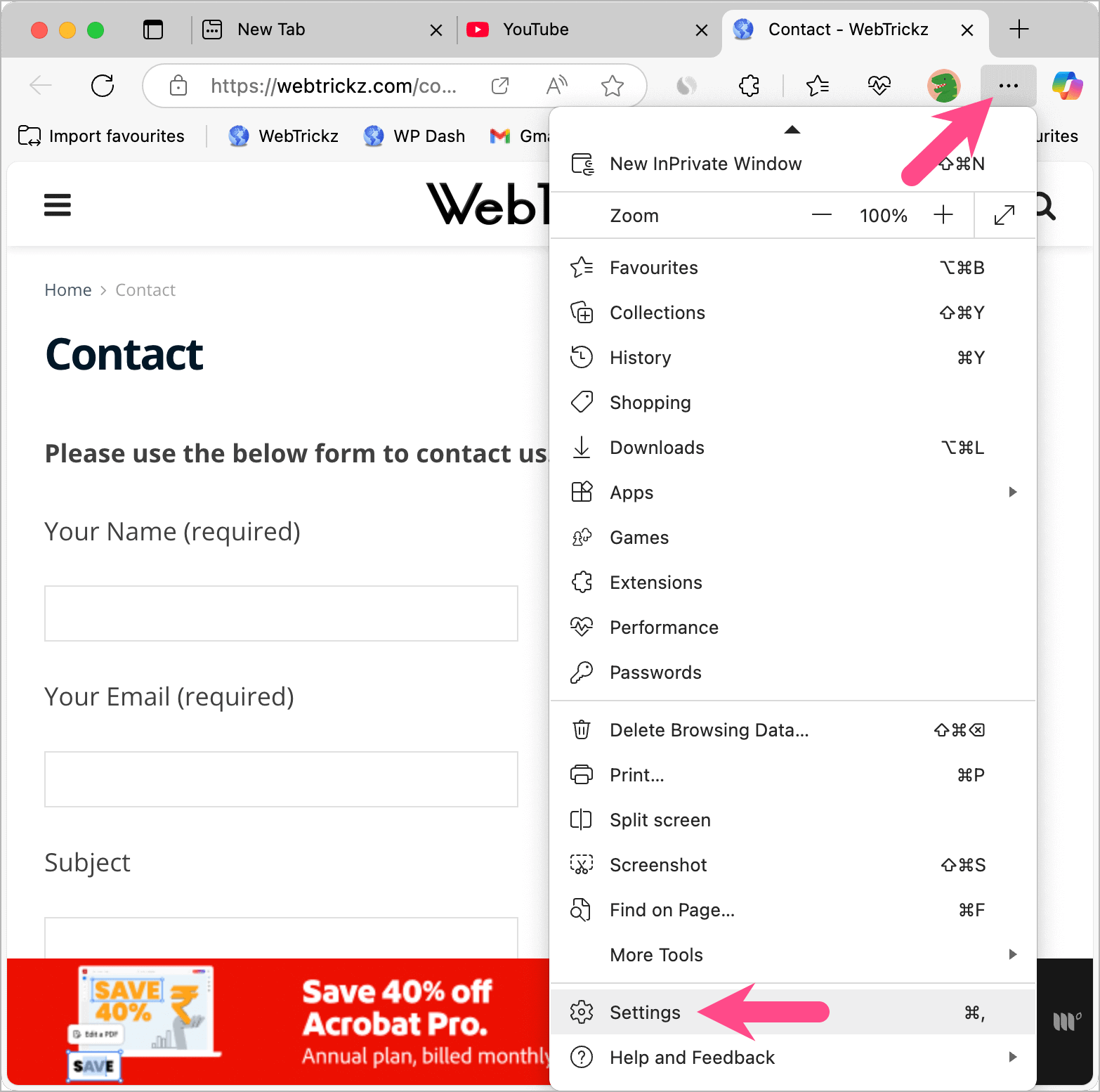
- Select AI innovations from the left sidebar to access Copilot settings.
- Turn off the switch for Copilot Mode.
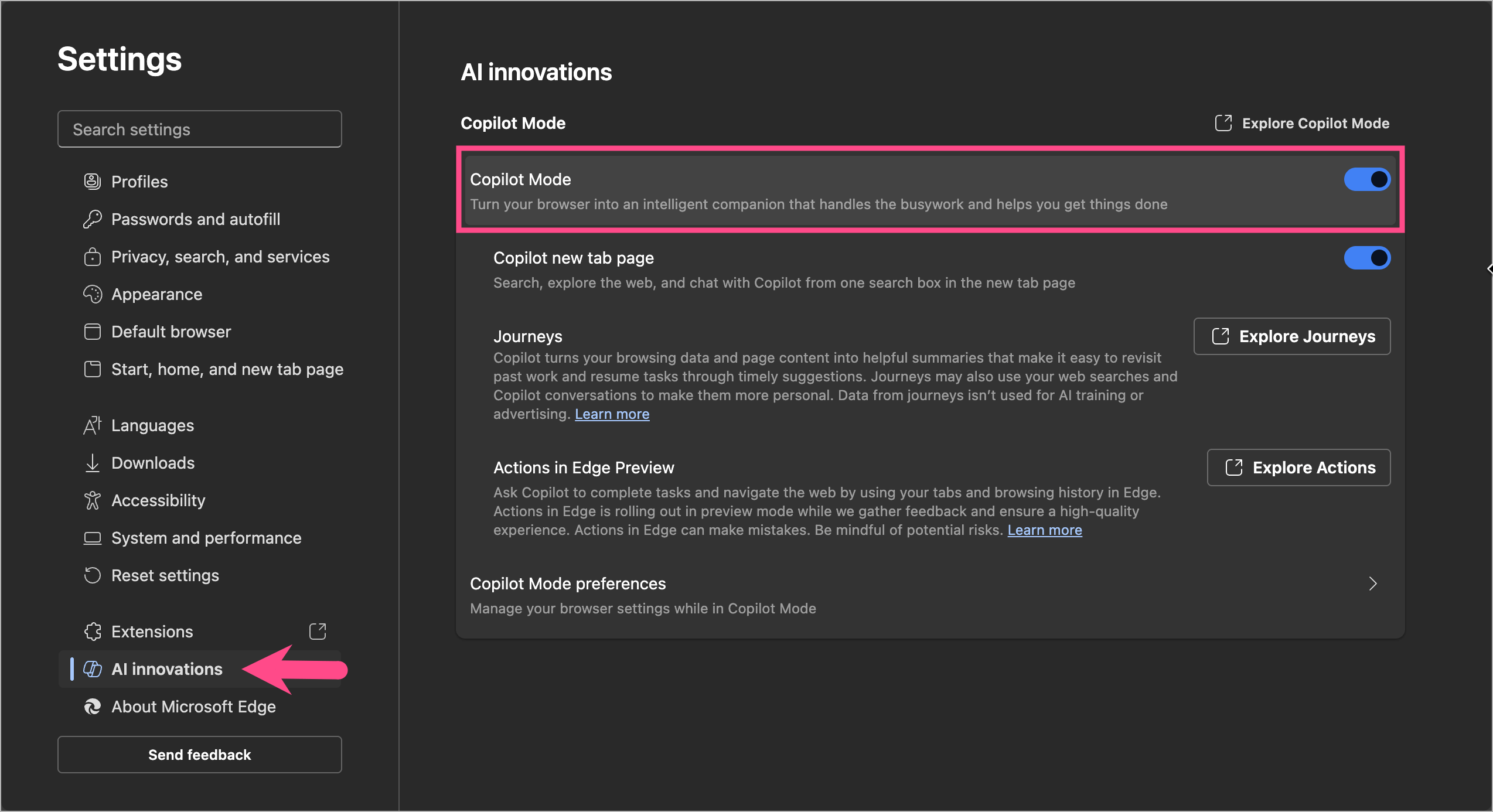
Turning off Copilot Mode disables the AI-powered browsing features associated with Copilot in Microsoft Edge.
Turn Off Copilot Mode Using Edge Flags
If the Copilot Mode setting isn’t available in your version of Edge, you can disable it using Edge’s experimental flags.
- Open Edge and type edge://flags/ in the address bar and press Enter.
- Search for Copilot and look for the following flag: Edge Copilot Mode
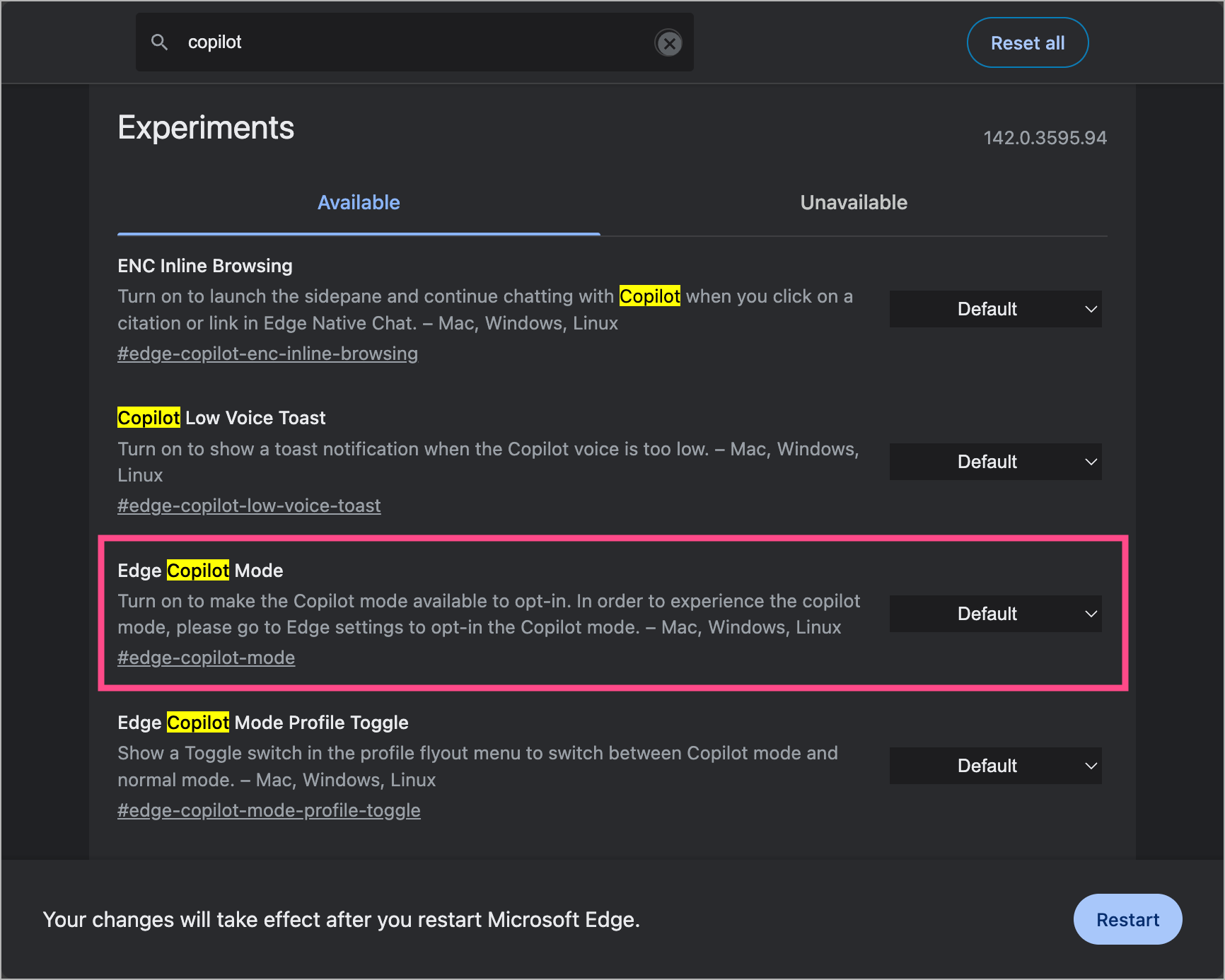
- To disable the flag related to Copilot Mode, click its dropdown box and select Disabled.
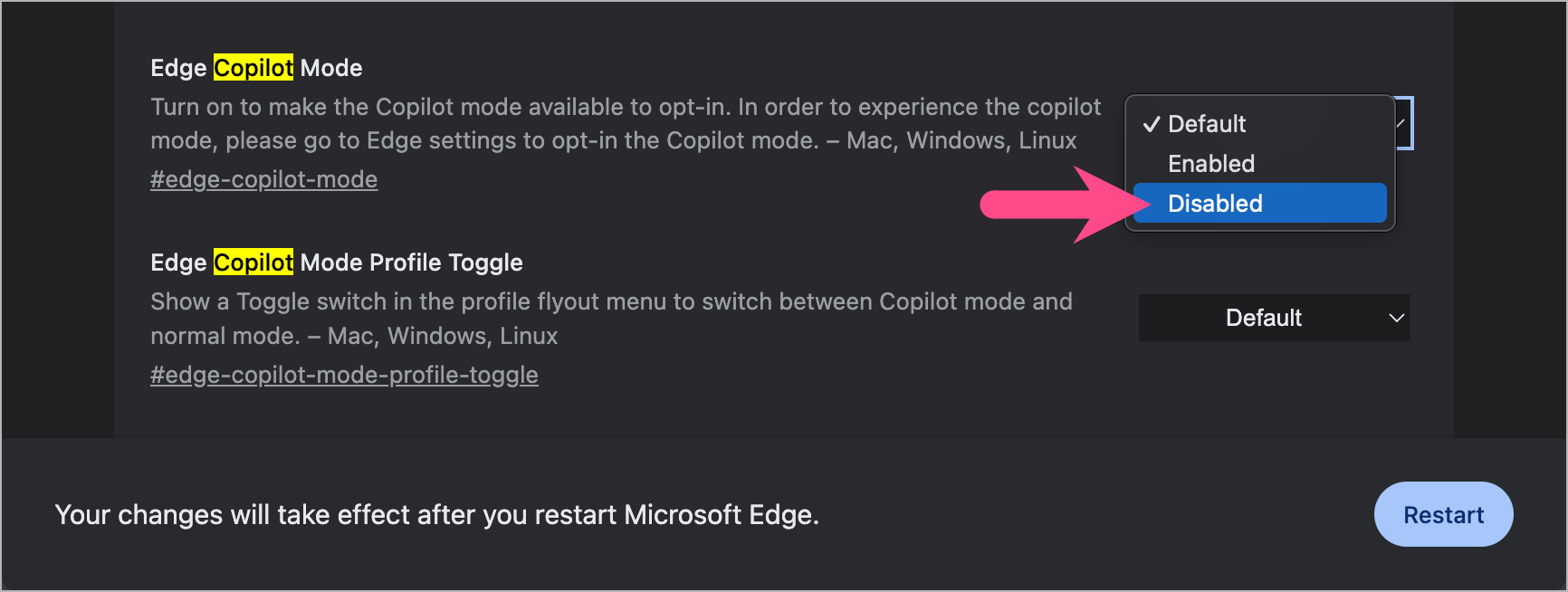
- Click Restart to restart Edge and let the changes take effect.
Use this method if Copilot Mode is still rolling out or the setting isn’t available on your device yet.
Hide the Copilot Button from the Edge Toolbar
If you only want a cleaner toolbar, you can hide the Copilot button without turning off Copilot Mode.
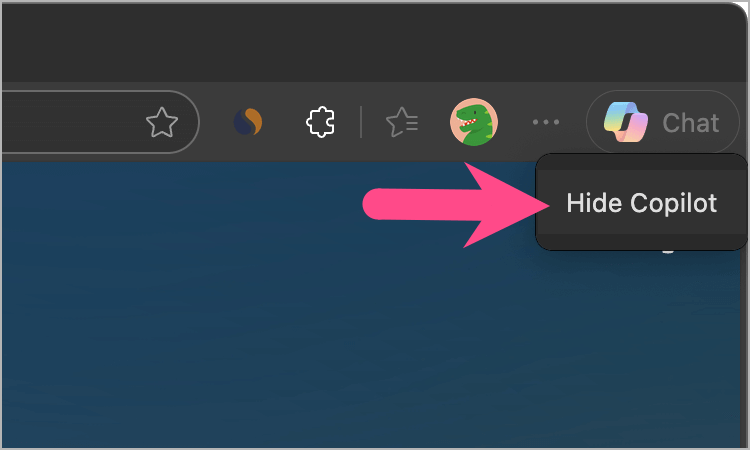
- Right-click the Copilot icon in the top-right corner.
- Click Hide Copilot.
- Turn off the toggle next to “Show Copilot button in toolbar“.
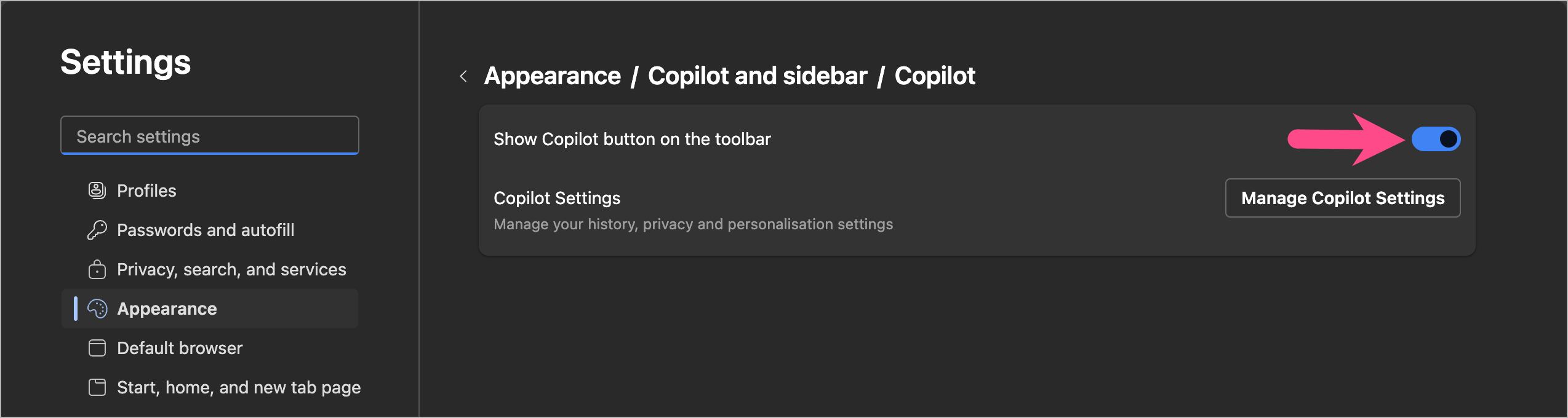
Alternatively, go to Settings > Copilot and AI and turn off Show Copilot button in toolbar.
Hiding the toolbar button doesn’t disable Copilot Mode or any of its AI features.
Related: How to Clear All Conversations from Copilot At Once
How to Turn Off Copilot Search in Bing
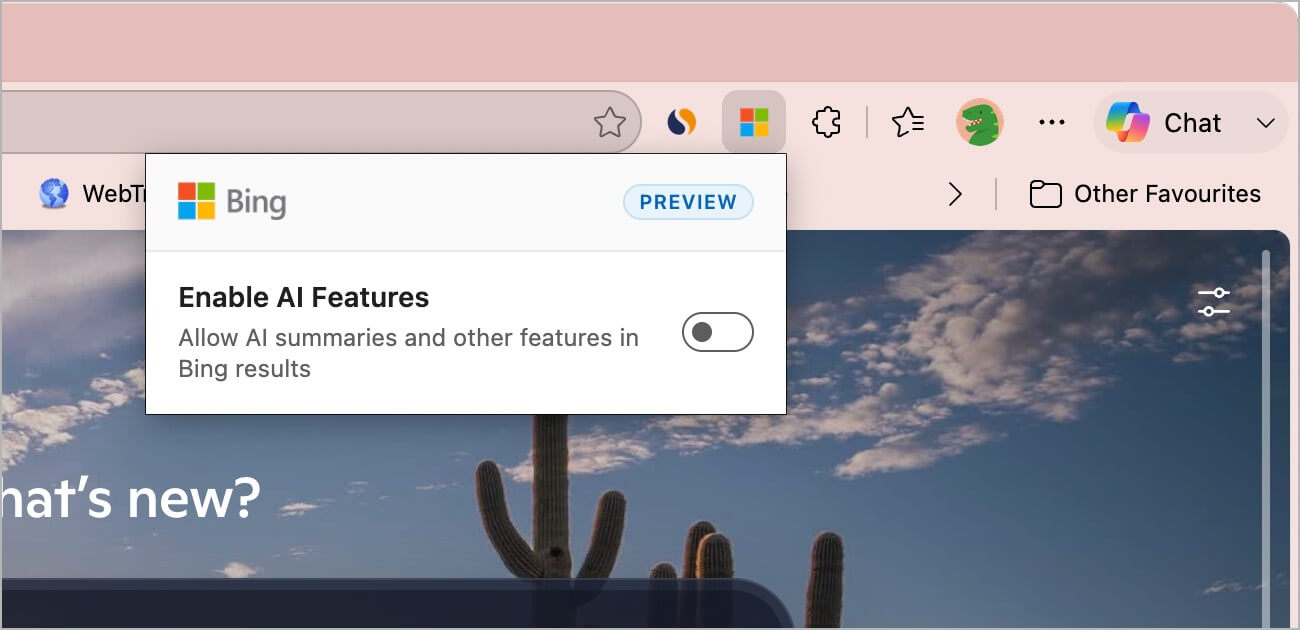
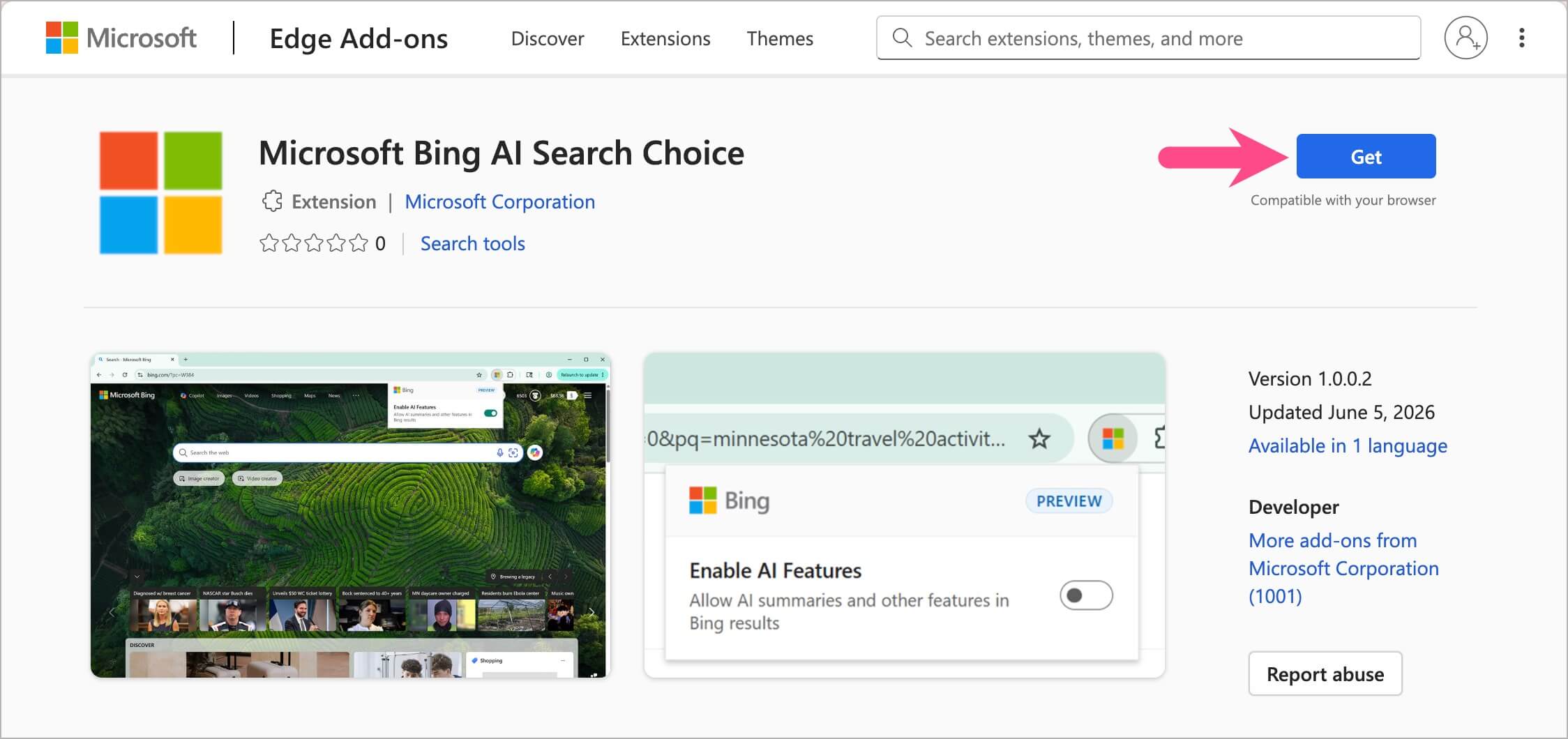
If you want Bing Search without AI-generated answers, Microsoft now provides an official way to turn off Copilot Search using the Microsoft Bing AI Search Choice extension for Edge and Chrome.
To turn off Copilot Search in Microsoft Edge:
- Open the Microsoft Bing AI Search Choice extension page in Edge.
- Click Get and then select Add Extension.
- After installation, open
edge://extensions. - Turn on the toggle next to Microsoft Bing AI Search Choice.
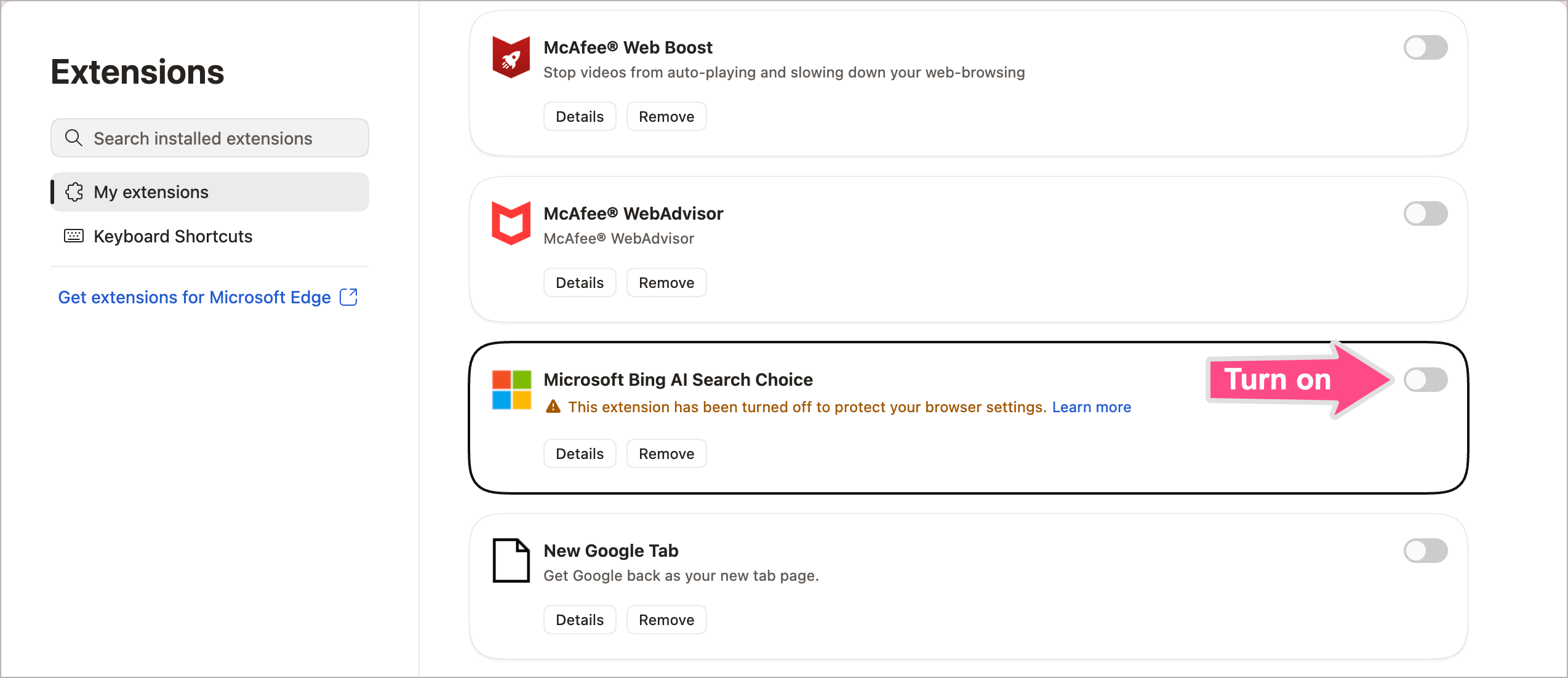
Once enabled, Bing Search shows only standard search results without Copilot-generated answers.
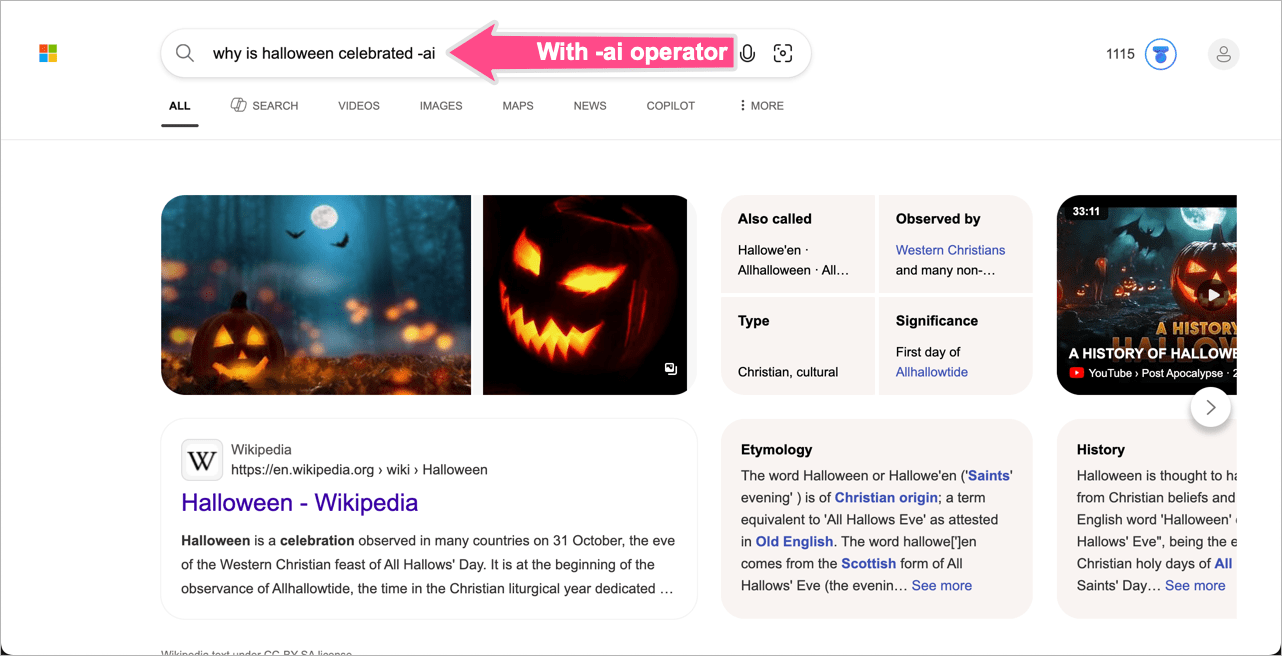
If you don’t want to install the extension, you can also use the -ai search operator in Bing to temporarily remove AI answers from a specific search query.
For example: windows 11 features -ai
For a detailed guide with Chrome steps, check our tutorial on turning off Copilot Search in Bing on Edge and Chrome.
Turn Off Specific Copilot Features
Turn Off Copilot on the Edge New Tab Page
If you prefer the classic new tab page, you can turn off the Copilot-powered search experience.
- Open Microsoft Edge.
- Click the three-dot menu at the top right and go to Settings.
- Click Start, home, and new tab page in the sidebar.
- Scroll down to the “New tab page” section.
- Turn off the toggle for Copilot new tab page.
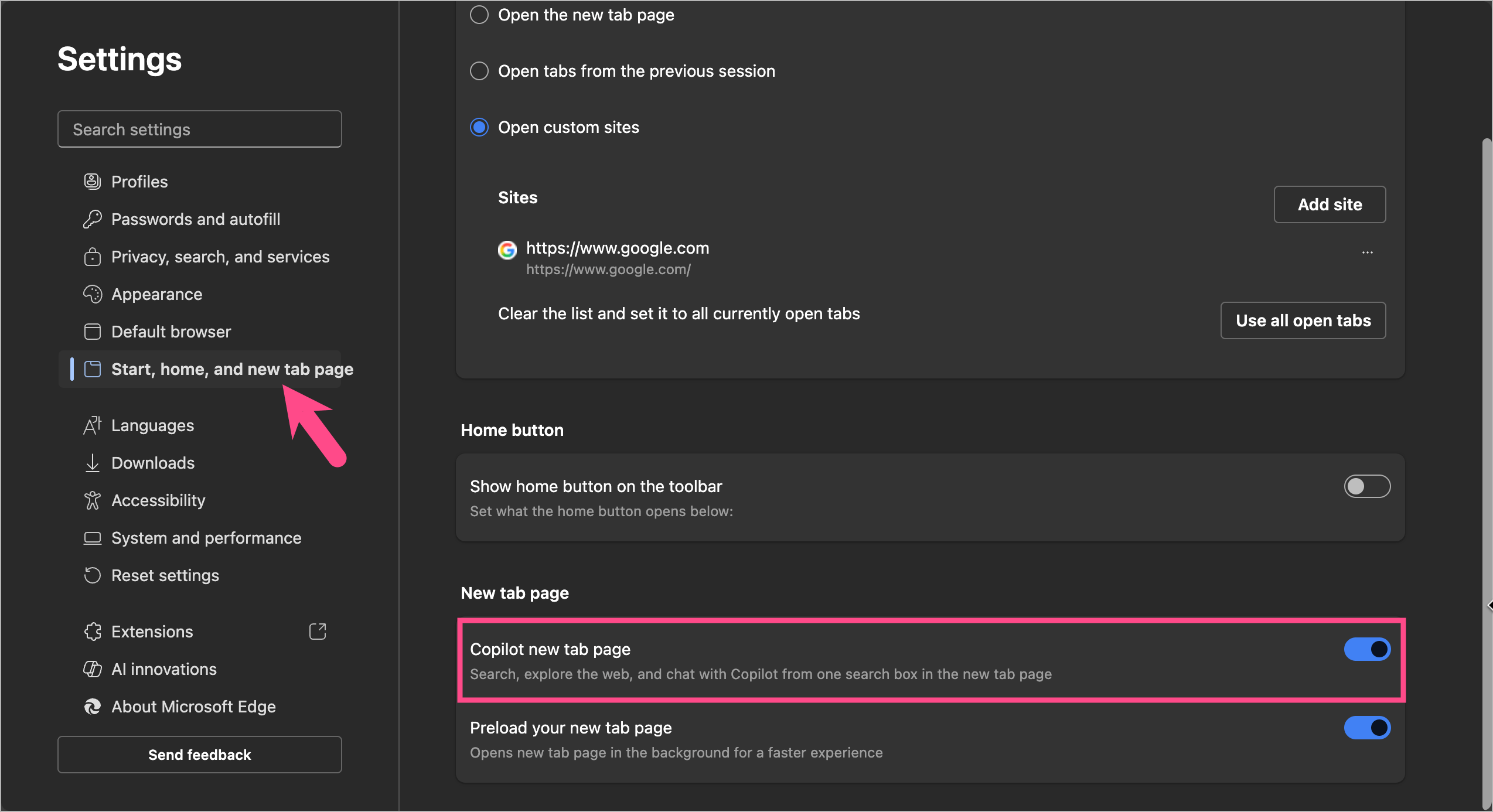 This restores the traditional new tab page without Copilot search.
Related: How to Change Edge New Tab Page to Google
Turn Off Copilot Vision
Copilot Vision lets Edge analyze images and on-screen content using AI. If you don’t use this feature, you can disable it through Edge flags.
To turn off Copilot Vision in Edge:
- Open Edge.
- Go to edge://flags/#edge-copilot-vision.
- Click the relevant dropdown box and set the flag to Disabled.
- Restart the browser.
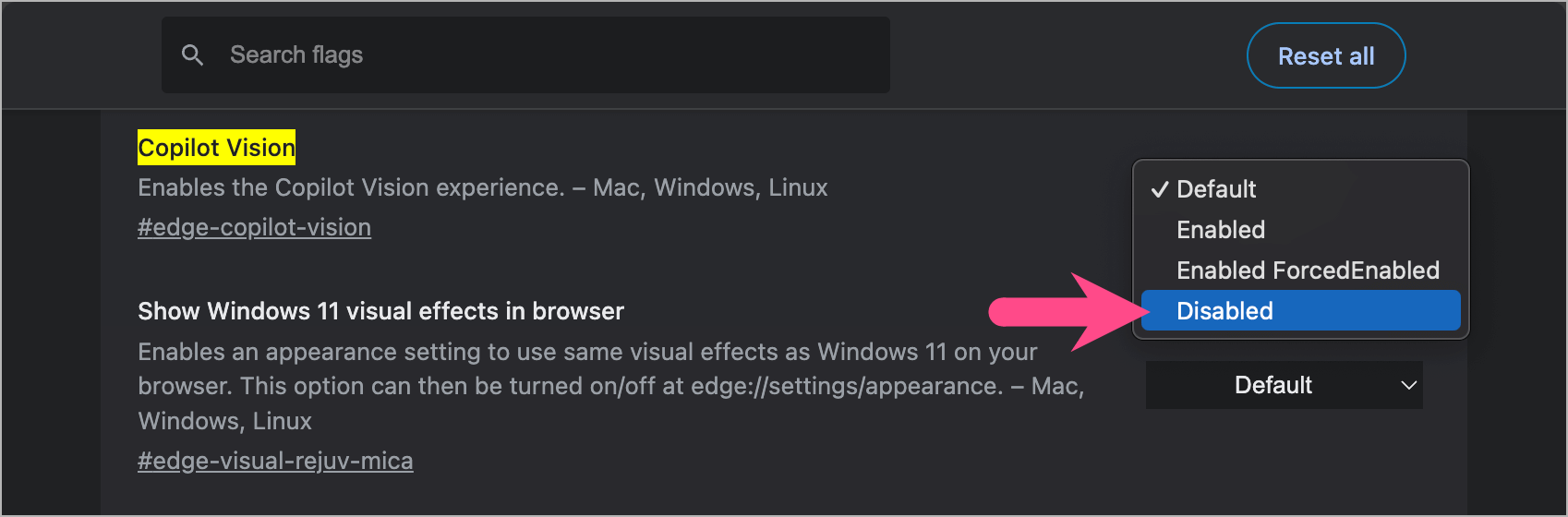
After restarting Edge, Copilot Vision will no longer be available.
Turn Off Copilot Writing Assistance
Edge includes AI-powered writing assistance for rewriting and improving text. You can turn it off if you prefer writing without AI suggestions.
- Open Settings in Edge.
- Go to Languages.
- Under Writing Assistance, turn off the toggle for “Use Copilot for writing on the web“.

Edge will stop showing AI rewrite suggestions and writing enhancements.
Frequently Asked Questions
Can I Remove Copilot from Microsoft Edge?
No. Microsoft doesn’t currently let you uninstall Copilot from Microsoft Edge. However, you can turn off Copilot Mode, hide the Copilot button, and disable most Copilot-powered features.
How Do I Turn Off Copilot Search?
You can turn off Copilot Search in Bing using Microsoft’s Bing AI Search Choice extension. Alternatively, use the -ai search operator to temporarily hide AI-generated answers for individual searches.
Why Can’t I Turn Off Copilot Mode?
If you don’t see the setting, update Microsoft Edge to the latest version. If the option is still unavailable, use the Edge flags method described above.
Can I Turn Copilot Back On Later?
Yes. You can re-enable Copilot Mode at any time by turning the same setting back on from the Copilot page or Edge Settings.
Can I Hide the Copilot Button Without Turning Off Copilot?
Yes. Hiding the toolbar button only removes the Copilot icon from the Edge toolbar. Copilot Mode and its AI features remain available unless you disable them separately.








