WebTrickz
TRENDING
  • Claude vs ChatGPT: Which Is Better in 2026?
No Result
View All Result
  • Reviews
  • Editorials
  • Social Media
    • Facebook
    • Twitter
    • YouTube
    • Messenger
    • Instagram
    • Snapchat
    • WhatsApp
    • TikTok
  • Apps
  • How To’s
  • Apple
  • iPhone
  • Google
  • Android
  • Mac
  • Security
  • About Us
    • About Us
    • Contact Us
    • Privacy Policy
  • Reviews
  • Editorials
  • Social Media
    • Facebook
    • Twitter
    • YouTube
    • Messenger
    • Instagram
    • Snapchat
    • WhatsApp
    • TikTok
  • Apps
  • How To’s
  • Apple
  • iPhone
  • Google
  • Android
  • Mac
  • Security
  • About Us
    • About Us
    • Contact Us
    • Privacy Policy
No Result
View All Result
WebTrickz
No Result
View All Result
Home How To's

How to Stop Microsoft Edge from Opening New Tabs

Mayur Agarwal by Mayur Agarwal
July 17, 2026
in How To's, Tips & Tricks

Does Microsoft Edge open every Bing search result or MSN link in a new tab? If Edge keeps opening new tabs whenever you click a link, the problem is usually caused by a Bing or MSN setting, not the Edge browser itself.

This guide shows how to stop Microsoft Edge from opening new tabs on Windows and Mac so links open in the same tab instead.

Quick answerIf Microsoft Edge opens every Bing search result in a new tab, go to Bing Settings > More and turn off Open links from search results in a new tab or window. If only links on the MSN new tab page open in new tabs, turn off Open in a new tab from the page settings.

Why Does Microsoft Edge Keep Opening Every Link in a New Tab?

If Microsoft Edge opens every link in a new tab, one of these settings is usually responsible:

  • Bing search settings – Bing can be configured to open search results and news links in a new tab or window.
  • MSN new tab page – The MSN feed shown on Edge’s new tab page has its own setting that opens news stories in a new tab.
  • Some websites – Certain websites are designed to open specific links in a new tab, and Edge can’t override that behavior.

The good news is that you can easily change the Bing and MSN settings if you prefer links to open in the same tab.

Stop Bing Search Results from Opening in a New Tab

If Bing is your default search engine, you can stop search results from opening in a new tab by changing one setting.

These steps work in Microsoft Edge on both Windows and Mac.

To stop Bing search results from opening in a new tab:

  1. Open Bing.com in Microsoft Edge.
  2. If you’re signed in with your Microsoft account, the setting will sync across your devices.
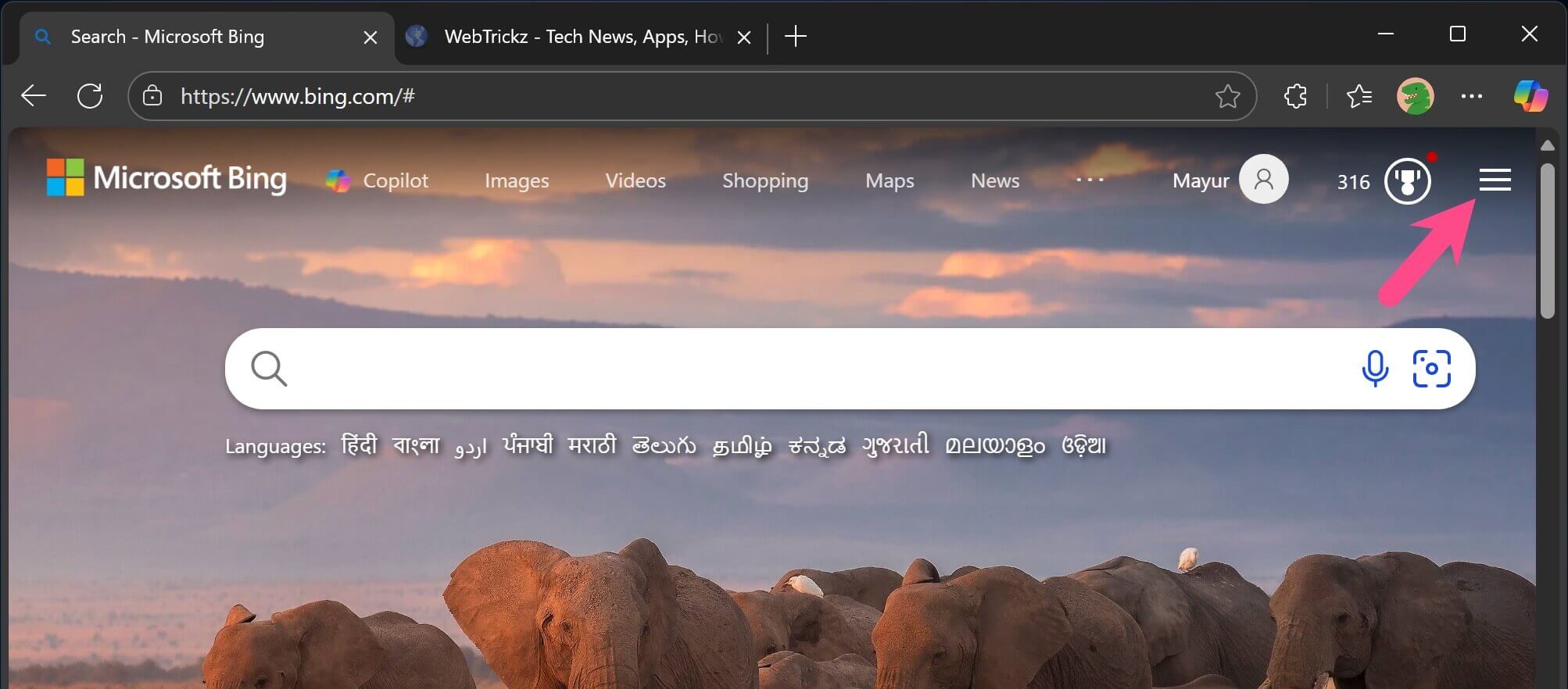
  3. Click the Menu button (three horizontal lines) in the upper-right corner. Bing menu in Microsoft Edge
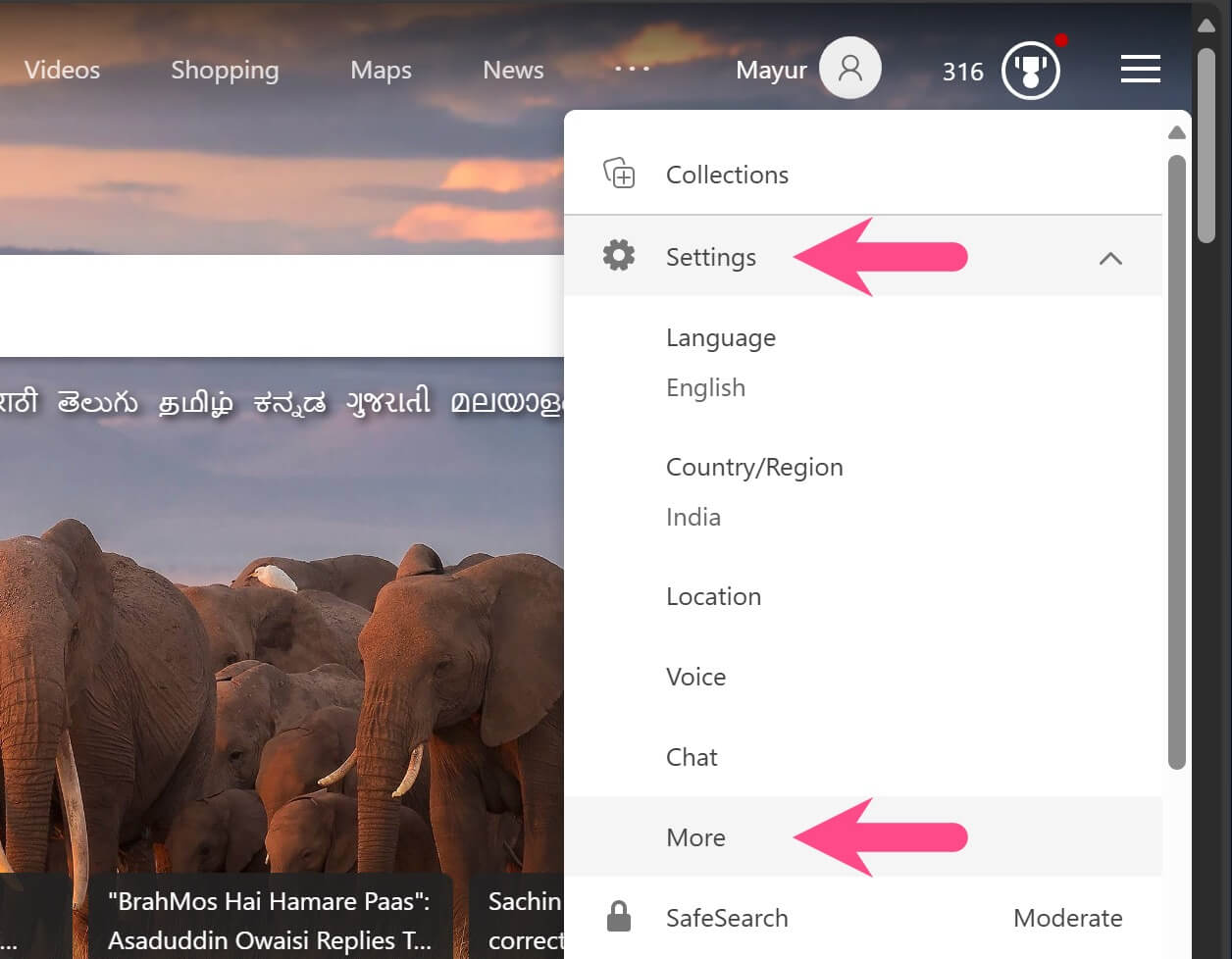
  4. Click Settings, then select More. Bing search settings in Microsoft Edge
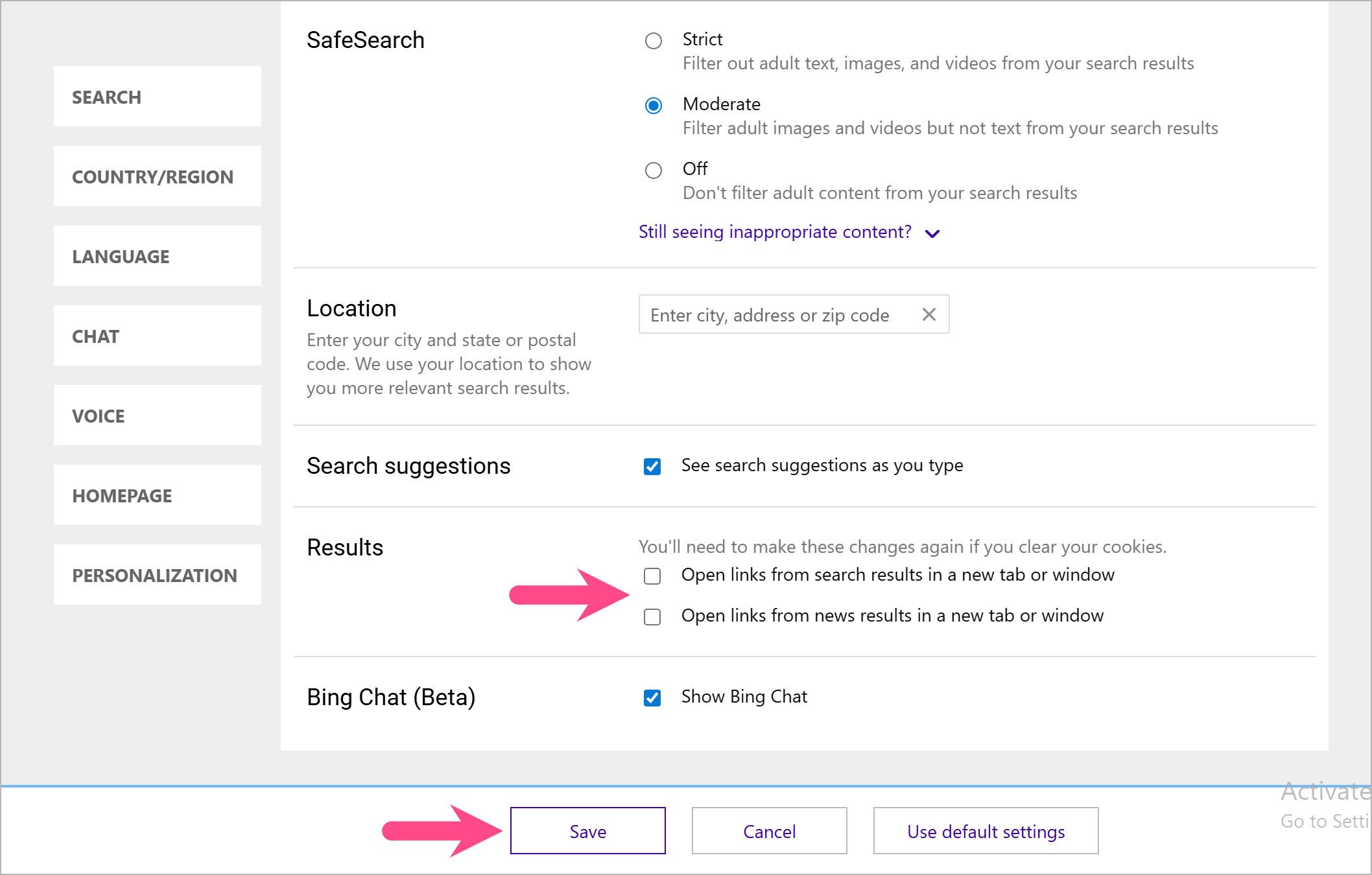
  5. Under Results, uncheck the following options:
    • Open links from search results in a new tab or window.
    • Open links from news results in a new tab or window.
  6. Click Save. Turn off opening search results in a new tab in Bing

Note: If you clear your browser cookies, you’ll need to change this setting again.

Search results and news links from Bing will now open in the same tab instead of opening a new tab every time you click a link.

Also read: How to Make Google Your Default Search Engine in Microsoft Edge

Stop MSN Links from Opening in a New Tab

By default, the Edge new tab page displays the MSN news feed. If clicking a news story always opens it in a new tab, you can change that behavior from the page settings.

To stop MSN links from opening in a new tab:

  1. Open a new tab in Microsoft Edge so the MSN feed appears.
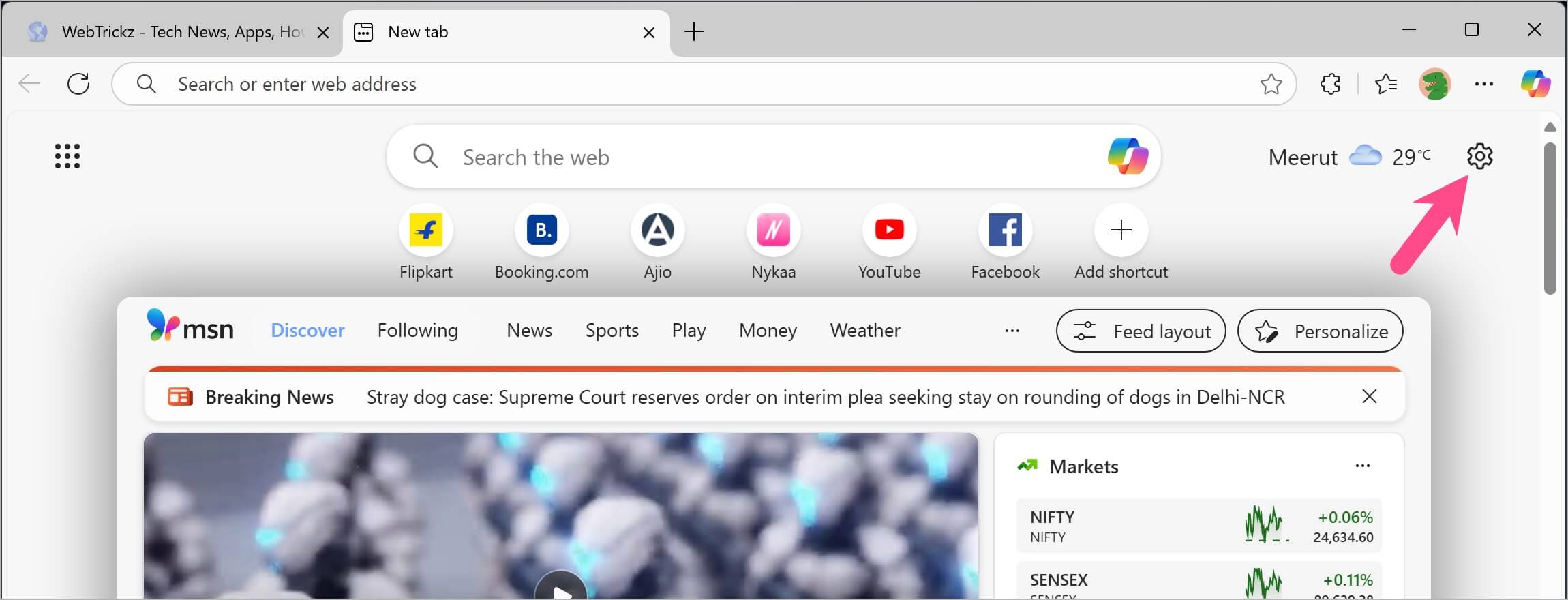
  2. Click the Page settings (gear) icon in the upper-right corner. Page settings on the Edge new tab page
  3. Under Quick links & search, turn off Open in a new tab. Turn off Open in a new tab for MSN in Microsoft Edge
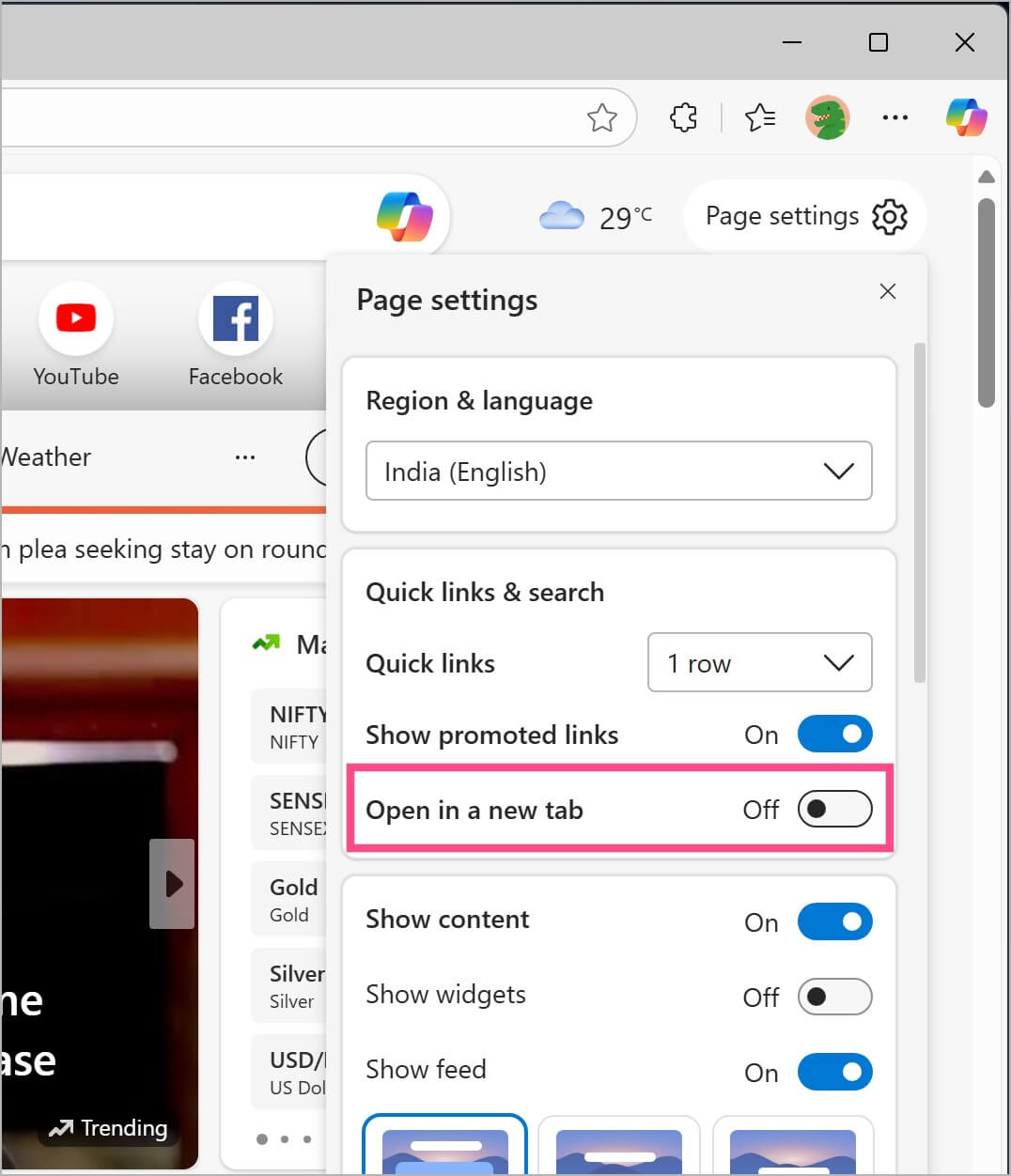
Links you open from the MSN feed will now open in the same tab instead of creating a new one.

Tip: If you don’t use the MSN feed, you can also change the new tab page in Edge to Google or another website.

FAQs

Why does Bing open every search result in a new tab?

This happens when Open links from search results in a new tab or window is enabled in Bing settings. Turn this option off to make search results open in the current tab.

Why do MSN links open in a new tab?

The MSN feed on Edge’s new tab page has a separate Open in a new tab setting. Turn it off from the Page settings menu to open news stories in the same tab.

Can I stop every website from opening links in a new tab?

Not always. Some websites are designed to open certain links in a new tab, and Microsoft Edge can’t override that behavior. However, you can stop Bing search results and MSN links from opening in new tabs by changing the settings shown above.

More Microsoft Edge Guides

  • How to Reopen Closed Tabs in Microsoft Edge
  • How to Stop Edge Tabs from Showing in Alt + Tab
  • How to Show the Favorites Bar in Microsoft Edge

Add WebTrickz as a preferred source on Google
Tags: BingMacMicrosoft EdgeWeb BrowserWindows 10Windows 11
ShareTweetSend
Previous Post

Guide to Turn Off Location Sharing on Instagram in 2026

Next Post

How to Stop Edge from Showing Tabs in Alt+Tab on Windows 11/10

Mayur Agarwal

Mayur Agarwal

Mayur Agarwal, the founder and editor of WebTrickz, is a tech enthusiast with a Bachelor's degree in Computer Applications and over 15 years of experience in tech writing. His passion for technology and gadgets drives him to create insightful how-to articles and troubleshooting guides.

Next Post
microsoft edge new logo

How to Stop Edge from Showing Tabs in Alt+Tab on Windows 11/10

Leave a Reply Cancel reply

Your email address will not be published. Required fields are marked *

Latest Stories

instagram logo

How to Find Scheduled Posts on Instagram

July 29, 2026
Facebook app on iPhone

How to Delete Watched Reels on Facebook (iPhone, Android, and Desktop)

July 28, 2026
facebook reels

How to See Your Liked Reels on Facebook App and Desktop

July 14, 2026
whatsapp username key

How to Add, Change, or Remove Your WhatsApp Username Key

July 3, 2026
whatsapp username key

How to Change or Delete Your WhatsApp Username

July 3, 2026
whatsapp username key

How to Create or Reserve a WhatsApp Username (2026 Guide)

July 3, 2026
Google Gemini

How to Cancel Your Gemini Subscription (2026 Guide)

June 21, 2026

Trending Stories

  • Photo by Jeff Hardi on Unsplash

    How to Turn Off Fn Lock on a Windows Laptop

  • 1337x Proxy List 2026: Working Proxy & Mirror Sites

  • How to Turn Off Microsoft Family Safety on Windows 11 & 10

  • How to Turn Off Microsoft Edge Game Assist in Windows 11

  • How to Delete Watched Reels on Facebook (iPhone, Android, and Desktop)

  • About Us
  • Contact Us
  • Privacy Policy
  • Advertise

© 2026 WebTrickz. All Rights Reserved.

No Result
View All Result
  • Reviews
  • Apps
  • How To’s
  • Android
  • Google
  • iPhone
  • Mac
  • About Us
  • Contact Us
  • Privacy Policy

© 2026 WebTrickz. All Rights Reserved.