

WebTrickz
TRENDING
  • Turn Off Copilot Search in Bing (Official Extension)
No Result
View All Result
  • Reviews
  • Editorials
  • Social Media
    • Facebook
    • Twitter
    • YouTube
    • Messenger
    • Instagram
    • Snapchat
    • WhatsApp
    • TikTok
  • Apps
  • How To’s
  • Apple
  • iPhone
  • Google
  • Android
  • Mac
  • Security
  • About Us
    • About Us
    • Contact Us
    • Privacy Policy
  • Reviews
  • Editorials
  • Social Media
    • Facebook
    • Twitter
    • YouTube
    • Messenger
    • Instagram
    • Snapchat
    • WhatsApp
    • TikTok
  • Apps
  • How To’s
  • Apple
  • iPhone
  • Google
  • Android
  • Mac
  • Security
  • About Us
    • About Us
    • Contact Us
    • Privacy Policy
No Result
View All Result
WebTrickz
No Result
View All Result
Home Instagram

How to See Who Liked Your Reel on Instagram & Facebook

View the list of people who liked your or someone else's reel.

Mayur Agarwal by Mayur Agarwal
March 12, 2024
in Facebook, How To's, Instagram

Ever since the ban of TikTok in India, Instagram Reels, featuring short-form video content, have seen immense popularity. Reels are also integrated into the main Facebook app, now available in the US as well.

Those who enjoy watching and creating reels must be aware that anyone can watch, share, like, and comment on reels. Users also have the option to share their Instagram reels on Facebook for potentially better reach.

Using Reel Insights to track the reach and performance of your reels requires users to have a business or creator account. However, even users who aren’t creators and simply post reels for fun can still check basic statistics, such as the total number of likes and comments on a reel, both on Instagram and Facebook.

Additionally, users can check the view count of their reels, but they cannot see who viewed their reels on Instagram. Similarly, they cannot find out who watched their reels on Facebook.

However, it is possible to see who liked your reel on both Instagram and Facebook. Viewing the list of people who liked a reel can help you easily find if a particular person has liked your reel or not.

How to see who liked your reels on Instagram

  1. Open the Instagram app and go to your profile tab. Then open the ‘Reels’ tab. reels tab in instagram app
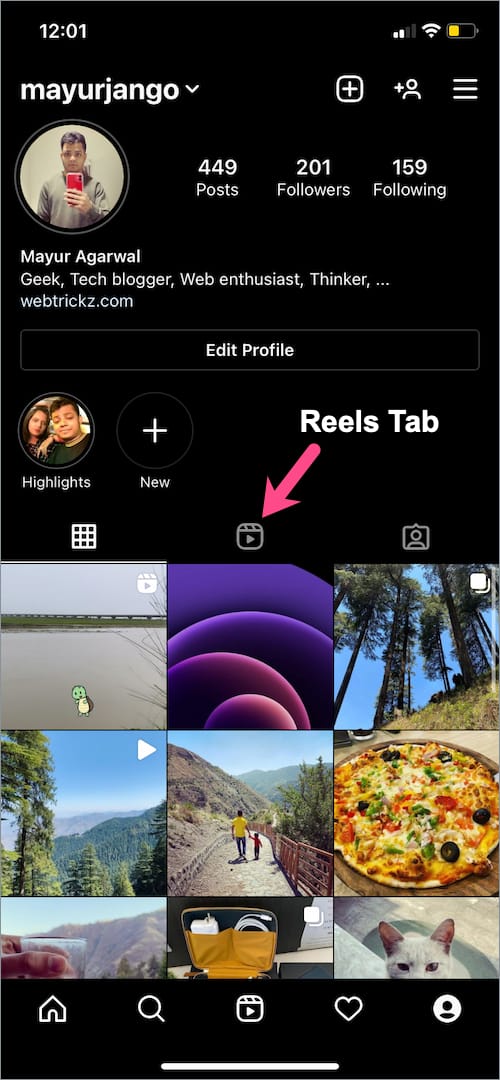
  2. Scroll through your reels and find the reel whose ‘Liked by’ you want to check.
  3. Tap the numeric count below the Like button (heart icon). instagram reels like count
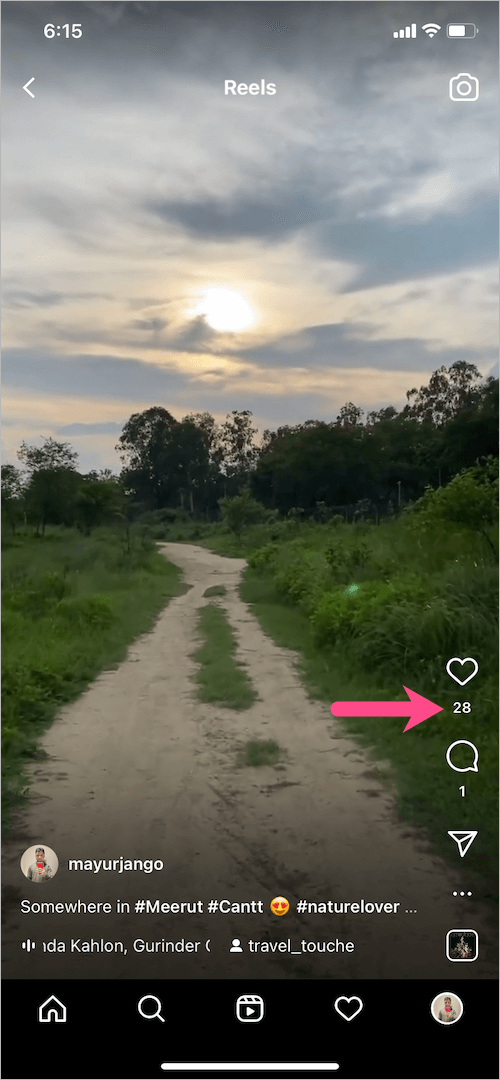
  4. Scroll through ‘Liked by’ to see the list of people who have liked that reel. You can even follow them or view their profile. - [ ] How to see who liked your reel on instagram

Using this method, you can check liked by on someone else’s reel as well.

The only downside is that Instagram reels show not more than 100 likes from people, irrespective of the like count.

RELATED: Hide reels from someone on Facebook

How to see who liked your reels on Facebook

  1. In the Facebook app, go to the Menu tab and tap the “Reels” shortcut. reels tab in Facebook app
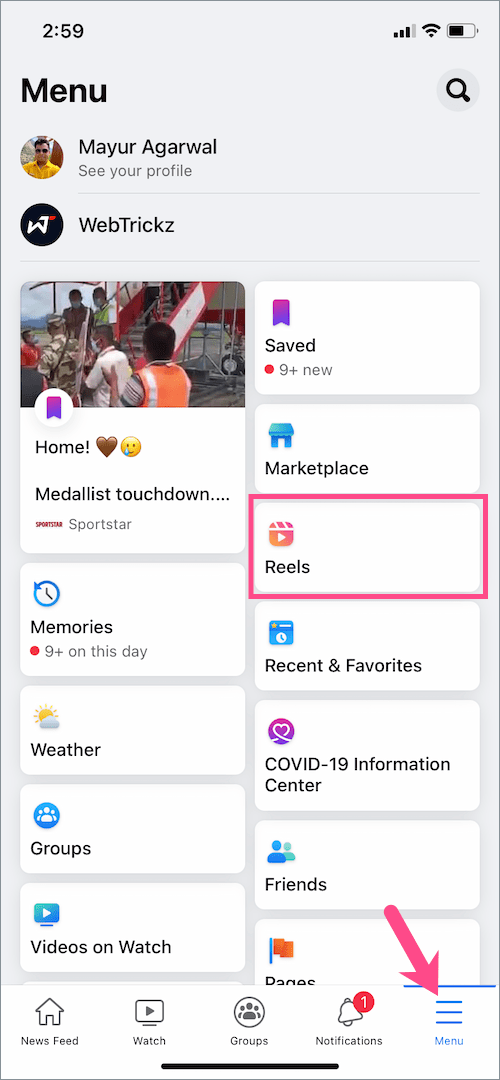
  2. Tap your profile picture in the top-right corner. Facebook reels
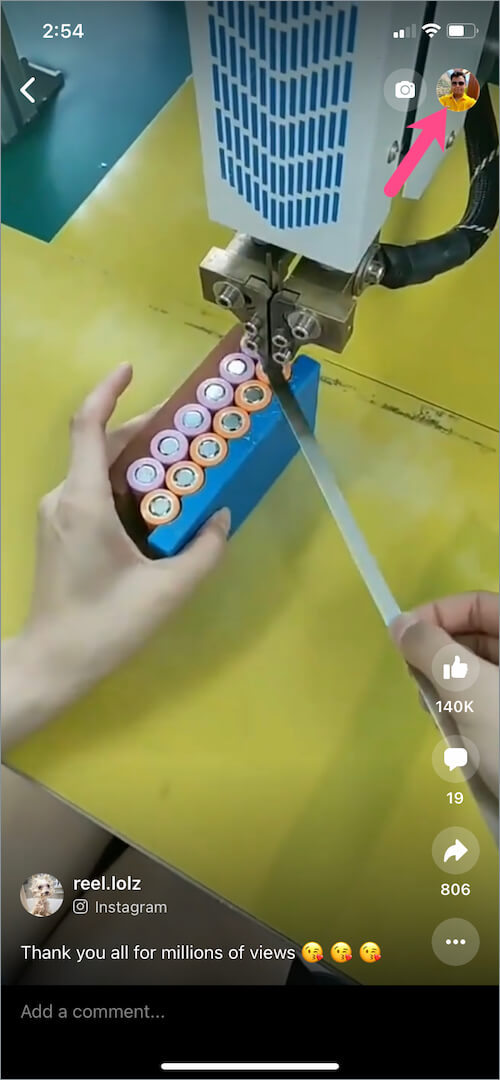
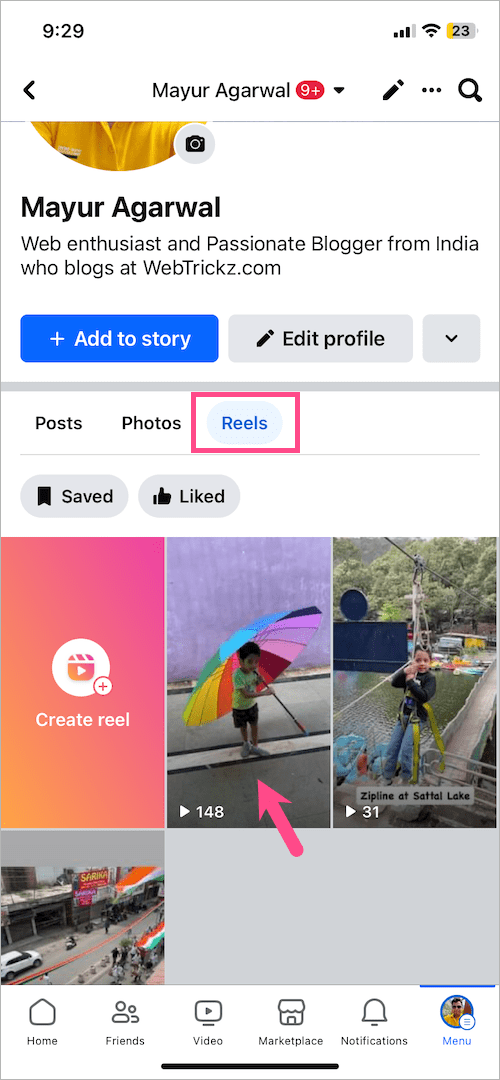
  3. Navigate to the “Reels” tab to view all the Facebook reels posted by you. Then open a reel. how do I see my reels on Facebook
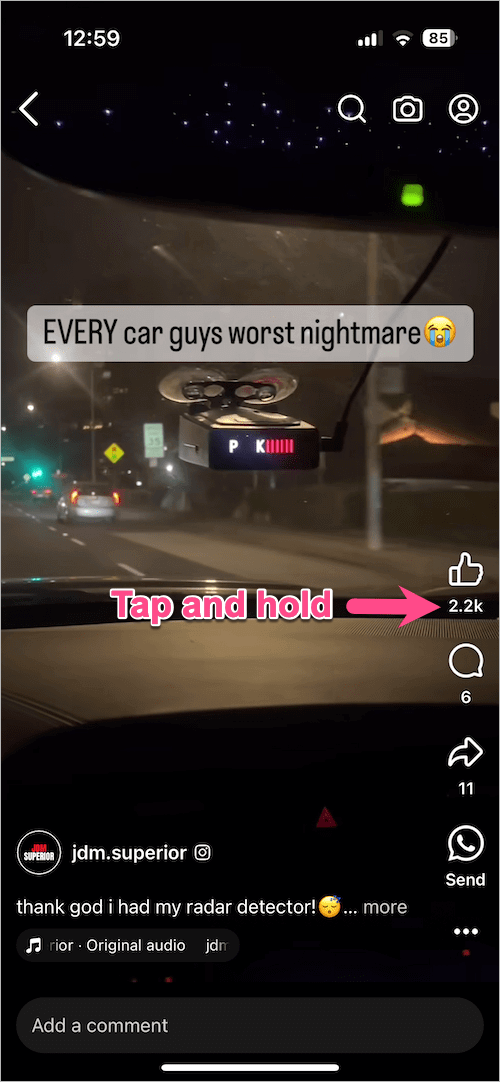
  4. Tap and hold (long-press) the number visible under the Like button (thumbs-up icon). view reel likes on Facebook
  5. The Likes section will list all the people who have liked your reel. You can view their profiles, send messages (if they are your friends), or add them as friends. how to see who liked my reels on facebook
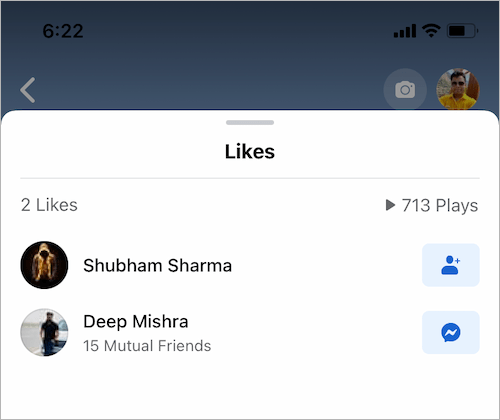
Similarly, you can also see the list of likes on other people’s Facebook reels.

Note that if a reel originally shared on Instagram is recommended on Facebook, it will also include the likes and plays from Instagram. This information is displayed at the top when viewing reel likes on Facebook, along with the exact number of likes from Instagram.
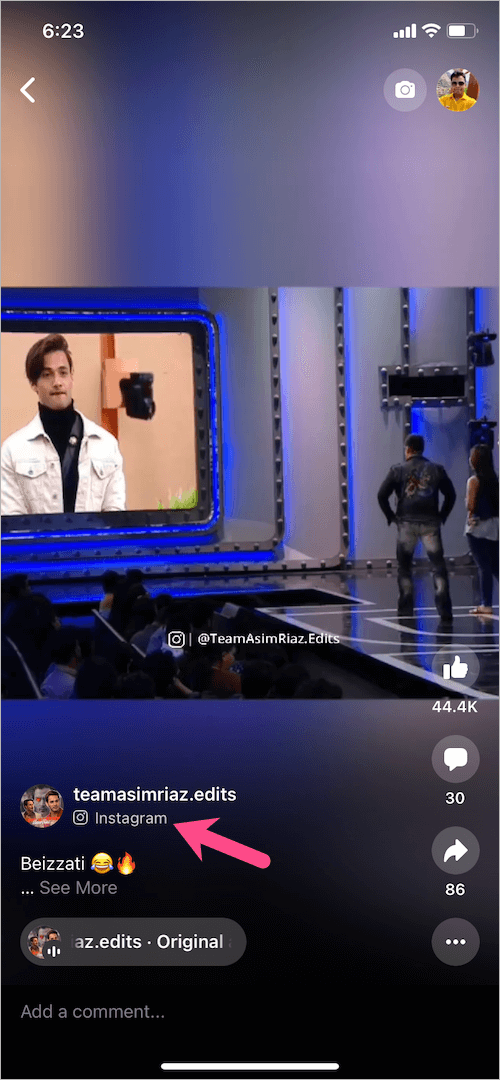
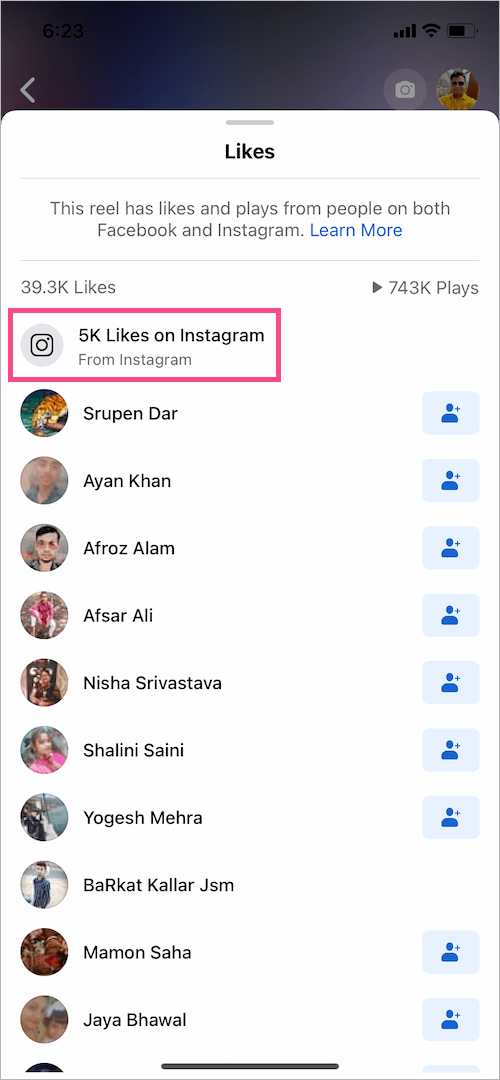
Facebook app showing instagram reel
see reel likes on Facebook

RELATED TIPS:

  • See your Liked and Saved reels on Facebook
  • See the number of views on Facebook reels
  • Add a reel back to your profile grid after removing it
  • Hide the number of likes on your Instagram reels
Tags: FacebookInstagramReelsSocial MediaTips
ShareTweetSend
Previous Post

Here’s how to Remove Tag from Instagram Reels

Next Post

How to Reset Home Screen Layout in iOS 15 on iPhone

Mayur Agarwal

Mayur Agarwal

Mayur Agarwal, the founder and editor of WebTrickz, is a tech enthusiast with a Bachelor's degree in Computer Applications and over 15 years of experience in tech writing. His passion for technology and gadgets drives him to create insightful how-to articles and troubleshooting guides.

Next Post
iPhone 13

How to Reset Home Screen Layout in iOS 15 on iPhone

Comments 1

  1. Ivan says:
    3 years ago

    Not the case for Facebook anymore

    Reply

Leave a Reply Cancel reply

Your email address will not be published. Required fields are marked *

Latest Stories

google chrome logo

Google Chrome Offline Installer: Direct Download Links

June 17, 2026
X logo

How to Remove All Bookmarks on X (Twitter) At Once in 2026

June 15, 2026
X logo

How to Find Bookmarks on X (Twitter) in 2026

June 15, 2026
copilot logo

How to Turn Off Copilot Search in Bing on Edge & Chrome

June 10, 2026
microsoft edge new logo

How to Turn Off Notifications in Microsoft Edge (2026 Guide)

June 8, 2026
chatgpt logo

How to Clear or Delete ChatGPT Memory on PC and Mobile

June 5, 2026
1337x logo

1337x Proxy List 2026: Working Proxy & Mirror Sites

June 2, 2026

Trending Stories

  • 1337x logo

    1337x Proxy List 2026: Working Proxy & Mirror Sites

  • How to Turn Off Microsoft Family Safety on Windows 11 & 10

  • How to Turn Off Microsoft Edge Game Assist in Windows 11

  • How to See Recently Watched Reels on Facebook (2026 Guide)

  • How to Turn Off Fn Lock or Fn Key on Windows 11/10 Laptop

  • About Us
  • Contact Us
  • Privacy Policy
  • Advertise

© 2026 WebTrickz. All Rights Reserved.

No Result
View All Result
  • Reviews
  • Apps
  • How To’s
  • Android
  • Google
  • iPhone
  • Mac
  • About Us
  • Contact Us
  • Privacy Policy

© 2026 WebTrickz. All Rights Reserved.






